
What to expect from a Mini PC in 2025: Reality vs. Marketing
Reality vs. Marketing: A deep dive into performance tiers, cooling physics, and what your money actually buys.
The “Desktop Replacement” Myth
The mini PC market has exploded in recent years, driven by major advances in mobile processor technology and the widespread shift towards remote work. Marketing promises are everywhere: “desktop replacement,” “console killer,” “workstation performance in your palm.” However, understanding what the reality looks like when you actually use these machines day to day requires moving past these slogans.
The fundamental challenge with mini PCs hasn’t changed since their inception: physics. You cannot pack 500 Watts of heat dissipation into a 0.5-liter box without severe consequences. Modern processors can dynamically adjust their power consumption to manage heat, but this means performance varies dramatically based on available thermal headroom, making sustained, heavy workloads the ultimate test.
This is why a Core i9-13900H in a mini PC is not equivalent to a desktop Core i9-13900K. While the mobile chip might boast similar core counts and architecture, it operates at significantly lower power limits (PL1/PL2). Desktop chips can sustain 125W or more indefinitely with robust cooling, whereas mini PC processors typically throttle performance between 35W and 65W under sustained load to prevent overheating. This guide helps you navigate these thermal realities and set realistic expectations for your investment.
Why read this guide?
Most reviews focus on 3-minute benchmarks. We focus on sustained usability. This guide categorizes machines not just by price, but by their realistic capabilities in daily workflows.
Tier 1: Entry-Level (Under $300)
This segment has seen the biggest revolution thanks to highly efficient chips like the Intel N100 and N97. These processors have become the definitive choice, effectively rendering alternatives like the Raspberry Pi obsolete for general desktop use. They are fan-efficient, incredibly affordable, and run full Windows 11 without stuttering on basic productivity tasks.
The “Daily Driver” Class
$150 – $299What to Expect: Expect perfection for 4K media consumption (Plex/Kodi), digital signage, and standard office work (Word, Excel, Email). These units excel in efficiency, often consuming under 15W, and remain silent or near-silent under light load.
- 4K/60Hz video streaming (YouTube/Netflix) is flawless.
- Low power consumption (often under 15W).
- Great for Home Assistant or basic servers.
- Limitation: Heavy multitasking (30+ chrome tabs) will cause lag and stuttering.
- Limitation: Gaming is strictly limited to 2D indie titles or retro emulation of older consoles.
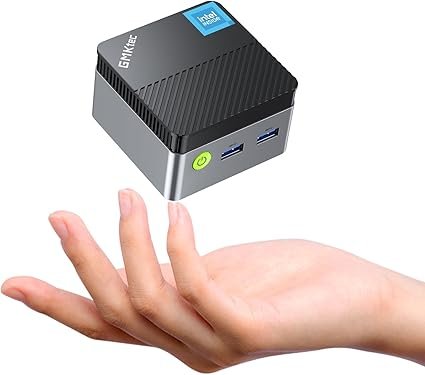
Pro Tip: Always ensure you get 16GB of RAM in this tier. 8GB is the absolute bare minimum for Windows 11, and since the iGPU shares system memory, 16GB is critical for preventing slowdowns and achieving smooth graphical performance. For more on memory, read our Complete Guide to RAM for Mini PCs.
Tier 2: Mid-Range ($400 – $700)
This segment represents the true “Sweet Spot” for most consumers. Here we find highly capable mobile CPUs like the AMD Ryzen 7 (7735HS, 8845HS) and the Intel Core i5/i7 (13th Gen). These machines offer an incredible performance-to-price ratio and can genuinely replace a family desktop for 90% of users without compromise on speed or responsiveness.
The “Versatile Workhorse”
$400 – $700What to Expect: Rapid, lag-free responsiveness. You gain the ability to comfortably edit 1080p video, perform heavy photo manipulation in software like Lightroom, and sustain dozens of browser tabs without issue. Gaming is unlocked for optimized esports titles (League of Legends, CS2, Fortnite) at medium to high settings, as well as decent playability for older AAA titles.
- Excellent multitasking capabilities due to higher core counts.
- Suitable for software developers (Docker containers, compilation).
- Playable 1080p gaming on older AAA titles (GTA V, Witcher 3).
- Limitation: 4K video rendering will still be significantly slower than a desktop with a dedicated GPU.
- Limitation: Fans will be clearly audible under sustained load as they manage heat dissipation.
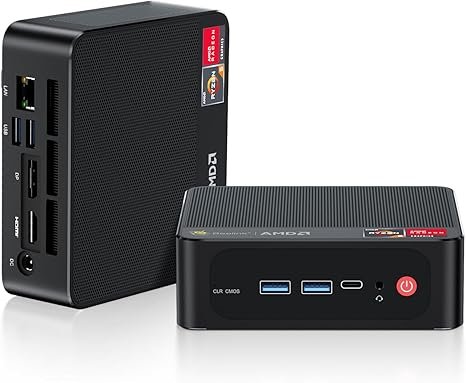
For professional environments where stability and driver support are paramount, models like the Intel NUC 13 Pro are the preferred choice. For enthusiasts seeking future expansion in this price range, the Bosgame M4 Plus offers a unique value proposition with its dedicated OCuLink port, making it ideal for external GPU docking. Read our full analysis here: Bosgame M4 Plus Review.
Tier 3: High-End ($800 – $1500+)
This is where the Mini PC category truly pushes the boundaries, featuring chips like the Ryzen 9 7940HS/8945HS and the cutting-edge Strix Halo (Ryzen AI Max), such as those found in the EVO-X2. These are engineering marvels designed to be “Console Killers” or “Mobile Workstations.” However, it is precisely at this tier that the thermal laws of physics are felt most harshly.
The “Power Brick”
$800 – $1500+What to Expect: Desktop-class CPU performance, but primarily for short bursts. The high-end integrated graphics (Radeon 780M or 8060S) can handle modern gaming at 1080p or even medium settings at 1440p. This is the machine for compilers, complex virtualization setups, and minimalists who require maximum power density in a tiny footprint.
- Strix Halo (EVO-X2): Proven capability to hit 85 FPS in Cyberpunk 2077 (1440p).
- Massive RAM support (up to 96GB or more), crucial for content creators.
- Advanced I/O standards (USB4, OCuLink, 2.5GbE).
- Limitation: Thermal Throttling is inevitable. Under 100% load for 30 minutes, speeds will drop significantly to manage the 100W+ heat output.
- Limitation: Noise levels can be high (40-50dB) under load due to the small, fast-spinning fans required to cool the unit.
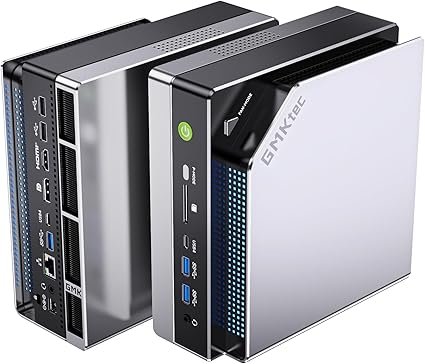
The GPU Dilemma & The OCuLink Revolution
The inherent flaw of any mini PC remains the reliance on an Integrated Graphics Processing Unit (iGPU), which must share system memory with the CPU, limiting bandwidth and dedicated VRAM. However, the graphics landscape was dramatically improved in 2025 with the proliferation of OCuLink (Optical Compute Link), which offers a solution far superior to older eGPU enclosures based on Thunderbolt.
The key advantage is speed: unlike USB4/Thunderbolt, which loses 15-20% of the discrete GPU’s potential performance due to encoding overhead, OCuLink offers a near-native PCIe 4.0 or 5.0 connection. This robust physical link allows you to dock your portable mini PC to a full desktop RTX 4070 or 4090 when you are at your desk, transforming it into a true gaming or rendering workstation without a major performance penalty.
For a real-world example of a model that embraces this superior expansion standard for incredible value, we recommend reading our dedicated review: ➜ BOSGAME M4 Plus Review: The Best Value Mini PC with OCuLink
The AI Hype: NPU Reality
In 2025, every manufacturer markets their product as an “AI PC,” thanks to the integration of specialized Neural Processing Units (NPUs) directly into the CPU die. This component is crucial for efficiency, but it does not eliminate the need for a powerful GPU for all tasks.
| Component | Best Used For | Reality |
|---|---|---|
| NPU (Neural Processing Unit) | Background tasks (Blur, Noise Cancellation), Live Translation, Small LLMs, Copilot. | Excellent for highly efficient inference (running models) at low power, but too slow for complex generation tasks. |
| GPU (Graphics Unit) | Heavy Training, Image Generation (Stable Diffusion), Large Model Inference. | Still the king. The raw compute and dedicated VRAM of a powerful GPU are indispensable for heavy AI work and complex media creation. |
However, high-end machines like the Geekom GT1 Mega AI with large pools of unified memory are dramatically changing the game for running local LLMs (Large Language Models) privately. By offering up to 128GB of high-speed system RAM, they can load massive models that would simply not fit in a standard consumer GPU’s VRAM buffer, making them unique powerhouses for private AI experimentation.
🏆 Best Deals Recap (2025)
Based on our testing and current market prices, these are the best value-for-money Mini PCs currently available for each major category.
| Category | Model Name | Key Spec | Best For | Action |
|---|---|---|---|---|
| BUDGET | Beelink Mini S12 Pro | Intel N100 / 16GB RAM | Office, Streaming, Plex Server | Check Price |
| PRO CHOICE | Intel NUC 13 Pro | Core i5 / i7 | Business Reliability, Stability | Check Price |
| VALUE GEM | Bosgame M4 Plus | Ryzen 9 / OCuLink Port | eGPU Gaming on a Budget | Check Price |
| ULTIMATE | Minisforum UM870 | Ryzen 7 8700G | Heavy Multitasking, 1080p Gaming | Check Price |
| AI READY | Geekom GT1 Mega AI | Core Ultra / NPU | Creators, Local AI Inference | Check Price |
*Prices and availability subject to change. As an Amazon Associate, we earn from qualifying purchases.