
Best Mini PC Under $200 (2026): What Still Makes Sense
In 2025, $150 to $200 bought an Intel N100 or N150 mini PC with 16GB of memory. The 2026 memory shortage changed that: most 16GB models are now listed above $200. Under $200 you are choosing between entry configurations with 8GB, sale prices on N150 boxes and refurbished business mini PCs. Here is what is worth buying, and what to check before you do.
In short
The best new mini PC under $200 is the GMKtec G3 Plus with an Intel N150: a 2.5GbE port, Wi-Fi 6 and a memory slot you can upgrade later. Look for its 8GB version, or the 16GB model on sale. The KAMRUI Essenx E1 is the simplest cheap Windows box, and the Beelink EQ14 is worth grabbing when a deal brings it near $200. For the most computer per dollar, a refurbished business mini PC such as a Lenovo ThinkCentre Tiny often beats them all.
What changed in this update (Oct 10, 2026)
We rewrote this guide for the 2026 market and as a research roundup. We removed the BMAX B8: our button pointed to a Ryzen 7 BMAX model far above this budget. We corrected the GMKtec G3 Plus (Intel N150, DDR4 and one 2.5GbE port; the old page listed an N100, DDR5, dual 2.5GbE and USB4) and the KAMRUI Essenx E1 (Intel N150, Wi-Fi 5, upgradeable memory slot, cooled by a fan). The GEEKOM Air12 moved to “Also worth a look” because it is now usually listed above $200. We also removed printed prices.
What $200 buys in 2026
An Intel N150 mini PC with 8GB, a 16GB model on sale, or a refurbished business PC with a faster 6-core processor. New 16GB mini PCs at full price have mostly moved above $200.
Memory is the reason. DDR4 and DDR5 prices climbed sharply from late 2025, and in budget mini PCs memory and storage are a large share of the cost (our RAM crisis guide has the details). The change is easy to see in published prices:
| Source and date | What it showed |
|---|---|
| GameSpot, July 2025 | N150 mini PCs with 16GB and 512GB on Amazon deals for about $140–$160 (KAMRUI Essenx E1, GMKtec G3 Plus) |
| StarryHope, June 2026 | KAMRUI Essenx E1 listed at $189.99 with 8GB and 256GB; 16GB versions well above $200 |
| PCWorld, October 6, 2026 | The cheapest mini PC in its deals roundup was $323 (a Ryzen 3 model) |
| ThatNerdKnows, July 2026 | Refurbished Lenovo ThinkCentre M720q and HP EliteDesk 800 G4 Mini asking prices around $70–$110 |
So a strict $200 budget leaves three sensible routes: an entry N150 configuration you upgrade later, a sale on a better-equipped N150 model, or a refurbished business mini PC. If you can stretch to $300, our best mini PCs under $300 adds Core i3 and Ryzen 5 options with more headroom.
Is 8GB enough?
For a single job — a media player, Home Assistant, Pi-hole or a kiosk — yes. For a Windows desktop with a browser and office apps, 16GB is noticeably smoother.
Windows 11 with a modern browser fills 8GB quickly. That is why the memory slot matters at this price: the G3 Plus and the Essenx E1 use a standard SO-DIMM slot, so you can buy the 8GB version now and move to 16GB later. Keep in mind that DDR4 modules also became more expensive in 2026; check the cost of a 16GB module before choosing the 8GB route.
1. GMKtec G3 Plus — best new mini PC under $200
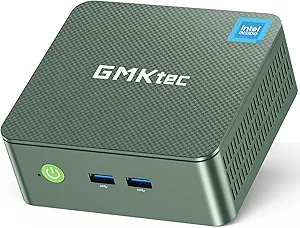
GMKtec G3 Plus
An Intel N150 box with an Intel 2.5GbE port, Wi-Fi 6, two 4K outputs and room to grow: one SO-DIMM slot and a free M.2 slot.
Check current price on AmazonThe G3 Plus is the most flexible cheap mini PC: its Intel i226-V network chip works out of the box with Proxmox and most Linux distributions, a second M.2 2242 slot takes a cheap SATA drive for storage, and the single DDR4 slot accepts up to 32GB. Two HDMI ports drive two 4K60 screens. The configuration we link has 16GB and a 512GB SSD; the 8GB version is the one most likely to stay under $200, so check the variant before you buy. Read our GMKtec G3 Plus review (6.8/10).
- Intel 2.5GbE, recognized by Proxmox
- Memory slot up to 32GB, free M.2 slot
- Low power for 24/7 use
- Single-channel memory
- No USB-C
- Configurations vary by listing
2. KAMRUI Essenx E1 — the cheapest Windows box
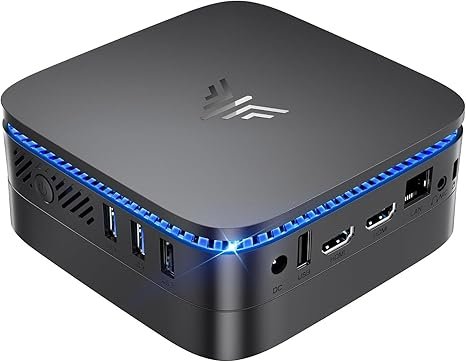
KAMRUI Essenx E1
A 10 cm square N150 mini PC with two 4K outputs, Windows 11 Pro and a VESA bracket — enough for a TV, a kiosk or a second desk.
Check current price on AmazonThe Essenx E1 keeps things simple: an Intel N150, one SO-DIMM slot, one M.2 2280 slot that accepts NVMe or SATA drives, Gigabit Ethernet and Wi-Fi 5. A reviewer quoted by StarryHope measured about 8W at idle and 29W at peak, so it costs little to leave on. Note that it is cooled by a small fan: it is not a fanless PC, despite claims in older guides. The listing we link has 16GB and 256GB; KAMRUI also sells 8GB versions and, on some batches, an Intel N97 instead of the N150, so read the specifications before buying.
- Very compact, VESA bracket included
- Upgradeable SO-DIMM and M.2 slots
- Low power draw
- Wi-Fi 5 and older Bluetooth
- Gigabit LAN only
- Small brand, basic ports
3. Beelink EQ14 — best when it is on sale
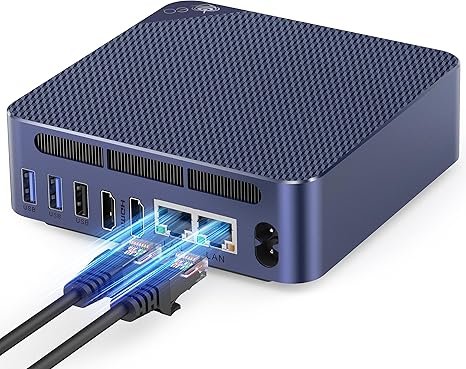
Beelink EQ14
Built-in power supply, two 2.5GbE ports and a 3-year warranty: the best-equipped N150 box, worth it when a deal brings it near $200.
Check current price on AmazonThe EQ14 is the N150 mini PC we would pick at equal price: no external power brick, two network ports for a router or firewall, 16GB and a 500GB NVMe SSD on the current listing. Notebookcheck found it very quiet even under load. It is usually listed above $200, so treat it as a deal to watch rather than a default choice. Read our Beelink EQ14 review (7.0/10).
- Internal power supply, no brick
- Dual 2.5GbE for router or server use
- Very quiet, 3-year warranty
- Usually listed above $200
- Single-channel memory
- No video over USB-C
4. Refurbished business mini PC — best value under $200
A refurbished Lenovo ThinkCentre Tiny, HP EliteDesk Mini or Dell OptiPlex Micro gives you a 6-core Core i5, two memory slots and business-grade build quality, often with 16GB already installed.
Companies replace these machines in bulk, and they are built to run for years. Models such as the ThinkCentre M720q and M920q or the EliteDesk 800 G4 Mini use 8th or 9th-generation Core i5 and i7 “T” processors with six cores, two DDR4 SO-DIMM slots and an NVMe slot. Because they use DDR4, they were less affected by the 2026 memory shortage, and ThatNerdKnows found asking prices around $70 to $140 in July 2026 depending on the model. The trade-offs: higher idle power than an N150, older integrated graphics, Gigabit Ethernet only, and often no Wi-Fi card.
- Buy from a seller with at least a 90-day warranty (Amazon Renewed, eBay Refurbished or a specialist).
- Check that the power adapter, memory and SSD are included, and the exact processor.
- Check for Wi-Fi if you can’t use Ethernet; a USB adapter is the easy fix.
Also worth a look
- GEEKOM Air12 — Intel N95 or N100, 16GB of DDR5 in a SO-DIMM slot, three display outputs and an SD card reader. A well-built option from a known brand, now usually listed above $200.
- MINIX Z150-0dB — the same N150 in a completely silent fanless case, for more money. See our fanless mini PC guide.
- Wait for a sale: N150 mini PCs drop sharply during Prime Day and Black Friday, when 16GB models can fall back under $200.
Comparison table
The new models side by side, in the configurations we link.
| Model | CPU | Memory | Storage | Network | Ports / displays | Price |
|---|---|---|---|---|---|---|
| GMKtec G3 Plus | Intel N150 · 4 cores, 6W | 16GB DDR4 · 1 SO-DIMM, up to 32GB | 512GB NVMe + free M.2 2242 SATA slot | 2.5GbE · Wi-Fi 6 | 2× HDMI 4K60 · 4× USB-A 10Gbps | Check price |
| KAMRUI Essenx E1 | Intel N150 · 4 cores | 16GB DDR4 · 1 SO-DIMM | 256GB M.2 SSD · one M.2 2280 slot | Gigabit LAN · Wi-Fi 5 | Two 4K outputs · 4× USB-A | Check price |
| Beelink EQ14 | Intel N150 · 4 cores, 6W | 16GB DDR4 · 1 SO-DIMM | 500GB NVMe · M.2 | Dual 2.5GbE · Wi-Fi 6 | 2× HDMI 4K60 · USB-C (data) | Check price |
| GEEKOM Air12 | Intel N95 or N100 · 4 cores | 16GB DDR5 · 1 SO-DIMM | 512GB NVMe | Gigabit LAN · Wi-Fi 6 | HDMI + mini DP + USB-C (3 displays) · SD slot | Check price |
What a $200 mini PC can and cannot do
Office work, web browsing, video calls, 4K streaming and light home-server tasks: yes. Gaming, video editing and heavy multitasking: no.
The Intel N150 is a 4-core, 6W chip with hardware decoding for H.265, VP9 and AV1, so Netflix, YouTube and Plex play smoothly in 4K while the processor stays nearly idle. It runs Home Assistant, Pi-hole, AdGuard Home and a few Docker containers comfortably. It is only slightly faster than the older N100 — see our N150 vs N100 vs N97 comparison — and its integrated graphics are limited to light games, emulation of older consoles and cloud gaming services such as GeForce Now.
What to check before buying
- The exact configuration: the same model name is sold with 8GB or 16GB, different SSDs and sometimes different processors.
- A memory slot, not soldered memory: it lets you start with 8GB and upgrade later.
- NVMe or SATA SSD: NVMe is several times faster for boot and app loading.
- Network speed: 2.5GbE matters for a NAS or home server, not for browsing.
- Listing claims: ignore “beats the i7” titles; compare the processor name and the specification table.
FAQ
What is the best mini PC under $200 in 2026?
For a new machine, the GMKtec G3 Plus with an Intel N150, ideally the 8GB version or the 16GB model on sale. For the most performance per dollar, a refurbished business mini PC such as a Lenovo ThinkCentre M720q or M920q, which often includes 16GB of memory.
Can you still buy a 16GB mini PC for under $200?
Mostly on sale. Memory prices rose sharply in 2026, and most new 16GB N150 models are now listed above $200. Prime Day and Black Friday deals can bring them back under that line, and refurbished business mini PCs with 16GB are often below it.
Is 8GB of RAM enough for a mini PC?
For a single-purpose device such as a media player, Home Assistant or Pi-hole, yes. For a Windows 11 desktop with a browser and office apps, 16GB is noticeably smoother. Choose a model with a SO-DIMM slot so you can upgrade later.
Is a refurbished mini PC better than a new N150?
Often, for performance: a 6-core Core i5 from a ThinkCentre Tiny or EliteDesk Mini has more processing power and two memory slots. A new N150 uses less power, includes Wi-Fi and a full warranty. For a 24/7 server where electricity matters, the N150 wins; for a desktop, the refurbished PC usually does.
Can a $200 mini PC run Linux and Home Assistant?
Yes. N150 mini PCs and refurbished business PCs run Ubuntu, Debian, Proxmox and Home Assistant OS well. Intel network chips such as the i226-V in the GMKtec G3 Plus are the most trouble-free under Linux.
Can a mini PC under $200 play games?
Only light games, older titles, emulation of older consoles and cloud gaming. For 1080p gaming in recent titles, look at Ryzen 7 models with Radeon 780M graphics in our under-$700 guide.
Related
- Best mini PCs under $300
- Best budget mini PCs by use
- Intel N150 vs N100 vs N97
- Beelink EQ14 review
- GMKtec G3 Plus review
Sources
- GameSpot, mini PC deals at Amazon (July 2025)
- StarryHope, KAMRUI Essenx E1 specifications and listings (June 2026)
- PCWorld, best mini PC deals (October 2026)
- ThatNerdKnows, best homelab mini PC in the 2026 memory shortage (August 2026)
- Notebookcheck, Beelink EQ14 review
- CNX Software, GEEKOM Mini Air12 specifications
- GMKtec G3 Plus product page (checked October 10, 2026); our reviews of the GMKtec G3 Plus and Beelink EQ14