
GMKtec G3 Plus Review: A Low-Power N150 Box for Home Servers and Simple Desks
The GMKtec NucBox G3 Plus pairs Intel’s N150 with 16GB of memory, an Intel 2.5GbE port and two M.2 slots in a small, quiet case. It is one of the most popular budget mini PCs for a first home server; its limits are a single LAN port, no USB-C and an entry-level chip.
In short
6.8 / 10
The G3 Plus is a solid, low-power starter home server and a capable basic desktop, helped by an Intel i226-V 2.5GbE port that Proxmox recognizes natively and a second M.2 slot for cheap extra storage. Buy the 16GB version when it costs less than better-equipped N150 boxes such as the Beelink EQ14; skip it if you need two LAN ports, USB-C or more than light workloads.
What changed in this update (Oct 10, 2026)
We removed written prices and corrected several specifications against GMKtec’s product page: dimensions and weight, the Wi-Fi module (Realtek, not Intel) and the USB speed. Unsourced performance figures were replaced with published results. The score moves from 8.4 to 6.8 to match the scale used in our other N150 reviews: the Beelink EQ14 (7.0) adds a second LAN port, an internal power supply and a 3-year warranty.
Specifications
Intel N150, one DDR4 slot (up to 32GB), an NVMe SSD plus a free M.2 2242 SATA slot, two HDMI 4K60 outputs, one Intel 2.5GbE port and Wi-Fi 6.
| Component | Specification |
|---|---|
| Processor | Intel N150 (Twin Lake) · 4 cores / 4 threads · up to 3.6GHz · 6W rated power |
| Graphics | Intel Graphics, 24 EU up to 1.0GHz · Quick Sync |
| Memory | 8GB or 16GB DDR4-3200 · one SO-DIMM slot (single-channel) · up to 32GB |
| Storage | 256GB or 512GB M.2 2280 PCIe 3.0 SSD · free M.2 2242 SATA slot (up to 2TB) |
| Display | 2× HDMI · up to 4096 × 2160 at 60Hz |
| USB | 4× USB 3.2 Gen 2 Type-A · no USB-C |
| Network | 1× 2.5GbE (Intel i226-V) · Wi-Fi 6 (Realtek 8852BE) · Bluetooth 5.2 |
| Power | External 12V / 3A adapter |
| Size / weight | 114 × 106 × 42.5 mm · 361 g · VESA mount included |
| OS | Windows 11 Pro |
Check the configuration before you buy
The G3 Plus is sold with 8GB or 16GB of memory and different SSD sizes, and some buyers report units shipping with an M.2 SATA drive instead of NVMe. For a home server, pick the 16GB version and check the storage line of the listing. It has one LAN port, not two (an earlier version of this page was wrong about that).
Design and ports
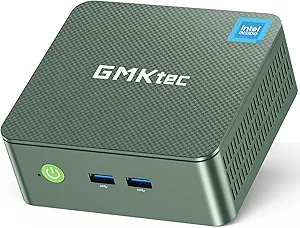
A compact plastic box with a sensible port layout; the missing USB-C port is the main gap in 2026.
Two USB-A ports sit on the front; the rear carries two more, the two HDMI outputs, the 2.5GbE port, the 3.5mm jack and the power input. Two HDMI ports mean two monitors at most, and without USB-C there is no single-cable dock or fast external SSD over USB4. The external 12V adapter is small, but it is one more box behind the desk compared with the Beelink EQ14’s internal supply. Inside, the single memory slot and both M.2 slots are user-accessible once the lid is off; the free 2242 SATA slot is a cheap way to add a second drive for backups or media.
Performance
Fine for office work, browsing, video calls and 4K streaming; not built for gaming, video editing or heavy multitasking.
The N150 averages around 2,500 points in Cinebench R23 multi-core and 900 in single-core in Notebookcheck’s database — level with the older N100 and roughly the level of an old dual-core Core i3. Single-channel memory limits the integrated graphics, while Quick Sync hardware decoding keeps 4K HEVC and AV1 playback smooth. Our N150 vs N100 vs N97 comparison explains how the chip compares with its siblings.
| Use | Rating | Comment |
|---|---|---|
| 4K streaming | 8.8 | Quick Sync hardware decoding |
| Web and office (light) | 8.5 | Smooth with 16GB |
| Home server / Docker | 8.0 | Low power, Intel NIC, second SSD slot |
| Proxmox (a few containers) | 7.0 | 4 cores and one memory slot set the limit |
| Router / firewall | 4.0 | Single LAN port |
| Gaming | 2.0 | Casual and older titles only |
| Video editing | 1.8 | Not suited |
Home server use
The Intel i226-V network chip, low power draw and two SSD slots make the G3 Plus a good first home server — as long as one LAN port is enough.
Virtualization Howto installed both Proxmox and VMware ESXi on the G3 Plus without trouble and measured about 21W at 100% load in Proxmox. The Intel i226-V is recognized natively, which is not a given with cheaper network chips. Typical jobs it can run together: Home Assistant, Pi-hole, a VPN, Nginx Proxy Manager, Nextcloud and Plex or Jellyfin with Quick Sync transcoding. Limits to keep in mind:
- One LAN port: not suitable as a pfSense or OPNsense router; the Beelink EQ14 has two.
- No SATA bays: storage is limited to the two M.2 slots or USB drives, so it is an all-SSD server, not a hard-drive NAS.
- Four cores, one memory slot: fine for containers, tight for several full virtual machines.
See our best mini PCs for NAS and home server and best mini PCs for Plex for stronger options.
When the G3 Plus is a good buy
Compare it with other N150 boxes: it is the right pick when it is the cheapest well-equipped one, since rivals add a second LAN port or an internal power supply.
- Cheaper than the Beelink EQ14: buy the G3 Plus if one LAN port is enough; you also get the extra SATA slot.
- Same price as the EQ14: the EQ14’s dual LAN, internal power supply and 3-year warranty make it the better buy.
- Close to Ryzen 5 / Ryzen 7 mini PCs: for general use, the Ryzen machine gives far more performance.
- Not in a hurry: budget mini PCs are often discounted during Black Friday; memory prices pushed 2026 prices up, as explained in our RAM crisis guide.
Alternatives
| Model | CPU | Choose it if… |
|---|---|---|
| Beelink EQ14 | Intel N150 | You want dual LAN, an internal power supply and a 3-year warranty. Review |
| MINIX Z150-0dB | Intel N150, fanless | You want complete silence, 2.5GbE and a USB-C port |
| KAMRUI Essenx E1 | Intel N150 | You only need a basic office box |
| Beelink SER5 | Ryzen 5 5500U, 6 cores | You need more speed and three monitors |
| GMKtec M5 Plus | Ryzen 7 5825U, 8 cores | You want a stronger home server with dual 2.5GbE. Review |
Who should buy it
- want a first low-power home server for containers
- need a basic desktop for office work and streaming
- want a second SSD slot for cheap extra storage
- value an Intel 2.5GbE chip for Proxmox or ESXi
- need two LAN ports for a router or firewall
- want USB-C, USB4 or three monitors
- plan to run several virtual machines
- want a long warranty and an internal power supply
Pros and cons
- Intel i226-V 2.5GbE, recognized by Proxmox and ESXi
- Free M.2 2242 SATA slot
- Memory upgradeable to 32GB
- Low power draw (about 21W at full load)
- Quick Sync for 4K streaming and Plex
- VESA mount included
- Single LAN port
- No USB-C or USB4
- Single-channel memory, entry-level CPU
- Configurations vary between listings
- External power adapter, plastic case
Verdict
6.8/10 — a dependable, low-power N150 box for a first home server or a simple desk, best bought when it undercuts better-equipped rivals.
The G3 Plus does what an N150 mini PC should: it stays quiet, sips power and handles office work, streaming and a modest stack of home server services. The Intel network chip and the second SSD slot are real advantages at this level. The single LAN port, the lack of USB-C and an external power brick are the trade-offs, and the Beelink EQ14 fixes most of them for a similar price. If the G3 Plus is the cheaper of the two and one LAN port is enough, it is a good buy; it also features in our best mini PCs under $200.
FAQ
Is the GMKtec G3 Plus good for a home server?
Yes, for light services such as Home Assistant, Pi-hole, a VPN, Nextcloud or Plex with Quick Sync transcoding. Its Intel i226-V 2.5GbE port works natively with Proxmox and ESXi, and Virtualization Howto measured about 21W at full load. It has a single LAN port and no SATA bays, so it is not a router or a hard-drive NAS.
Does the GMKtec G3 Plus have dual LAN?
No. It has one 2.5GbE port (Intel i226-V). For two LAN ports at the same level, look at the Beelink EQ14.
Can the G3 Plus run Proxmox?
Yes. Virtualization Howto installed Proxmox VE and VMware ESXi on it, and the network chip is recognized without extra drivers. With 4 cores and 16GB it suits a few LXC containers or one or two light virtual machines.
Should I buy the 8GB or 16GB version?
The 16GB version for any home server or Proxmox use; 8GB is tight for several containers. The single slot accepts up to 32GB if you need more later.
GMKtec G3 Plus or Beelink EQ14?
Both use the N150 and perform alike. The EQ14 adds a second LAN port, an internal power supply and a 3-year warranty; the G3 Plus has a free SATA M.2 slot and is often cheaper. Choose the EQ14 at the same price, the G3 Plus when it is clearly cheaper and one LAN port is enough.
Can the G3 Plus run Linux?
Yes. The N150 is supported by current Linux kernels, and Ubuntu, Debian, Proxmox and TrueNAS SCALE are common choices. Use a recent release so that the graphics are properly supported.
Related
- Intel N150 vs N100 vs N97
- Beelink EQ14 review
- Best mini PC for NAS and home server
- Best mini PCs under $200
- Best fanless mini PCs
Sources
- GMKtec, NucBox G3 Plus product page
- Virtualization Howto, GMKtec NucBox G3 Plus review as a home lab server
- Notebookcheck, Intel N100 vs N150 benchmarks
- GMKtec G3 Plus product listing on Amazon (checked October 10, 2026)