
We may earn a commission from Amazon if you buy via our links.
BOSGAME M4 Plus Review: Ryzen 9 7940HS & OCuLink Gaming Powerhouse
Complete Analysis | OCuLink eGPU | Ryzen 9 7940HS (5.2GHz) | USB4 | 32GB DDR5
Quick Verdict: The OCuLink Value King
9.3/10Bottom Line: The BOSGAME M4 Plus is a rare gem. It pairs the high-end Ryzen 9 7940HS with a native OCuLink port, offering better expandability than the Beelink SER8 or Geekom A8 for a significantly lower price. It’s the ultimate starter kit for a high-performance modular desktop.
- Power: Ryzen 9 7940HS boosts to 5.2GHz, beating most laptops.
- Expansion: Native OCuLink (63Gbps) + USB4 (40Gbps).
- Value: Unbeatable price-to-performance ratio in the 2025 market.
High Demand: OCuLink models are selling fast.
Why the BOSGAME M4 Plus is a Serious Contender
Flagship Ryzen 9 specs without the premium tax
In the current Mini PC landscape, you usually have to choose between a premium price tag or limited expandability. Brands like Geekom and Beelink offer fantastic, sleek devices, but they often restrict you to USB4 for external graphics. The BOSGAME M4 Plus shatters this limitation.
Powered by the formidable AMD Ryzen 9 7940HS (up to 5.2GHz), this machine is already a top-tier performer out of the box. But its secret weapon is the OCuLink port. This interface offers 63Gbps of bandwidth—significantly more than Thunderbolt 4 or USB4—allowing you to connect desktop graphics cards with minimal performance loss. Combined with 32GB of DDR5 RAM and a 1TB SSD included, the M4 Plus positions itself not just as a mini PC, but as a modular workstation foundation.
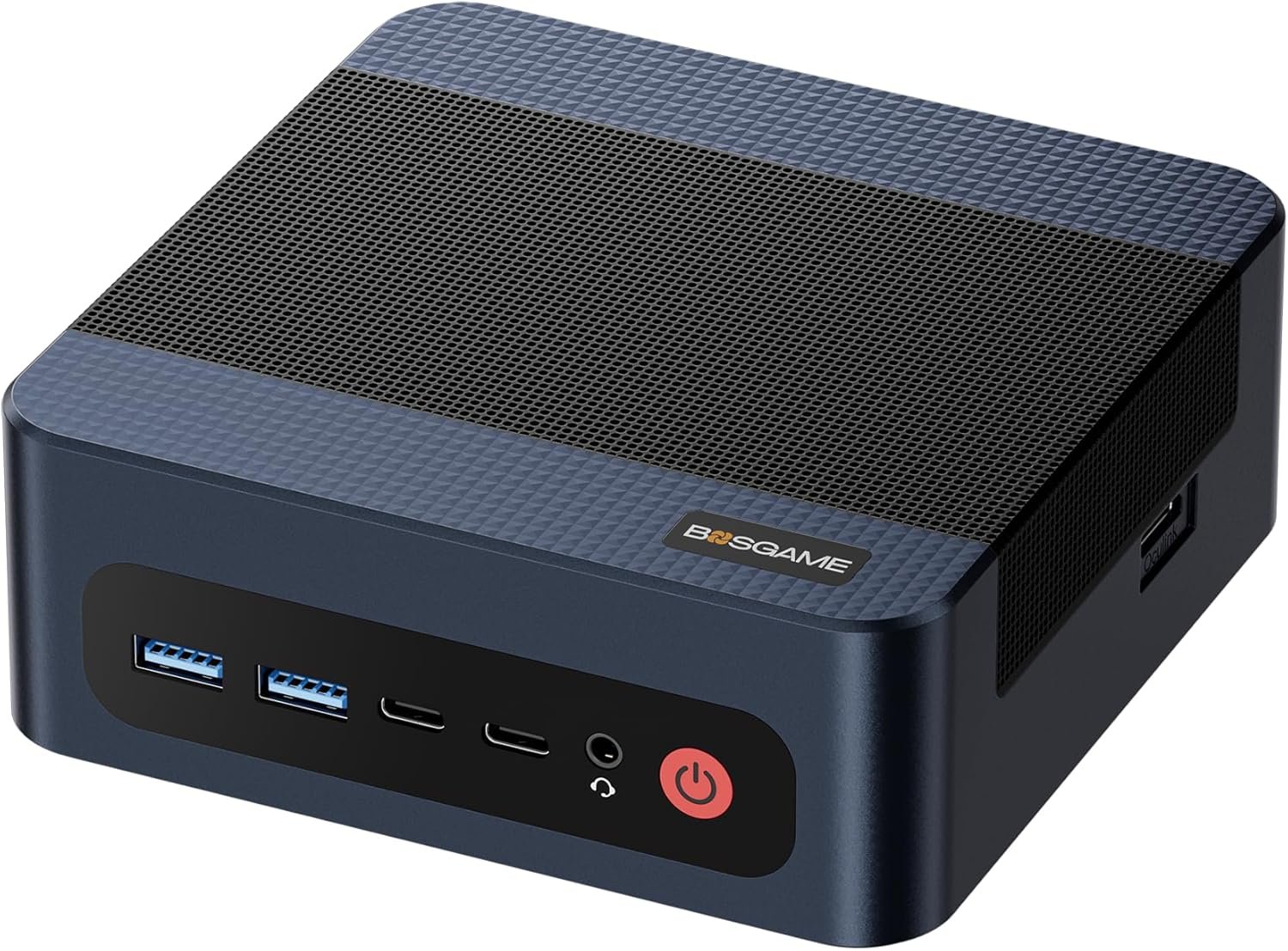
Design, Ports & Connectivity
The BOSGAME M4 Plus prioritizes function over form. While it lacks the unibody aluminum finish of the Beelink SER8, its industrial design is optimized for airflow and connectivity. The chassis is robust, featuring ample ventilation to tame the 54W TDP of the Ryzen 9 processor.
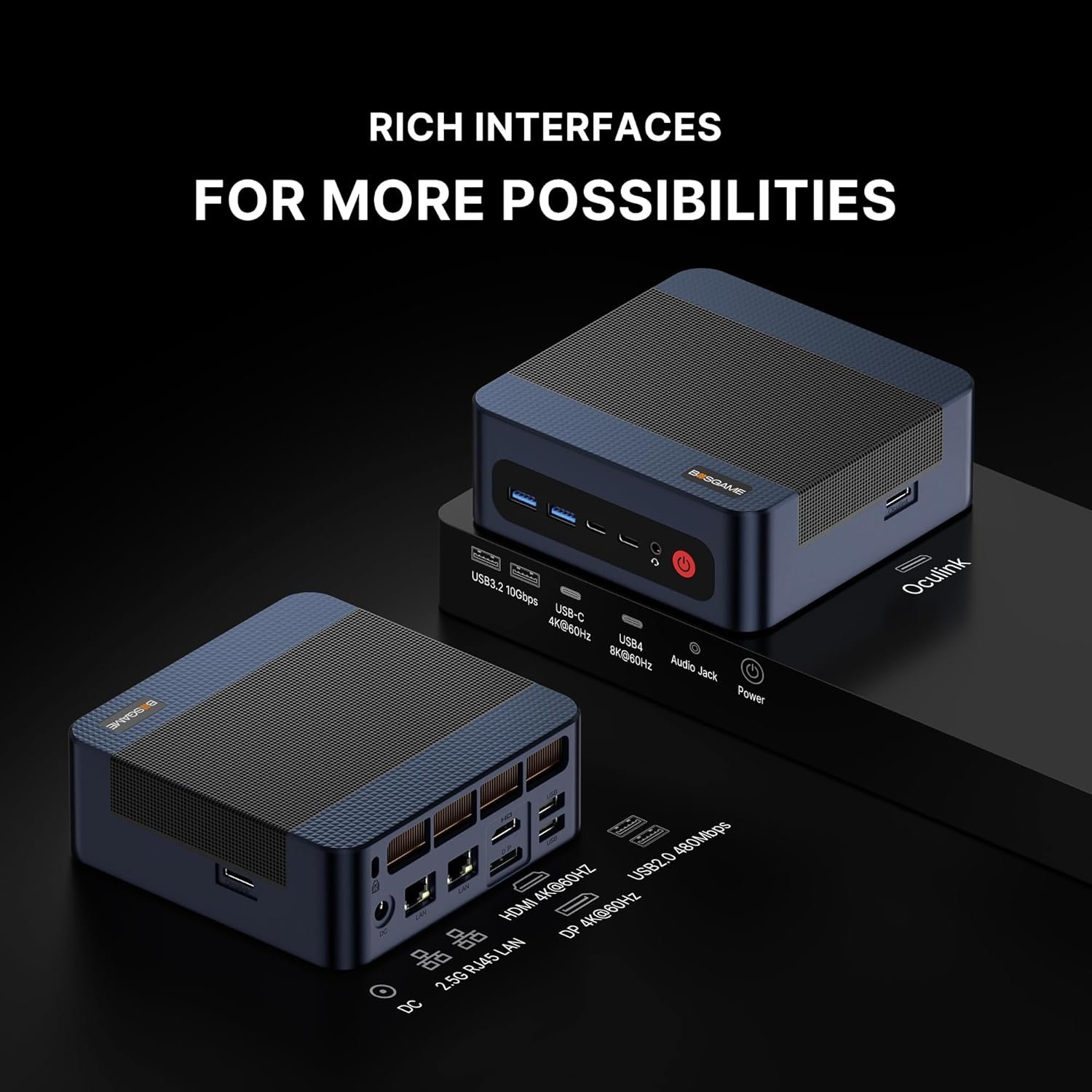
Connectivity is where this model truly shines. It is one of the few consumer units offering Dual 2.5G LAN ports, perfect for home labs, virtualization, or separating network traffic. Wireless duties are handled by reliable Wi-Fi 6 and Bluetooth 5.2.
OCuLink Ready
Native OCuLink (SFF-8612) port for direct PCIe x4 connection to external GPUs.
USB 4.0
40Gbps versatile port for fast docks, storage, and 8K display output.
Dual 2.5G LAN
Double the networking potential for NAS, routers, or bonding.
Technical Specifications
Flagship “Phoenix” architecture under the hood
The AMD Ryzen 9 7940HS is a beast. Built on the Zen 4 architecture with 4nm process technology, it features 8 cores and 16 threads capable of boosting up to 5.2GHz. It also includes the Ryzen AI engine (XDNA), making it future-proof for local AI workloads.
| Component | Specification |
|---|---|
| CPU | AMD Ryzen 9 7940HS (8C/16T, up to 5.2 GHz) |
| GPU | AMD Radeon 780M (12 CUs, 2800 MHz) |
| RAM | 32GB DDR5 Dual Channel (Upgradable to 64GB) |
| Storage | 1TB PCIe 4.0 NVMe SSD (Slot for 2nd SSD available) |
| Graphics Exp. | 1x OCuLink + 1x USB4 |
| Displays | Triple Display Support (HDMI 2.1, DP, USB4) |
| Networking | 2x 2.5GbE LAN, Wi-Fi 6, BT 5.2 |
Performance & Benchmarks
In CPU-heavy tasks, the Ryzen 9 7940HS rivals desktop processors from just a few years ago. It scores significantly higher than the Ryzen 7 7840HS found in cheaper units and trades blows with the newer Ryzen 9 8945HS found in the much more expensive Geekom A8.
The integrated Radeon 780M graphics card is capable of smooth 1080p gaming on its own. You can expect playable frame rates in competitive titles like Valorant, CS2, and League of Legends at high settings. Even heavy titles like Cyberpunk 2077 are playable at 1080p Low/Medium settings with FSR enabled.
| Benchmark | Score / FPS | Notes |
|---|---|---|
| Cinebench R23 (Multi) | ~16,800 | Flagship mobile performance |
| Geekbench 6 (Single) | ~2,800 | Excellent responsiveness |
| Cyberpunk 2077 (1080p Low) | ~58 FPS | Playable with FSR |
| Forza Horizon 5 (1080p Med) | ~75 FPS | Smooth experience |
The OCuLink Advantage
While the iGPU is great, the OCuLink port is the game changer. By connecting a dedicated GPU dock (like the Aoostar AG01 or Minisforum DEG1), you bypass the limitations of USB4. OCuLink provides a near-native PCIe connection.
When paired with an NVIDIA RTX 4070 via OCuLink, the BOSGAME M4 Plus transforms into a 4K gaming rig, suffering almost no performance loss compared to a desktop PC. This makes it a far superior choice for gamers compared to the Beelink SER8, which relies solely on USB4 for eGPU connectivity (losing 15-20% performance).
Comparisons with Alternatives
M4 Plus vs. Beelink SER8 vs. Geekom A8
The M4 Plus enters a fierce market. Here is how it stands against the heavyweights.
| Model | CPU | Key Feature | Price Est. | Action |
|---|---|---|---|---|
| BOSGAME M4 Plus (Best Value) | Ryzen 9 7940HS | OCuLink + Dual LAN | $599 | View Deal |
| Beelink SER8 | Ryzen 7 8845HS | Metal Body / Quiet | Compare | |
| Geekom A8 | Ryzen 9 8945HS | Ultra Compact | Compare |
Verdict: Choose the Geekom A8 if you need the absolute smallest size and premium build. Choose the Beelink SER8 for silence and Mac-like aesthetics. But choose the BOSGAME M4 Plus if you want the most performance and expandability for your money.
Pros and Cons
Pros
- Rare OCuLink port for desktop-class eGPU gaming
- Ryzen 9 7940HS (5.2GHz) performs exceptionally well
- Dual 2.5G LAN ports for advanced networking
- Excellent price-to-performance ratio
- 32GB DDR5 and 1TB SSD standard
Cons
- Plastic chassis feels less premium than Beelink/Geekom
- Fan can be audible under maximum load
- OCuLink cable/dock not included in box
Ready to buy the BOSGAME M4 Plus?
Ryzen 9 Power | Fast Shipping | OCuLink Ready
GET THE BOSGAME M4 PLUS ON AMAZON