
Best Mini PC for NAS & Home Server 2026: 4 Picks for TrueNAS, Unraid & Proxmox
A mini PC left on around the clock can serve your files, back up your phones, run Home Assistant, Pi-hole and Docker apps, and host virtual machines, for about the electricity of a light bulb. What matters is not raw speed but network ports, memory you can upgrade, storage slots and idle power. Here are four mini PCs that get those right, the software to run on them, and the purpose-built mini NAS boxes to consider when you need drive bays.
In short
For a file server, Docker host or soft router, an Intel N150 mini PC is enough: the Beelink EQ14 adds dual LAN and an internal power supply, the GMKtec G3 Plus is the cheaper single-LAN option. For Proxmox with several virtual machines, step up to 8–12 cores and upgradable DDR5: the BOSGAME M4 Plus or the Minisforum AI X1 Pro-370. Standard mini PCs take NVMe drives, not 3.5-inch disks; for hard drives, choose a mini NAS such as the Beelink ME Pro or Minisforum N5 Max.
- 1Beelink EQ14Best budget server · N150 · dual LAN · internal power supplySee pick
- 2GMKtec G3 PlusCheapest start · N150 · Intel 2.5GbE · second SSD slotSee pick
- 3BOSGAME M4 PlusBest Proxmox value · 8 cores · DDR5 to 64GB · dual 2.5GbESee pick
- 4Minisforum AI X1 Pro-370Full homelab · 12 cores · DDR5 to 128GB · 3 M.2See pick
What changed in this update (Oct 13, 2026)
We corrected the GMKtec G3 Plus specifications (one 2.5GbE port, DDR4, no USB4, not the dual-LAN USB4 machine we described in April), replaced the “BOSGAME M4” with the M4 Plus our link actually leads to, and replaced the Peladn HO5 with the Minisforum AI X1 Pro-370, whose memory can be upgraded. We updated the software section (TrueNAS SCALE is now TrueNAS Community Edition; Unraid’s current license prices), added purpose-built mini NAS boxes, replaced power estimates with published measurements and removed prices and scores.
Why use a mini PC for a NAS or home server?
A mini PC gives you a full x86 computer that runs any NAS system, Docker app or virtual machine, at low power and low cost. The trade-off is storage: most have no bays for 3.5-inch hard drives.
Synology and QNAP appliances are excellent when storage is all you need, but their processors and software are fixed. A mini PC running TrueNAS, Unraid or Proxmox can do everything at once: file shares and backups, Home Assistant, Pi-hole or AdGuard, a password manager, Nextcloud, Plex or Jellyfin, and a few virtual machines. If your needs change, it becomes a desktop or a router.
The catch is drives. A standard mini PC holds one to three M.2 SSDs, sometimes a 2.5-inch drive, never a stack of 3.5-inch disks. That’s fine for an all-flash server or a few terabytes, and USB enclosures or a USB4 dock can add more. For tens of terabytes on hard drives, look at the mini NAS boxes further down.
Mini PC or dedicated NAS?
Choose a mini PC if you want apps, containers and virtual machines on one machine, freedom to pick the software, and SSD storage. Choose a NAS appliance or a mini NAS if storage is the main job, you want hot-swap 3.5-inch bays, or you’d rather not manage Linux.
What to look for: the specs that matter for a server
Five specs matter more than processor speed: the number and speed of LAN ports, memory size and whether it’s upgradable, M.2 and drive slots, idle power, and cores for virtual machines.
1. Network ports
One port is enough for a file server. Two ports let the machine act as a router or firewall (pfSense, OPNsense, OpenWrt) or separate storage traffic from internet traffic. 2.5GbE is now common on budget models and lets an NVMe server deliver about 280 MB/s to a 2.5GbE PC, versus about 115 MB/s over Gigabit. Intel i226-V chips work out of the box in Proxmox and TrueNAS; check the exact port speed on the listing, because some models are sold in Gigabit and 2.5GbE versions.
2. Memory: size and upgradability
TrueNAS recommends at least 8GB for a basic system and 16GB is a comfortable start; Proxmox with several virtual machines wants 32GB or more. The often-quoted “1GB of RAM per TB of storage” is a rough guideline, not a requirement. What matters more is whether memory is soldered (LPDDR5X, fixed for life) or in SO-DIMM slots you can upgrade. Intel N-series chips have a single memory channel and one slot.
3. Storage slots
Keep the operating system on its own SSD and data on others. Two M.2 slots allow a system drive plus a data drive, or a mirrored pair; three slots give more room. A 2.5-inch bay takes a large SATA SSD or laptop hard drive.
4. Idle power
A server spends most of its life idle, so idle draw sets the bill. At the 2026 US average of 18.2 cents per kWh, every 10 watts of continuous draw costs about $16 a year.
5. Cores for containers and virtual machines
Four cores handle file serving and a dozen light containers. Several virtual machines, or containers that do real work (Nextcloud with many users, game servers, CI jobs), benefit from 8 to 12 cores.
Which software? TrueNAS, Unraid, Proxmox and the easy options
Pick TrueNAS for data integrity, Unraid for mixing drives and easy apps, Proxmox for virtual machines. All run on every mini PC in this guide.
| System | Cost | Strength | Best for |
|---|---|---|---|
| TrueNAS Community Edition | Free | ZFS file system: checksums, snapshots, protection against silent corruption; Docker apps | Storage-first builds where data safety comes first |
| Unraid | $49 Starter (up to 6 drives), $109 Unleashed, $249 Lifetime; $36 a year for updates after the first year on Starter and Unleashed | Mix drives of any size with parity; very easy Docker and VM setup | Media servers that grow drive by drive |
| Proxmox VE | Free (optional paid support) | Hypervisor for virtual machines and LXC containers; can host TrueNAS or OpenMediaVault | Homelabs with several systems on one box |
| OpenMediaVault / CasaOS | Free | Simple web interfaces on Debian for shares and Docker | First home server, light use |
Unraid prices from Unraid’s license announcement; check unraid.net for current offers.
TrueNAS CORE is discontinued. The FreeBSD-based CORE is in maintenance only; the Debian-based TrueNAS SCALE was renamed TrueNAS Community Edition in January 2025, and version 25.04 “Fangtooth” unified the two lines. New builds should use the current Community Edition (25.10 “Goldeye” at the time of writing).
Quick comparison: the four picks
Two Intel N150 machines for low-power file and app servers, and two 8- and 12-core Ryzen machines with upgradable DDR5 for Proxmox and heavier labs.
| Model | CPU | Memory | Storage | Network | Ports / displays | Price |
|---|---|---|---|---|---|---|
| Beelink EQ14 | Intel N150 · 4 cores, 6W | 16GB DDR4 · 1 SO-DIMM | 500GB NVMe · M.2 | Dual 2.5GbE · Wi-Fi 6 | 2× HDMI 4K60 · USB-C (data) | Check price |
| GMKtec G3 Plus | Intel N150 · 4 cores, 6W | 16GB DDR4 · 1 SO-DIMM, up to 32GB | 512GB NVMe + free M.2 2242 SATA slot | 2.5GbE · Wi-Fi 6 | 2× HDMI 4K60 · 4× USB-A 10Gbps | Check price |
| BOSGAME M4 Plus | Ryzen 9 7940HS · 8 cores / 16 threads | 32GB DDR5 · upgradable to 64GB | 1TB NVMe | Dual 2.5GbE | OCuLink · USB4 · HDMI 2.0 · DP 1.4 | Check price |
| Minisforum AI X1 Pro-370 | Ryzen AI 9 HX 370 · 12 cores | 64GB DDR5-5600 · 2 SO-DIMM, up to 128GB | 1TB NVMe · 3 M.2 slots | Dual 2.5GbE · Wi-Fi 7 | 2× USB4 · OCuLink · HDMI · DP | Check price |
#1 — Beelink EQ14: best budget home server
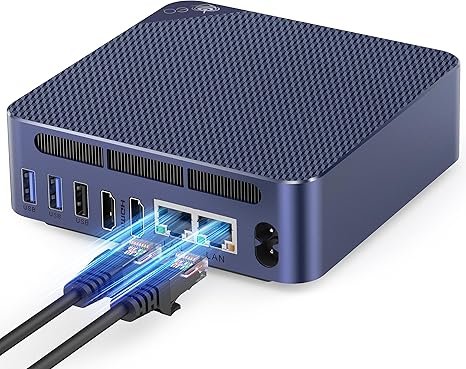
An Intel N150 with two LAN ports, two M.2 slots, an internal power supply and server features (Wake on LAN, PXE, auto power-on): the most complete low-power box for files, Docker and routing.
Beelink EQ14
Intel N150, 16GB DDR4 (one slot), two M.2 2280 slots, dual LAN (2.5GbE on the current listing), Wi-Fi 6 and a power supply inside the case.
Check current price on AmazonThe EQ14 does the jobs most home servers do: SMB shares and backups, Home Assistant, Pi-hole, a VPN, Plex with Intel Quick Sync, or an OpenWrt or OPNsense router thanks to its two ports. The internal power supply removes the brick, and Beelink lists Wake on LAN, PXE boot and automatic power-on after an outage.
Buy the right version. The EQ14 tested by Notebookcheck and TweakTown had two Gigabit ports; the current listing describes dual 2.5GbE. Check the network line of the listing before you buy.
- Dual LAN for routing or a storage network
- Two M.2 slots
- Internal power supply, 3-year warranty
- Gigabit on older units
- Single memory slot, 4 cores
- No SATA bay
#2 — GMKtec G3 Plus: cheapest way to start
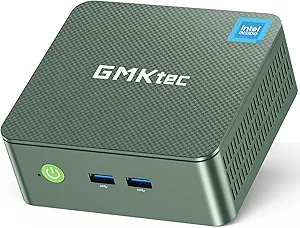
The same N150 for less, with an Intel i226-V 2.5GbE port that Proxmox and TrueNAS recognize natively and a free M.2 slot for a second drive. One LAN port only.
GMKtec G3 Plus
Intel N150, 16GB DDR4 in one SO-DIMM slot (32GB max), 512GB NVMe plus a free M.2 2242 SATA slot, one Intel i226-V 2.5GbE port and Wi-Fi 6.
Check current price on AmazonVirtualization Howto installed Proxmox VE and VMware ESXi on the G3 Plus without extra drivers and measured about 21 watts at full load. With 16GB it runs a handful of containers or one or two light virtual machines; the single slot accepts 32GB. Our April guide wrongly credited it with dual 2.5GbE and USB4: it has one 2.5GbE port and four 10Gbps USB-A ports.
Read our GMKtec G3 Plus review
- Intel 2.5GbE, native in Proxmox
- Second SSD slot (SATA)
- Often the cheapest N150 box
- One LAN port: not a router
- No USB4, no USB-C
- External power adapter
#3 — BOSGAME M4 Plus: best Proxmox value
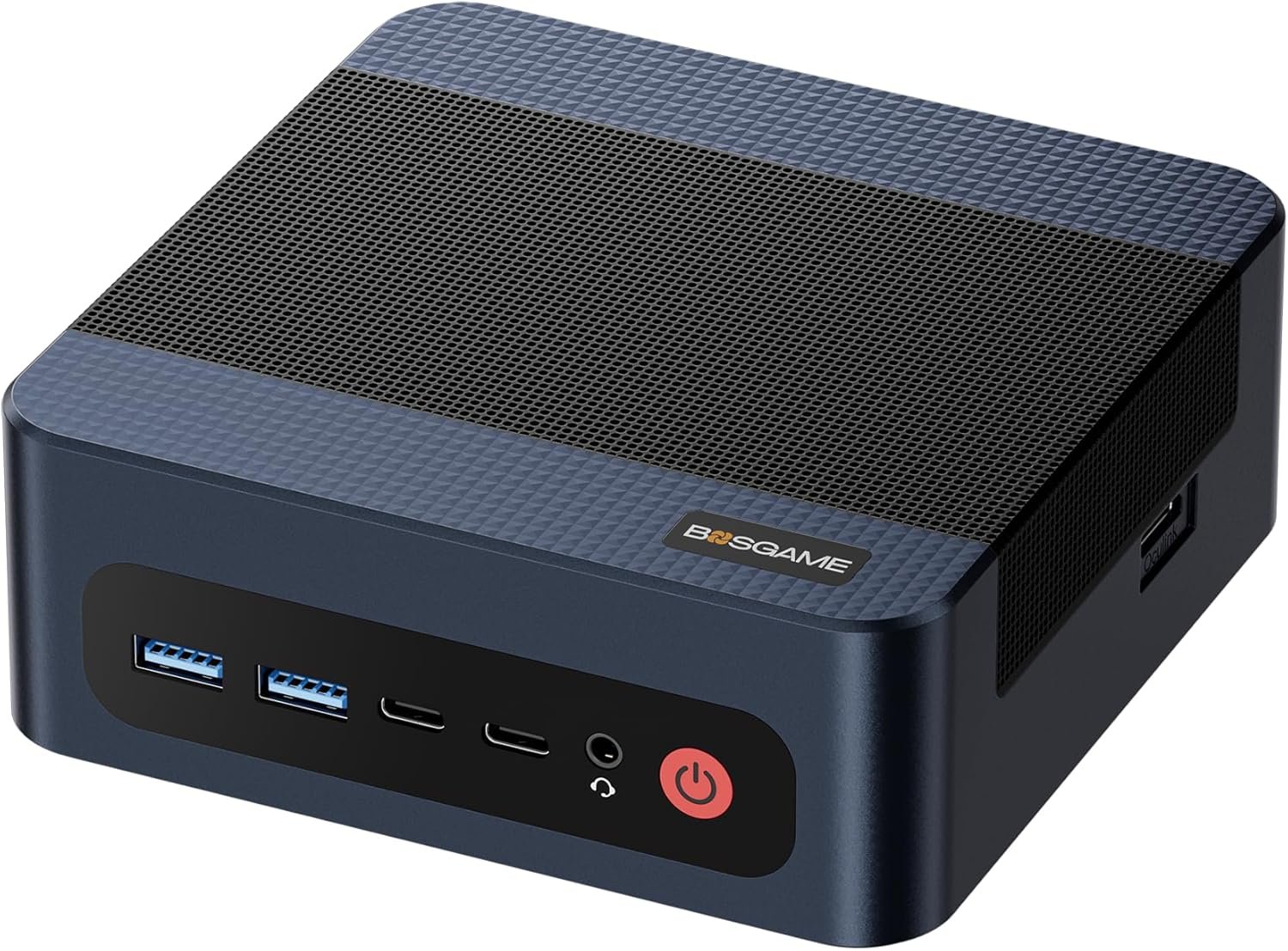
Eight Zen 4 cores, DDR5 in two slots up to 64GB, dual 2.5GbE, USB4 and OCuLink: the step up for several virtual machines, at a price well below Ryzen AI 9 machines.
BOSGAME M4 Plus
Ryzen 9 7940HS (8 cores / 16 threads), 32GB DDR5 upgradable to 64GB, 1TB NVMe, dual 2.5GbE, USB4 and OCuLink.
Check current price on AmazonLinuxLinks found the Ryzen 9 7940HS close to an Intel Core Ultra 7 255H in multi-core work and measured lower idle power than the Intel N100 machine in its comparison, a good sign for a 24/7 box. Two SO-DIMM slots take up to 64GB, enough for a Proxmox host running TrueNAS, Home Assistant and several containers. USB4 adds fast external storage, and OCuLink can pass a graphics card to a virtual machine. One caution: if you plan heavy Plex transcoding, Intel is the better platform, as our Plex guide explains.
Read our BOSGAME M4 Plus review
- 8 cores, upgradable DDR5 to 64GB
- Dual 2.5GbE, USB4, OCuLink
- Very low idle power in LinuxLinks' test
- Fan audible in a quiet room
- AMD graphics: weak for Plex transcoding
- Wi-Fi 6 only
#4 — Minisforum AI X1 Pro-370: the full homelab
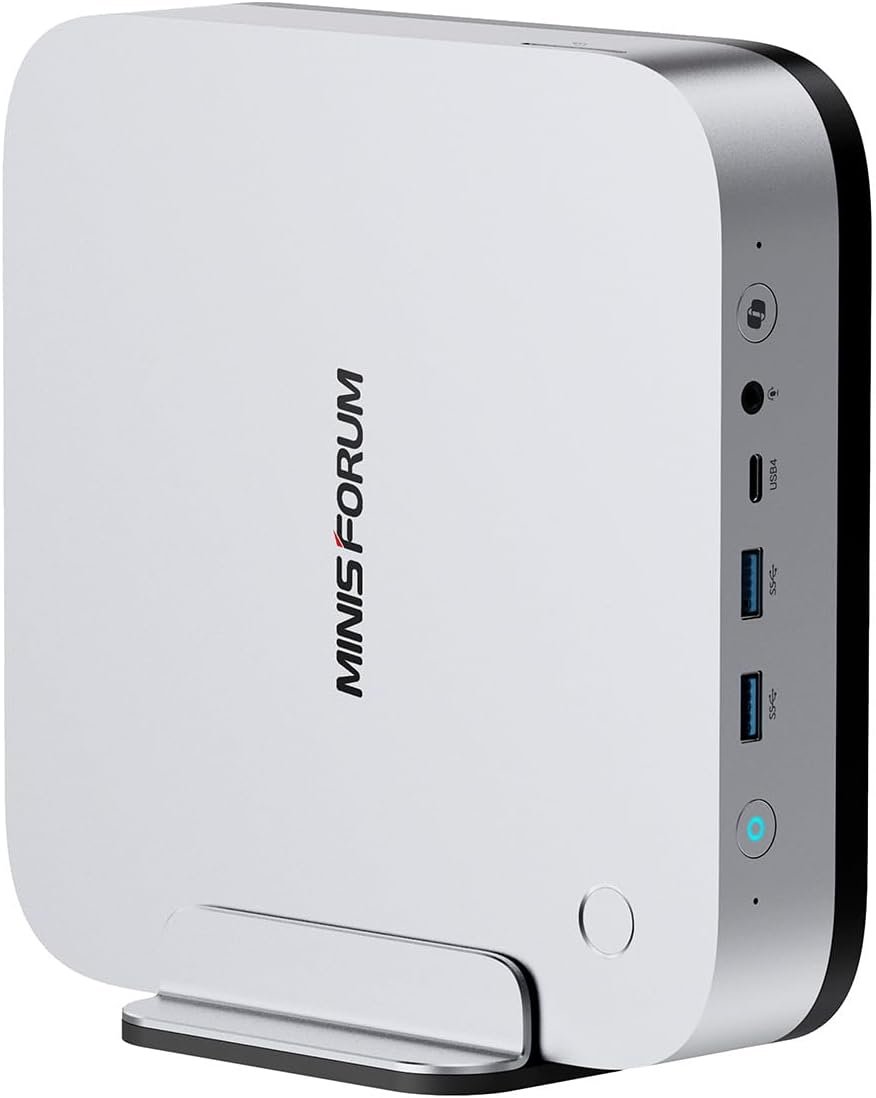
Twelve Zen 5 cores, DDR5 upgradable to 128GB, three M.2 slots, dual 2.5GbE, two USB4 ports, OCuLink and an internal power supply: room for a real lab on one machine.
Minisforum AI X1 Pro-370
Ryzen AI 9 HX 370 (12 cores), 64GB DDR5 in two SO-DIMM slots (up to 128GB), three M.2 slots, dual 2.5GbE, two USB4, OCuLink, Wi-Fi 7 and an internal power supply.
Check current price on AmazonThis is the machine for a Proxmox host that runs a storage VM, Home Assistant, a dozen containers, a Windows VM and local AI models without running out of memory. Unlike the Peladn HO5 we listed in April, whose 32GB is soldered, the AI X1 Pro-370 takes up to 128GB in two slots, and its three M.2 slots allow a system drive plus a mirrored data pair. It is also a strong desktop; see our local AI guide for what its memory allows.
Read our Minisforum AI X1 Pro-370 review
- Memory up to 128GB
- Three M.2 slots, dual 2.5GbE
- Internal power supply
- Expensive for a server
- Higher idle power than an N150
- AMD graphics for Plex transcoding
Also worth a look
GEEKOM AX8 Max (Ryzen 7 8745HS): dual 2.5GbE, DDR5 up to 64GB and a 2.5-inch SATA bay next to the NVMe slot, handy for a large SATA SSD. GMKtec EVO-X1 and Peladn HO5 (Ryzen AI 9 HX 370): fast, with OCuLink, but 32GB of soldered memory limits a growing lab.
Need hard drives? Purpose-built mini NAS boxes
When you need many drives, a mini NAS built around the same low-power chips makes more sense than a mini PC with USB enclosures.
| Model | Processor and memory | Drives | Network | Measured power |
|---|---|---|---|---|
| Beelink ME Mini | Intel N150 · 12GB LPDDR5 (soldered) | 6 × M.2 NVMe (PCIe 3.0 x1/x2) + 64GB eMMC | Dual 2.5GbE | About 8.5 W idle, 21 W near full load |
| Beelink ME Pro | Intel N95 or N150 · 12 or 16GB LPDDR5 (soldered) | 2 × 2.5/3.5-inch SATA + 3 × M.2 NVMe | 5GbE + 2.5GbE | About 22 W idle, 34 W at full CPU load |
| Minisforum N5 Max | Ryzen AI Max+ 395 · 64 or 128GB (soldered) | 5 × SATA + 5 × M.2 | Dual 10GbE | See our review |
Beelink figures from Virtualization Howto’s reviews; power with the drives installed in each test.
The ME Mini is an all-flash NAS the size of a coaster, but each SSD slot gets a single PCIe 3.0 lane, plenty for a 2.5GbE network but not for local speed records. The ME Pro takes two real hard drives and has a 5GbE port. The Minisforum N5 Max is a different class: a five-bay NAS with a workstation processor that can also run large AI models.
Power cost: what running 24/7 costs
An N150 mini PC costs about $15–20 a year to run around the clock; an 8- to 12-core Ryzen or a mini NAS with hard drives about $30–40.
| Average draw | Cost per year | Typical machine |
|---|---|---|
| 10 W | about $16 | Intel N150 mini PC, mostly idle (EQ14, G3 Plus, ME Mini) |
| 20 W | about $32 | Ryzen mini PC under light load, mini NAS with hard drives |
| 60 W | about $96 | Older desktop tower used as a server |
Calculation: watts × 8,760 hours ÷ 1,000 × $0.182 (EIA 2026 US residential average). Hard drives add roughly 3 to 8 watts each when spinning.
FAQ
What is the best mini PC for a home NAS in 2026?
For a budget file server, Docker host or soft router, the Beelink EQ14: Intel N150, dual LAN (2.5GbE on the current listing), two M.2 slots and an internal power supply. For a Proxmox host with several virtual machines, the BOSGAME M4 Plus adds eight cores and upgradable DDR5; the Minisforum AI X1 Pro-370 goes further with 12 cores, memory up to 128GB and three M.2 slots. For hard drives, a purpose-built box such as the Beelink ME Pro, with two 3.5-inch bays, fits better than a standard mini PC.
Can a mini PC run TrueNAS?
Yes. TrueNAS Community Edition (formerly TrueNAS SCALE) runs on any modern x86 mini PC. TrueNAS recommends at least 8GB of RAM for a basic system, and 16GB is a more comfortable start. Use a separate boot SSD, not a USB stick. The main limit is storage: most mini PCs have no SATA bays, so you use NVMe drives, a USB enclosure or a mini NAS with drive bays.
What is the best mini PC for Proxmox in 2026?
Look for 8 or more cores, 32GB of upgradable memory and two M.2 slots. The BOSGAME M4 Plus (Ryzen 9 7940HS, DDR5 up to 64GB, dual 2.5GbE) is the value choice; the Minisforum AI X1 Pro-370 (Ryzen AI 9 HX 370, DDR5 up to 128GB, three M.2 slots, dual 2.5GbE) suits larger labs. Avoid soldered memory if you expect to add virtual machines.
How much does it cost to run a mini PC home server 24/7?
At the 2026 US average of 18.2 cents per kWh, a machine averaging 10 watts costs about $16 a year and one averaging 20 watts about $32. Intel N150 mini PCs idle around 8 to 11 watts in published measurements; a mini NAS with spinning hard drives draws more, about 22 watts idle for the Beelink ME Pro in Virtualization Howto’s test.
What is the difference between TrueNAS, Unraid and Proxmox?
TrueNAS Community Edition is a free storage-first system built on ZFS, the strongest choice for data integrity. Unraid is a paid system that lets you mix drives of different sizes with parity protection and makes Docker apps easy. Proxmox VE is a free hypervisor that runs virtual machines and containers, and can host TrueNAS or OpenMediaVault as one of them.
Can a mini PC run Plex and a NAS at the same time?
Yes; Plex or Jellyfin usually runs as a Docker container next to the storage. If you need transcoding, prefer an Intel machine: Plex treats Intel Quick Sync as its reference, and recent tests found AMD Ryzen mini PCs falling back to software transcoding under Linux.
Related
- Best mini PCs for Plex
- Minisforum N5 Max review
- Beelink EX Mate Pro: four M.2 slots over USB4
- How to upgrade a mini PC’s RAM and SSD
- Best fanless mini PCs
Sources
- Virtualization Howto, Beelink ME Mini review and Beelink ME Pro review (January 2026)
- LinuxLinks, BOSGAME M4 Plus power consumption and benchmarks
- Notebookcheck, Beelink EQ14 review and TweakTown, Beelink EQ14 review
- endoflife.date, TrueNAS releases and CORE status and TrueNAS, Fangtooth unifies the Community Editions
- Hetzner, TrueNAS Community Edition hardware guidance (September 2026)
- Unraid, New Unraid OS license pricing
- Plex Support, hardware-accelerated streaming and Lon.TV, Plex transcoding on AMD Ryzen tested (July 2026)
- U.S. EIA, Short-Term Energy Outlook, October 2026
- MiniPCDeals analyses with their own sources: GMKtec G3 Plus review (Virtualization Howto tests), BOSGAME M4 Plus review, Beelink EQ14 review; manufacturers’ Amazon listings checked October 2026