
SIKAI CASE Foldable Bluetooth Keyboard: The Best Pocket Keyboard for Tablets and Phones?
Aluminum alloy build, hidden magnetic stand, 45-hour battery, and multi-device pairing — the SIKAI CASE foldable keyboard is designed for anyone who types on the go. But does it actually deliver? We break it down honestly.
Introduction — Who Is This Keyboard For?
The best keyboard is the one you actually have with you. That’s the premise behind compact foldable Bluetooth keyboards, and the SIKAI CASE foldable keyboard is a textbook example of the category done right — mostly. Whether you’re a student taking notes in class, a remote worker squeezing productivity out of a café visit, or a traveler who refuses to type on a glass screen, this tiny keyboard promises to solve a real problem: serious typing without serious bulk.
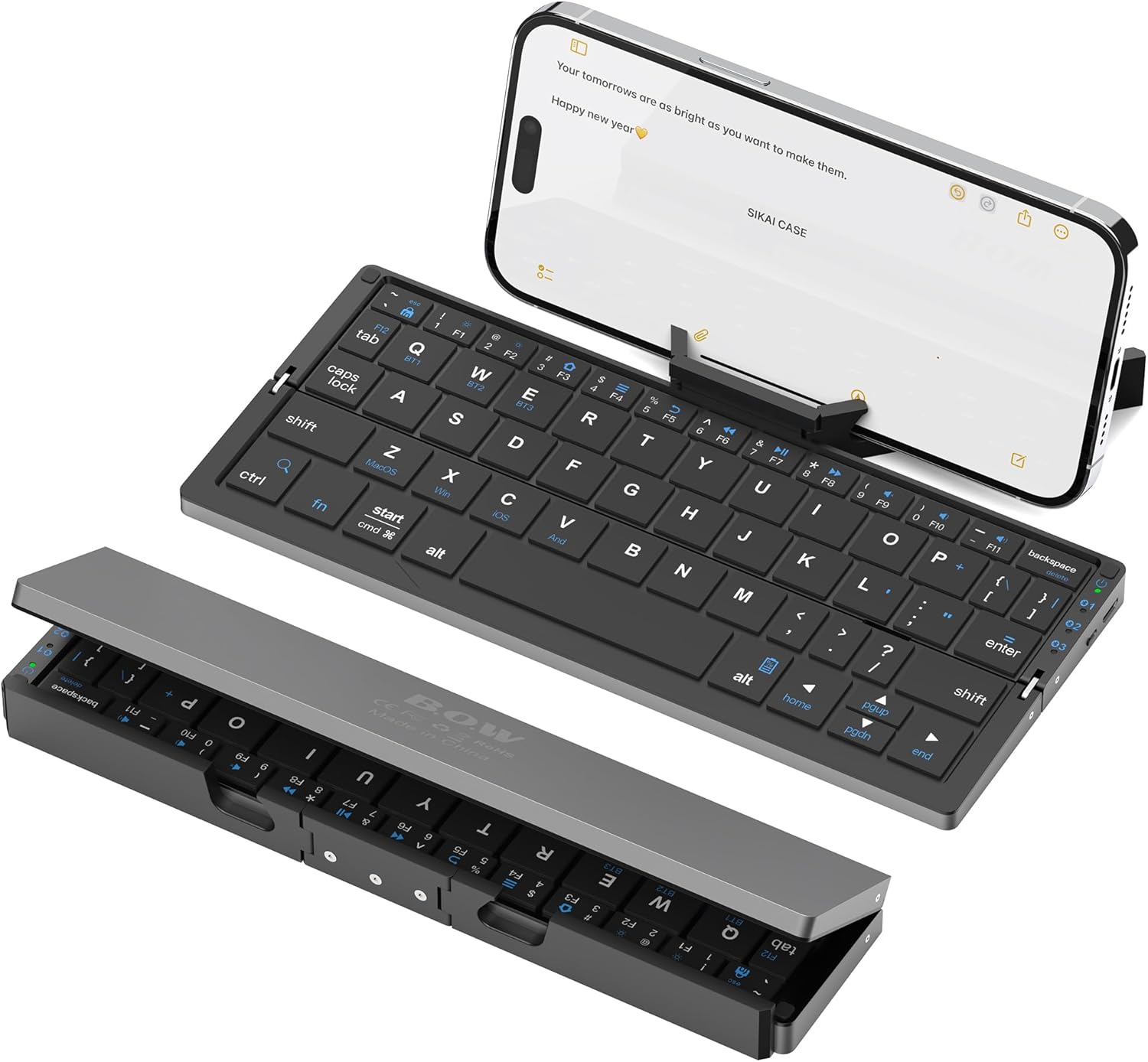
At roughly 250 grams and a folded size of 7.97 × 1.83 inches, it genuinely fits in a jacket pocket. The aluminum alloy chassis gives it a premium feel far above its price bracket. The built-in magnetic stand holds your tablet or phone without needing a separate prop. And the 60-key layout covers the essentials without wasting space.
But compact always means compromise. There’s no dedicated number row. The magnetic stand only supports tablets up to 11 inches. The Bluetooth pairing process has quirks on some Android devices. These are not dealbreakers — but they are things you need to know before buying. That’s exactly what this review covers.
Full Specifications
Here is every confirmed specification for the SIKAI CASE foldable Bluetooth keyboard, based on manufacturer data. We flag anything that requires a caveat.
| Layout | 60-key compact (no dedicated number row) |
|---|---|
| Connection | Bluetooth (chip: American Broadcom) |
| Multi-device pairing | Up to 3 devices (Fn + BT1 / BT2 / BT3) |
| Compatibility | iOS, iPadOS, Android, Windows, macOS, HarmonyOS (HMS) |
| Key mechanism | Scissor-switch (low-profile) |
| Key finish | Matte |
| Chassis material | Aluminum alloy |
| Folding direction | Horizontal fold |
| Stand | Hidden magnetic bracket (supports tablets up to 11″) |
| Battery capacity | 160 mAh lithium rechargeable |
| Charge time | ~2 hours |
| Battery life (typing) | Up to 45 hours continuous (manufacturer claim) |
| Standby time | Up to 90 days (manufacturer claim) |
| Auto sleep | After 10 minutes of inactivity |
| Folded dimensions | 7.97 × 1.83 in (≈ 202 × 46 mm) |
| Open dimensions | 7.97 × 3.51 in (≈ 202 × 89 mm) |
| Weight | 250 g |
| Color | Black |
| Pairing name (Bluetooth) | B.O.W (or device MAC address on some Android phones) |
Design, Build Quality & Portability
Open the SIKAI CASE keyboard and the first thing you notice is the build. The aluminum alloy chassis is a genuine differentiator at this price point — most keyboards in this category use polycarbonate plastic that flexes when you type. This one doesn’t. It feels rigid and solid in the hand, and the matte black finish resists fingerprints better than glossy alternatives.
The horizontal fold design means you unfold it like a small book to reveal the full keyboard layout. This is more ergonomic for one-handed deployment than the split-fold designs used by some competitors. Once open, a small magnet locks both halves in place so the seam doesn’t shift mid-sentence.
The Magnetic Stand
The hidden magnetic bracket is the most useful feature for tablet users. It pops out from the back of the keyboard body and holds your device at a comfortable reading angle. The key limitation: it’s designed for devices up to 11 inches and doesn’t hold heavy tablets securely. For an iPhone, iPad mini, or iPad Air (up to 11″), it works well. For larger iPads or tablets with thick cases, the magnetic force isn’t sufficient — the manufacturer explicitly notes this.
Key Feel
The scissor-switch keys have a low travel distance — typical for ultra-compact keyboards — with a light, quiet actuation. The matte keycap surface provides enough texture to locate keys without looking. Given the reduced key size (a necessary trade-off at this form factor), touch typists will need an adjustment period. The manufacturer notes this is particularly well-suited for younger users or those with smaller hands.
Bluetooth Connectivity & Multi-Device Pairing
The SIKAI CASE keyboard connects via Bluetooth using a Broadcom chip — a well-established choice known for stable, low-latency connections. Pairing follows a standard procedure: hold Fn + BT1 (or BT2/BT3) to enter pairing mode, then select the device from your Bluetooth settings. The keyboard can store up to three paired devices and switching between them is a single key combination.
Compatibility Across Platforms
The keyboard is confirmed compatible with iOS / iPadOS, Android (including HarmonyOS / HMS), Windows, and macOS. This covers virtually all consumer devices. Special function keys behave correctly on iOS (home button, screenshot shortcuts, etc.), and Windows media keys work as expected.
Android Pairing Quirk
One known issue: on some Android phones, the Bluetooth pairing list may display the keyboard’s MAC address (e.g., 19:16:4A:77:9E:D3) instead of the name “B.O.W”. This is a display behavior of certain Android versions and does not affect function — you simply pair with the address shown. The manufacturer documents this clearly, and it’s worth knowing before assuming a pairing failure.
Battery and Energy Saving
The 160 mAh lithium battery charges via USB in approximately 2 hours. The manufacturer claims up to 45 hours of continuous typing or 90 days of standby. The keyboard enters an auto-sleep mode after 10 minutes of inactivity and wakes instantly with a keypress. For a day trip, a single charge is more than sufficient. For extended travel, a short top-up every few days is all it needs.
Use Cases — Who Should Buy This Keyboard?
Great For
Tablet users on the go are the primary audience. If you own an iPad (up to 11″), Samsung Tab, or similar tablet and want to type properly without a bulky case keyboard, the SIKAI CASE delivers a complete solution: keyboard and stand in one package. Students taking notes in class, on public transport, or in libraries will appreciate the quiet keys and pocket-friendly form. Remote workers and frequent travelers who want to stay productive in hotels, airports, or cafés without packing a laptop will find this genuinely useful.
Not Ideal For
Heavy daily typists who need full-travel mechanical keys or a standard layout will be frustrated by the 60-key compact design. Users with larger tablets (iPad Pro 12.9″, 13″ Android tablets) should note that the magnetic stand will not support their device — the keyboard still functions, but the stand does not. Anyone typing in the dark should also know there is no keyboard backlight.
Compatibility Note for Mini PC Users
If you use a mini PC at a desk and are looking for a secondary portable keyboard — for example, when traveling with a phone or compact tablet alongside your main setup — this keyboard pairs cleanly with Windows mini PCs via Bluetooth and is an excellent complement to a compact home office arrangement.
Pros & Cons
✓ What We Like
- Aluminum alloy build — premium feel
- Genuinely pocket-sized (250g, folds flat)
- Integrated magnetic stand — tablet-ready
- Up to 3 paired devices, easy switching
- Long battery (45h typing / 90d standby)
- Quiet scissor-switch keys
- iOS, Android, Windows, macOS compatible
- Auto-sleep saves battery passively
- Stable Broadcom Bluetooth chip
✕ Watch Out For
- No dedicated number row (60-key only)
- Stand limited to tablets ≤ 11 inches
- No keyboard backlight
- Android Bluetooth pairing can show MAC instead of name
- Thick phone/tablet cases may reduce stand grip
- Small key size — adjustment needed for fast typists
Frequently Asked Questions
Final Verdict
The SIKAI CASE foldable Bluetooth keyboard does what it promises: it gives you a real, tactile typing experience in a package that fits in your pocket. The aluminum build quality is noticeably better than most plastic competitors, the magnetic stand removes the need for a separate tablet holder, and the three-device pairing makes it genuinely versatile for mixed-device users.
The trade-offs are what you’d expect from any 60-key foldable keyboard — no number row, smaller key size, no backlight. If you understand the format going in, none of these are surprises. If you’re expecting a full desktop keyboard in pocket form, you will be disappointed — but that was never the goal here.
For its intended audience — tablet users, students, and travelers — this is a well-priced, well-built accessory that solves a real problem. The magnetic stand alone makes it more useful than a bare keyboard at this size.
Share this review: