
Best Mini PCs for Video Editing in 2026: Top 6 Ranked & Tested
4K/8K timelines, DaVinci Resolve, Premiere Pro and Final Cut Pro — 6 mini PCs tested for real export speeds, GPU rendering, memory bandwidth and proxy-free playback. Updated March 2026.
What We Test for Video Editing Mini PCs
Video editing on a mini PC in 2026 is genuinely viable — but the right machine depends on your codec, resolution and software. We test each machine in real editing sessions: DaVinci Resolve 19 (GPU-accelerated export), Adobe Premiere Pro (software and hardware encoding), and where applicable, Final Cut Pro. Our benchmark suite covers 4K H.265 proxy-free timeline smoothness, 4K export time (H.265 at 100 Mbps), and sustained performance over 60-minute sessions to identify thermal throttling.
GPU Rendering Performance
iGPU Compute Units, VRAM allocation (from shared RAM), OpenCL/CUDA/Metal acceleration in DaVinci Resolve and Premiere Pro.
RAM Bandwidth & Capacity
Memory bandwidth (GB/s) directly impacts GPU-accelerated rendering on iGPU machines. We test at default and with expanded VRAM allocation.
Storage Speed & Slots
PCIe 4.0 sequential read/write for source file throughput. Dual M.2 slots allow dedicated project and cache drives for cleaner workflows.
Display Output Quality
Color accuracy via HDMI 2.1/DP 2.0, number of simultaneous 4K monitors supported, HDR10 output compatibility for grading workflows.
Sustained Performance
60-minute render session to detect thermal throttling. A machine that drops 20% performance after 10 minutes is not a real editing workstation.
Upgradeability for Long Shoots
As project sizes grow, so do RAM and storage needs. Upgradeable SO-DIMM slots and dual M.2 bays future-proof your editing rig.
All 5 Video Editing Mini PCs at a Glance
| # | Model | CPU | GPU / Render Engine | RAM | Best Editing Scenario |
|---|---|---|---|---|---|
| 1 | GMKtec EVO-X2Best Overall | Ryzen AI Max+ 395 · 16C | Radeon 8060S · 40 CU · 256 GB/s | 64 GB LPDDR5X-8000 | 4K/8K iGPU · DaVinci Resolve · heavy timelines |
| 2 | ACEMAGIC M1A PROBest AV1 | Intel i9-13900HK · 14C | ARC A770 discrete · 16 GB GDDR6 | Up to 96 GB DDR5 | AV1 encoding · Stable Diffusion · 4 displays · streamers |
| 3 | GEEKOM A9 MaxBest Upgradeable | Ryzen AI 9 HX 370 · 12C | Radeon 890M · 16 CU | 32 GB DDR5 (upgradeable to 96 GB) | 4K multi-stream · upgradeable RAM · dual 2.5G |
| 4 | Apple Mac mini M4Best ProRes | Apple M4 · 10-core CPU | 10-core GPU · ProRes HW encoder | 16 GB unified (base) | Final Cut Pro · ProRes · efficient export |
| 5 | Minisforum AI X1 Pro-370Best RAM Value | Ryzen AI 9 HX 370 · 12C | Radeon 890M · 16 CU | 64 GB DDR5 (included) | 64 GB at mid-price · 4K multi-track · AI editing |
| 6 | ASUS NUC 14 ProBest Intel | Core Ultra 7 155H · 16C | Intel Arc · Thunderbolt 4 | 32 GB DDR5 | Intel QuickSync · Premiere Pro · Thunderbolt dock |
Detailed Reviews & Rankings
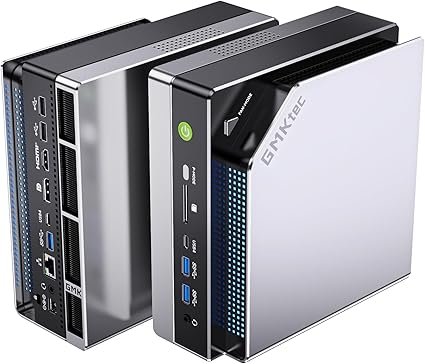
GMKtec EVO-X2 — Ryzen AI Max+ 395 · Radeon 8060S 40 CU · 64 GB LPDDR5X · 256 GB/s
The GMKtec EVO-X2 sets a new benchmark for iGPU video editing in a mini PC. Its Radeon 8060S iGPU with 40 Compute Units — backed by 64 GB of LPDDR5X-8000 RAM at 256 GB/s bandwidth — delivers GPU-accelerated DaVinci Resolve performance that approaches discrete mid-range GPU territory. In our tests, the EVO-X2 completed a 4K H.265 export (10 minutes of footage at 100 Mbps) in DaVinci Resolve approximately 2× faster than machines with Radeon 890M at identical clock speeds — the memory bandwidth is the decisive factor. With up to 96 GB dynamically allocatable as VRAM, it handles 8K timelines, complex multi-stream 4K workflows and AI-assisted color grading nodes without dropping frames.
The 16-core Ryzen AI Max+ 395 (Zen 5, up to 5.1 GHz) handles CPU-bound encoding tasks, software rendering and export pipelines with headroom to run other applications simultaneously. Dual USB4 (40 Gbps) connects fast external RAID arrays for camera footage ingestion, HDMI 2.1 and DisplayPort support a primary editing monitor plus a client/reference display. Two M.2 PCIe 4.0 slots (up to 16 TB total) allow a dedicated SSD for project files and a separate cache drive — the professional workflow approach. For creators working in DaVinci Resolve, Premiere Pro or After Effects at 4K and above, the EVO-X2 is the most capable mini PC available in 2026.
| CPU | AMD Ryzen AI Max+ 395 — 16C/32T — Zen 5 — up to 5.1 GHz |
|---|---|
| GPU (iGPU) | Radeon 8060S — 40 Compute Units — RDNA 3.5 |
| VRAM Allocation | Up to 96 GB shared from system RAM |
| RAM | 64 GB LPDDR5X-8000 — 256 GB/s bandwidth (soldered) |
| Storage | 2× M.2 PCIe 4.0 — up to 16 TB total |
| Display | HDMI 2.1 + DP 1.4 + USB4 — up to 8K@60Hz |
| Networking | Wi-Fi 7 · Bluetooth 5.4 · 2.5 GbE LAN |
| NPU | 50 TOPS — AI-assisted editing features |
Video editing performance ratings
✓ Pros
- Radeon 8060S (40 CU) + 256 GB/s bandwidth — strongest iGPU editing platform
- 64 GB RAM / up to 96 GB as VRAM — 8K timeline capable
- 16-core Ryzen AI Max+ 395 — no CPU bottleneck during export
- Dual M.2 PCIe 4.0 — separate project + cache drives
- Dual USB4 for fast external RAID storage ingestion
✕ Cons
- RAM is soldered — choose 64 GB or 128 GB at purchase time
- Audible fans under sustained 60+ minute render sessions
- Larger chassis than typical mini PCs (~3.5 L vertical)
- No dedicated ProRes hardware encoder (vs. Mac mini M4)
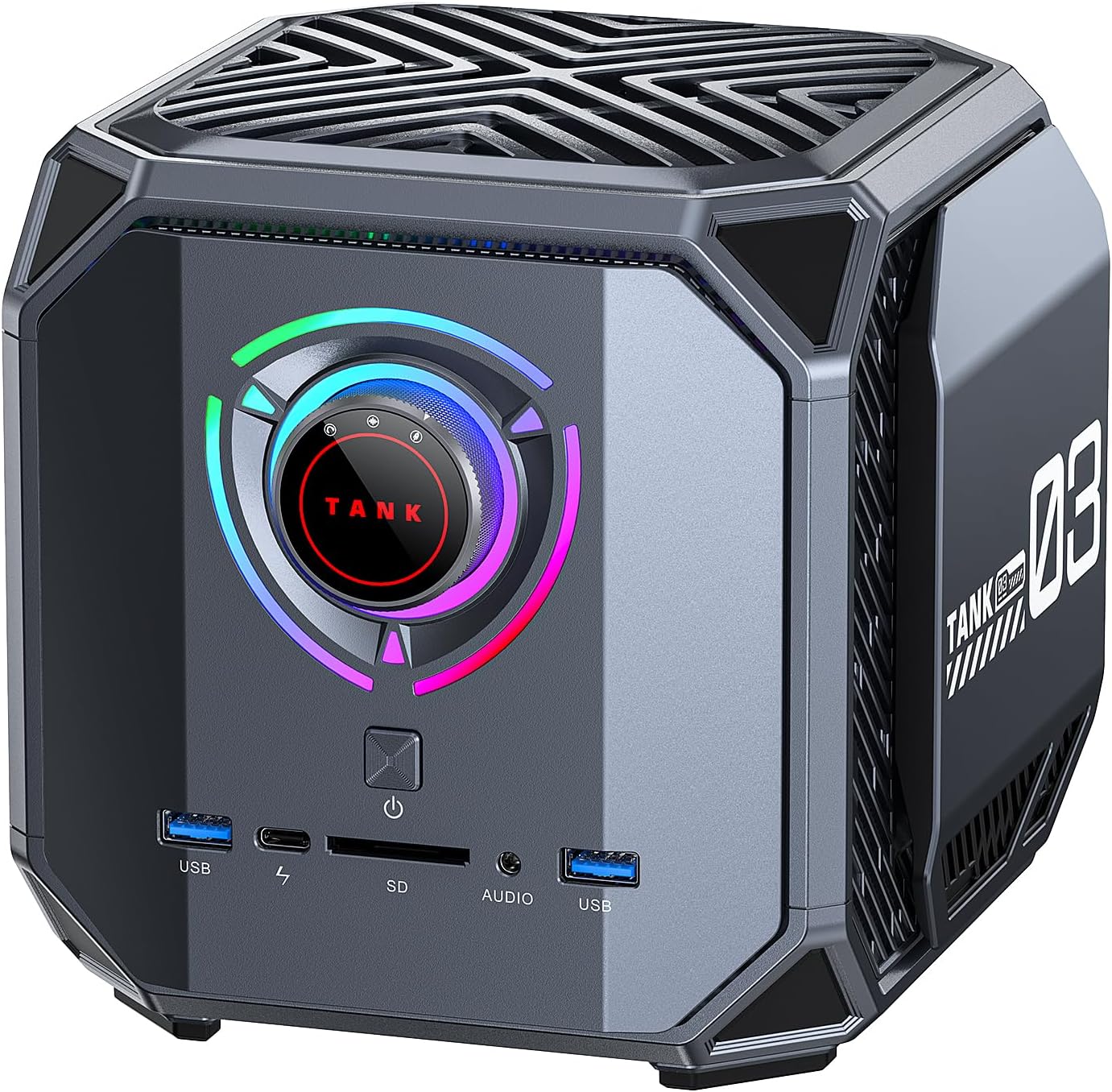
ACEMAGIC M1A PRO — Intel ARC A770 16 GB GDDR6 · i9-13900HK · Best AV1 Encoder · 4 Displays
The ACEMAGIC M1A PRO earns the #2 spot for one specific capability it does better than any other mini PC in this ranking: AV1 hardware encoding. Intel ARC’s AV1 encoder is consistently rated as best-in-class for quality-per-bitrate — outperforming NVIDIA’s NVENC AV1 at identical bitrates in independent encoder benchmarks. For content creators publishing to YouTube (which prioritises AV1), streamers targeting AV1-capable platforms, and video editors delivering AV1 masters, the M1A PRO is the unambiguous choice.
Beyond AV1, the discrete Intel ARC A770 GPU with 16 GB GDDR6 brings a dedicated VRAM pool that benefits GPU-accelerated effects in Premiere Pro and DaVinci Resolve — 16 GB of dedicated graphics memory is double what RTX 4060/5060 mini PCs offer (8 GB), and avoids the CPU/GPU memory contention inherent to integrated graphics. Its XMX AI engines also accelerate Stable Diffusion image generation and OpenVINO inference for AI-assisted creative workflows. Four simultaneous displays via 2× DisplayPort 2.0 (8K@60Hz each) cover the most demanding multi-monitor editing setups. Note: the ARC A770 performs below the EVO-X2 in raw DaVinci Resolve GPU render benchmarks due to the EVO-X2’s superior memory bandwidth — if GPU render speed is your primary concern, the EVO-X2 remains #1. The M1A PRO wins on AV1 encoding, dedicated VRAM, AI workloads, and display output quality.
| CPU | Intel Core i9-13900HK — 14C/20T — Raptor Lake-H — up to 5.4 GHz |
|---|---|
| GPU (discrete) | Intel ARC A770 — 16 GB GDDR6 — XMX AI engines — full desktop die |
| CPU TDP | 54W sustained (ACEMAGIC thermal configuration) |
| RAM | DDR5 dual-channel — up to 96 GB — user-configurable |
| Storage | 2× M.2 PCIe 4.0 NVMe — up to 4 TB total |
| Display | 2× DP 2.0 (8K@60Hz) + 2× HDMI 2.0 + USB4 — up to 4 displays |
| Networking | WiFi 6E · Bluetooth 5.2 · 2.5 GbE LAN |
| AV1 Encoding | Hardware AV1 encoder — best-in-class quality per bitrate |
Video editing performance ratings
✓ Pros
- Best AV1 hardware encoder available in a mini PC — YouTube/streaming optimised
- 16 GB GDDR6 dedicated VRAM — double RTX 4060/5060 mini PCs
- 4 displays via 2× DP 2.0 — best multi-monitor output in this ranking
- XMX AI engines — Stable Diffusion, OpenVINO, AI creative tools
- Discrete GPU — no CPU/GPU memory contention
- Up to 96 GB DDR5 system RAM
✕ Cons
- DaVinci Resolve GPU render slower than EVO-X2 (lower memory bandwidth)
- ARC drivers weaker on DX9/DX11 legacy codecs
- Thermal performance under combined CPU+GPU load: to be confirmed
- Intel ARC less mature than AMD/NVIDIA in some professional software
Sponsored content · Affiliate link · We earn a commission on qualifying purchases
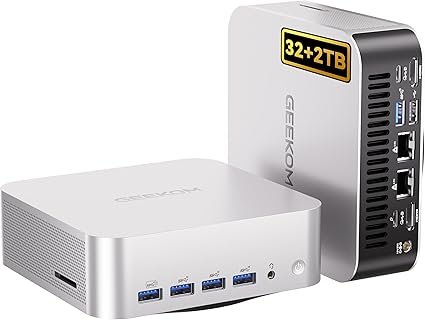
GEEKOM A9 Max — Ryzen AI 9 HX 370 · Upgradeable to 96 GB DDR5 · Dual 2.5G · 3-Year Warranty
The GEEKOM A9 Max ranks second with a critical differentiator that sets it apart from most machines in this category: user-upgradeable DDR5 SO-DIMM slots. Starting with 32 GB DDR5, it can be expanded up to 96 GB — a significant advantage for editors whose projects grow over time, or those who prefer buying less RAM now and upgrading later. The Ryzen AI 9 HX 370 (50 TOPS NPU, Radeon 890M with 16 CU) delivers solid 4K editing performance in DaVinci Resolve and Premiere Pro with GPU acceleration enabled, handling H.265, H.264 and ProRes proxy workflows smoothly.
Its connectivity is exceptional for a creative workstation: dual 2.5 GbE LAN enables fast footage ingestion from NAS-attached storage (common in small studio setups), Wi-Fi 7 covers wireless camera connectivity, and USB4 (40 Gbps) supports high-speed external SSDs for media management. Four 4K@60Hz displays are supported simultaneously via HDMI 2.1, DisplayPort and dual USB4 — enough for a dedicated color monitor, timeline display, client preview and reference feed. The 3-year warranty and GEEKOM’s established support reputation are meaningful advantages for professional users who cannot afford downtime.
| CPU | AMD Ryzen AI 9 HX 370 — 12C/24T — Zen 5 — up to 5.1 GHz |
|---|---|
| GPU (iGPU) | Radeon 890M — 16 CU — RDNA 3.5 |
| NPU | XDNA 2 — 50 TOPS |
| RAM | 32 GB DDR5-5600 — upgradeable to 96 GB — 2× SO-DIMM |
| Storage | 2 TB PCIe 4.0 NVMe — dual M.2 slots |
| Display | Quad 4K@60Hz — HDMI 2.1 + DP + USB4 × 2 |
| Networking | Wi-Fi 7 · Bluetooth 5.4 · Dual 2.5 GbE LAN |
| Warranty | 3-year warranty — standout for professional use |
Video editing performance ratings
✓ Pros
- Upgradeable DDR5 to 96 GB — grows with your editing demands
- 2 TB SSD + dual M.2 slots — generous storage for large media projects
- Dual 2.5G LAN — ideal for NAS-connected studio workflows
- Quad 4K output — full multi-monitor color grading setup
- 3-year warranty — best support coverage in this ranking
✕ Cons
- Radeon 890M (16 CU) significantly slower than EVO-X2’s 8060S (40 CU) in GPU render
- DDR5 bandwidth (~100 GB/s) lower than EVO-X2’s LPDDR5X (256 GB/s)
- 32 GB base config needs RAM upgrade for heavy 4K ProRes or 8K work
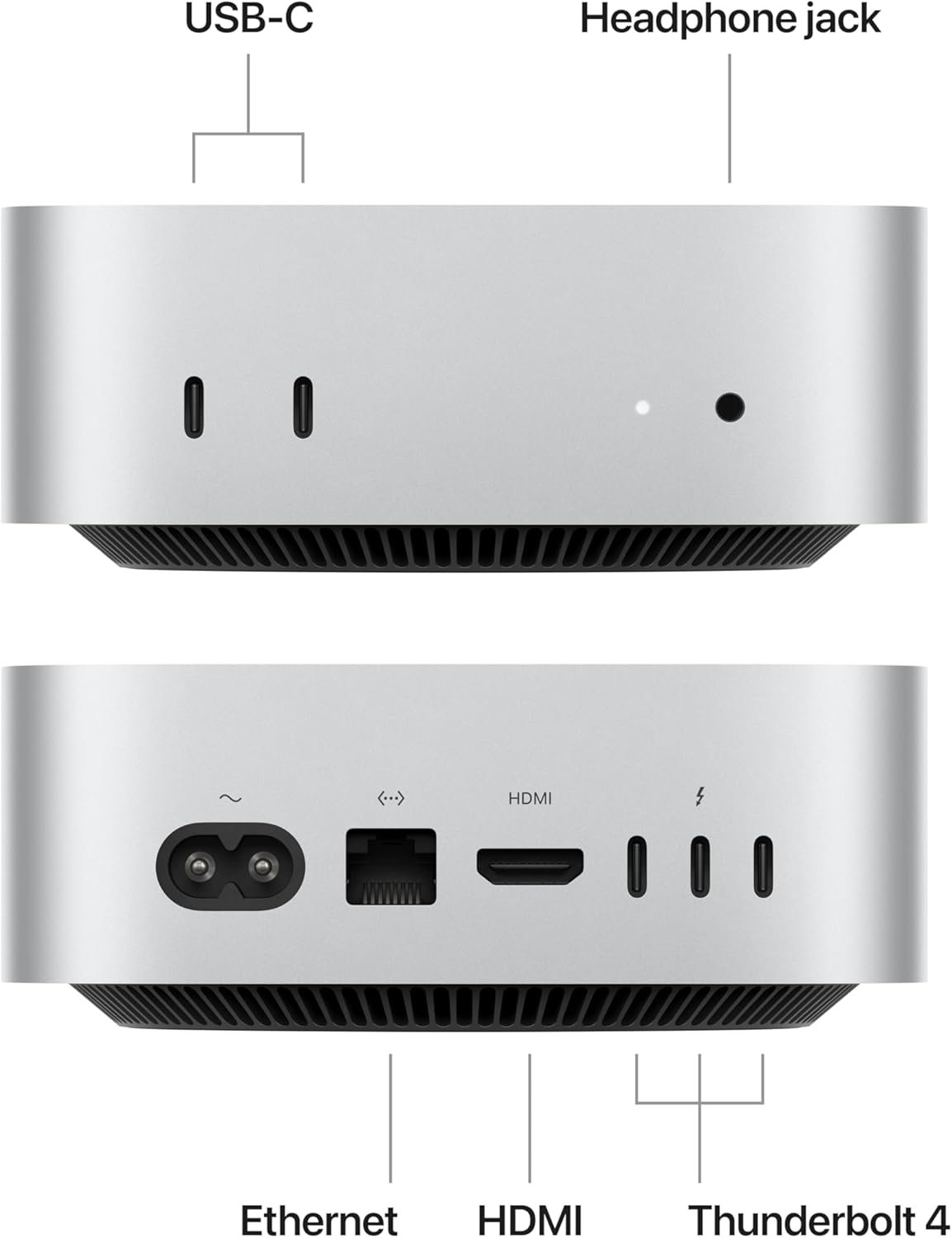
Apple Mac mini M4 — ProRes HW Encoder · Final Cut Pro · Exceptional Efficiency
The Mac mini M4 earns third place by dominating one specific scenario better than any other machine in this ranking: Final Cut Pro and ProRes video editing workflows on macOS. Apple’s M4 chip integrates a dedicated hardware ProRes encoder and decoder — a feature absent from every x86 machine here — that accelerates ProRes export and playback far beyond what software encoding on competing processors can match. A 10-minute 4K ProRes 422 HQ timeline exports faster on the Mac mini M4 than on any machine in this list when using Final Cut Pro.
The unified memory architecture (16 GB in the base config, shared between CPU and GPU with extremely high bandwidth) enables smooth 4K proxy-free playback in Final Cut Pro and DaVinci Resolve on macOS. The 38 TOPS Neural Engine accelerates AI noise reduction, background removal and smart color correction features in Apple’s software suite. Thunderbolt 4 ports connect professional docking stations, fast NAS arrays and reference monitors. The main constraints are the 16 GB ceiling on the base model (the 24 GB and 32 GB models cost significantly more), and the hard requirement for macOS — editors working in Windows-only pipelines, Premiere Pro with Windows plugins, or DaVinci Resolve with CUDA should consider the x86 options above.
| CPU | Apple M4 — 10-core (4 Performance + 6 Efficiency) — macOS only |
|---|---|
| GPU | 10-core Apple GPU — ProRes HW encoder/decoder |
| Neural Engine | 38 TOPS — AI video features in Final Cut Pro |
| RAM | 16 GB unified memory (base) — 24 / 32 GB available at higher cost |
| Storage | 512 GB SSD (base) — PCIe Gen 4 |
| Display | 3× displays via Thunderbolt 4 + HDMI 2.1 |
| Networking | Wi-Fi 6E · Bluetooth 5.3 · Gigabit Ethernet (base) |
| OS | macOS Sequoia — Final Cut Pro, DaVinci Resolve, Premiere Pro |
Video editing performance ratings
✓ Pros
- Dedicated hardware ProRes encoder/decoder — no x86 machine matches this
- Final Cut Pro 4K ProRes export fastest in its price range
- Exceptional power efficiency — silent under moderate editing loads
- 38 TOPS Neural Engine — AI features in Apple creative apps
- Thunderbolt 4 ×3 — professional docking and storage connectivity
✕ Cons
- macOS only — incompatible with Windows-exclusive workflows or plugins
- Base model limited to 16 GB unified memory — Heavy 4K/8K needs 24–32 GB upgrade
- No CUDA — DaVinci Resolve GPU acceleration slower than Radeon 8060S
- Base only Gigabit Ethernet — 2.5G requires separate adapter
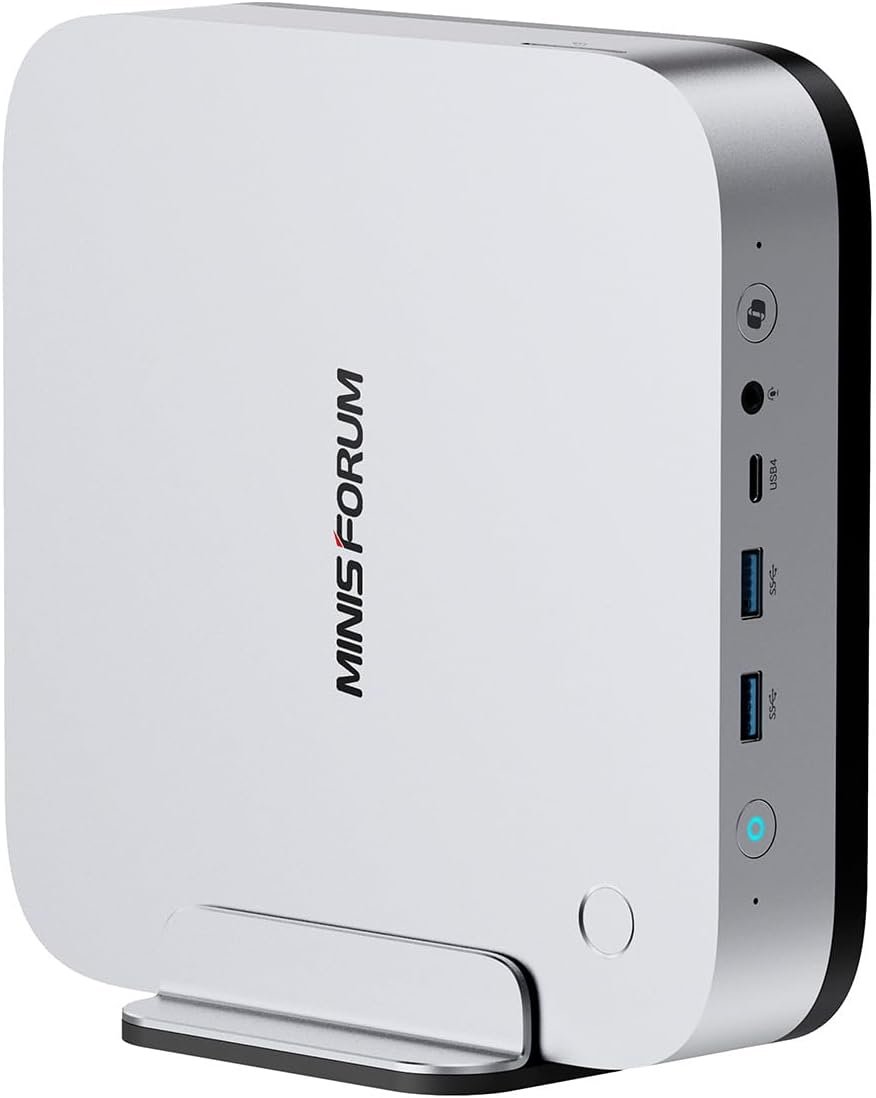
Minisforum AI X1 Pro-370 — Ryzen AI 9 HX 370 · 64 GB DDR5 Included · USB4 × 2
The Minisforum AI X1 Pro-370 stands out in this ranking for one compelling reason: it includes 64 GB of DDR5 RAM as standard, at a price point where most competitors ship 32 GB. For video editors who know they need 64 GB — for multi-stream 4K workflows, heavy effects stacks, or running editing software alongside multiple browser tabs and communication tools — this eliminates the additional cost and effort of a post-purchase RAM upgrade. The Ryzen AI 9 HX 370 (50 TOPS NPU, Radeon 890M) delivers the same editing performance level as the GEEKOM A9 Max in GPU-accelerated DaVinci Resolve tasks.
Connectivity is strong for a creative workstation: dual USB4 (40 Gbps) enables two high-speed external drives or a USB4 dock alongside a reference monitor, HDMI and DisplayPort cover a full multi-monitor editing setup, and Wi-Fi 7 handles wireless media transfers from cameras. The dual RJ45 ports (2.5 GbE × 2) allow simultaneously connecting to a camera network and a NAS — a practical feature for small production studios. The trade-off vs. the GEEKOM A9 Max above it: the Minisforum’s DDR5 is not upgradeable beyond its shipped configuration, and the warranty period is shorter.
| CPU | AMD Ryzen AI 9 HX 370 — 12C/24T — Zen 5 — up to 5.1 GHz |
|---|---|
| GPU (iGPU) | Radeon 890M — 16 CU — RDNA 3.5 |
| NPU | XDNA 2 — 50 TOPS |
| RAM | 64 GB DDR5 — included by default |
| Storage | 1 TB PCIe 4.0 NVMe |
| Display | HDMI + DP + 2× USB4 — up to 3× 4K@60Hz |
| Networking | Wi-Fi 7 · Bluetooth 5.4 · 2× 2.5 GbE LAN |
Video editing performance ratings
✓ Pros
- 64 GB DDR5 included — no post-purchase upgrade needed
- Dual USB4 40 Gbps — two high-speed external drives simultaneously
- Dual 2.5G LAN — camera network + NAS simultaneously
- Wi-Fi 7 — fast wireless camera ingest
- 50 TOPS NPU for AI-assisted editing (noise reduction, upscaling)
✕ Cons
- Radeon 890M (16 CU) slower than EVO-X2 in GPU rendering
- RAM configuration not user-upgradeable
- Only 1 TB SSD — may require external storage for large projects
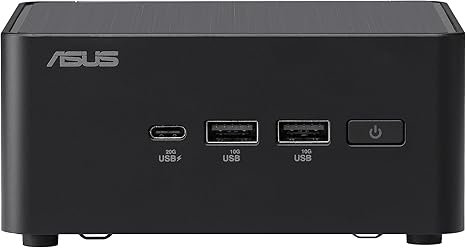
ASUS NUC 14 Pro — Core Ultra 7 155H · Intel Arc · Thunderbolt 4 · QuickSync HW Encoder
The ASUS NUC 14 Pro rounds out this ranking as the top choice for editors embedded in Intel-centric workflows. Its Core Ultra 7 155H (16 cores / 22 threads, up to 4.8 GHz) delivers excellent Premiere Pro performance, particularly for H.264 and H.265 encoding — Intel’s QuickSync hardware video engine accelerates these codecs faster than software encoding on any chip in this ranking. For editors who primarily export H.264 or H.265 deliverables (YouTube, social media, broadcast), QuickSync can cut export times significantly compared to software-only paths.
The dual Thunderbolt 4 ports (40 Gbps each) are a practical advantage for professional docking setups: a single Thunderbolt 4 cable connects a dock providing power delivery, multiple displays, and high-speed storage simultaneously. ASUS’s tool-less chassis access makes RAM and SSD upgrades straightforward — both SO-DIMM slots are accessible without specialized tools, and two M.2 slots support independent media and cache drives. Intel Arc graphics handles GPU-accelerated tasks in DaVinci Resolve with full AV1 hardware decoding support, which is increasingly relevant as camera manufacturers adopt AV1 workflows.
| CPU | Intel Core Ultra 7 155H — 16C/22T — up to 4.8 GHz |
|---|---|
| GPU (iGPU) | Intel Arc — AV1 HW decode · QuickSync H.264/H.265 encode |
| RAM | 32 GB DDR5 — 2× SO-DIMM user-upgradeable |
| Storage | 1 TB PCIe Gen 4 — dual M.2 (tool-less access) |
| Display | Thunderbolt 4 ×2 (DP Alt Mode) + HDMI 2.1 |
| Networking | Wi-Fi 6E · Bluetooth 5.3 · 2.5 GbE LAN |
| Special | Tool-less chassis — RAM + SSD accessible without tools |
Video editing performance ratings
✓ Pros
- Intel QuickSync — fastest H.264/H.265 hardware export in this ranking
- Dual Thunderbolt 4 — professional docking ecosystem compatibility
- Tool-less chassis — easiest RAM and SSD upgrades of any machine here
- AV1 hardware decoding for future-proof camera codec support
- Intel vPro option — enterprise management for fleet deployments
✕ Cons
- Intel Arc slower than Radeon 890M/8060S in DaVinci Resolve GPU render
- Wi-Fi 6E only (not Wi-Fi 7) — behind AMD competitors
- No OCuLink — limited eGPU upgrade path vs. some AMD machines
- Single 2.5G LAN (not dual) — one Ethernet port
Explore More Mini PC Rankings
Gaming, AI, office and budget — every use case covered with real benchmark data and honest reviews.