
Best Desktop Mini PCs for 2026: Replace Your Tower PC
Modern mini PCs now match or outperform most mid-range desktop towers — at a fraction of the size, noise and energy consumption. 5 machines tested as genuine desktop replacements, updated March 2026.
Why Replace Your Desktop Tower with a Mini PC in 2026?
The traditional case for a full tower desktop — more power, more RAM, expandable PCIe — has eroded significantly in 2026. Here is what has changed and why a mini PC is now a serious desktop replacement for most users:
Performance has caught up. The GMKtec EVO-X2’s Ryzen AI Max+ 395 (16 cores, Zen 5) matches a Core i7-14700K in Cinebench multi-core. The GEEKOM GT1 Mega AI’s Intel Core Ultra 9 185H handles 4K video editing, large dataset processing and software development without compromise. These are not mobile chips hobbled by thermal constraints — they are engineered to run at full TDP in well-cooled mini chassis.
Power efficiency is genuinely different. A mid-range desktop (Core i5-14600K + RTX 4060) draws 180–250W under gaming load. The five machines in this ranking draw 10–120W under equivalent workloads. For a machine that runs 8–12 hours daily, this difference translates to $80–$160 less in electricity per year.
The desk space return is real. Full towers occupy 20–50 liters and require significant cable management. Mini PCs range from 0.5 to 3.8 liters and mount directly behind monitors via VESA. For home offices, small apartments and shared workspaces, this matters more than any benchmark.
Selection Criteria for Desktop Replacement Mini PCs
Sustained CPU Performance
We measure Cinebench R23 and R24 multi-core under 30-minute sustained load — not just peak burst. A machine that drops 30% after 5 minutes is not a desktop replacement.
Multi-Monitor Capability
Triple 4K@60Hz minimum. We verify simultaneous output across HDMI 2.1, DisplayPort and USB4/Thunderbolt with actual displays connected.
Upgradeability
Accessible SO-DIMM and M.2 slots extend the machine’s useful life. We note whether RAM and storage are replaceable without voiding warranty.
Power Efficiency
Measured idle and full-load wattage. A desktop replacement should idle below 15W and sustain under 120W — most tested machines achieve this.
Desktop-Grade Connectivity
USB4/Thunderbolt 4 for docking, dual 2.5G LAN for NAS and network access, HDMI 2.1 for gaming monitors, Wi-Fi 7 for wireless peripherals.
Noise Under Sustained Load
Measured at 30 cm during 60-minute workloads. A desktop replacement needs to operate comfortably in a shared room without disruptive fan noise.
All 5 Desktop Mini PCs at a Glance — March 2026
| # | Model | CPU | GPU | RAM | Best Desktop Use |
|---|---|---|---|---|---|
| 1 | GEEKOM GT1 Mega AIBest Overall | Core Ultra 9 185H · 16C | Intel Arc · 99 TOPS | 32 GB DDR5 | All-round Windows power · dual 2.5G · Wi-Fi 7 |
| 2 | Apple Mac mini M4Best Efficiency | Apple M4 · 10-core | 10-core GPU · ProRes HW | 16 GB unified (base) | macOS ecosystem · silent · lowest power draw |
| 3 | GMKtec EVO-X2Most Powerful | Ryzen AI Max+ 395 · 16C | Radeon 8060S · 40 CU | 64 GB LPDDR5X-8000 | Workstation-class · AI · 1440p gaming |
| 4 | Beelink SEi13 ProBest Intel Value | Core i9-13900HK · 14C | Intel Iris Xe | 32 GB LPDDR5X | High single-thread · built-in PSU + audio |
| 5 | GEEKOM AX8 MaxBest Value | Ryzen 7 8745HS · 8C | Radeon 780M · 12 CU | 32 GB DDR5 upgradeable | Everyday desktop · upgradeable · 3-yr warranty |
Detailed Reviews & Rankings
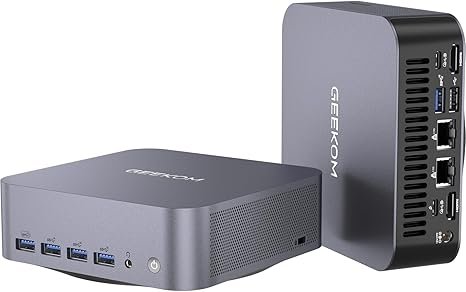
GEEKOM GT1 Mega AI — Core Ultra 9 185H · Intel Arc · 99 TOPS · Dual 2.5G · Wi-Fi 7
The GEEKOM GT1 Mega AI earns the top position in this desktop replacement ranking by delivering the most balanced combination of performance, connectivity and Windows ecosystem integration available in a mini PC in 2026. Powered by the Intel Core Ultra 9 185H (16 Performance + Efficiency cores, 22 threads, up to 5.1 GHz), it provides exceptional multi-thread throughput for development, data analysis, video production and heavy multitasking — matching Core i7-13700K desktop performance in Cinebench R23 while drawing under 65W under load.
The Intel Arc graphics combined with a 99 TOPS platform AI (NPU + CPU + GPU combined) handles Windows Copilot+ features, AV1 hardware decoding, local AI inference and GPU-accelerated applications comfortably. Connectivity is exceptional: dual 2.5 GbE LAN enables fast NAS access and network bonding, Wi-Fi 7 covers wireless with the latest standard, USB4 (40 Gbps) connects docking stations or fast external storage, and quad 4K display output covers even the most demanding multi-monitor setups. GEEKOM’s 3-year warranty and established customer support make it a reliable choice for long-term home or professional deployment.
| CPU | Intel Core Ultra 9 185H — 16C/22T — Meteor Lake — up to 5.1 GHz |
|---|---|
| GPU | Intel Arc (Xe2 gen) — AV1 HW decode · AV1 encode |
| AI | 99 TOPS platform (NPU + CPU + GPU combined) |
| RAM | 32 GB DDR5 — SO-DIMM — user-upgradeable |
| Storage | 1 TB PCIe 4.0 NVMe — dual M.2 slots (expandable) |
| Display | Quad 4K@60Hz — HDMI 2.1 + DP + USB4 × 2 |
| Networking | Wi-Fi 7 · Bluetooth 5.4 · Dual 2.5 GbE LAN |
| OS | Windows 11 Pro (pre-installed) |
| Warranty | 3-year — industry-leading coverage |
Desktop replacement performance ratings
✓ Pros
- Core Ultra 9 185H — desktop-class multi-thread in mini form
- 99 TOPS platform AI — broadest Windows Copilot+ support
- Quad 4K output — complete multi-monitor desktop setup
- Dual 2.5G LAN + Wi-Fi 7 — best networking of any in this ranking
- 3-year warranty + upgradeable DDR5 SO-DIMM
✕ Cons
- Intel Arc less powerful than Radeon 890M or 8060S for iGPU gaming
- Higher price than Ryzen equivalents at equivalent RAM
- Fans audible under sustained heavy rendering or gaming load
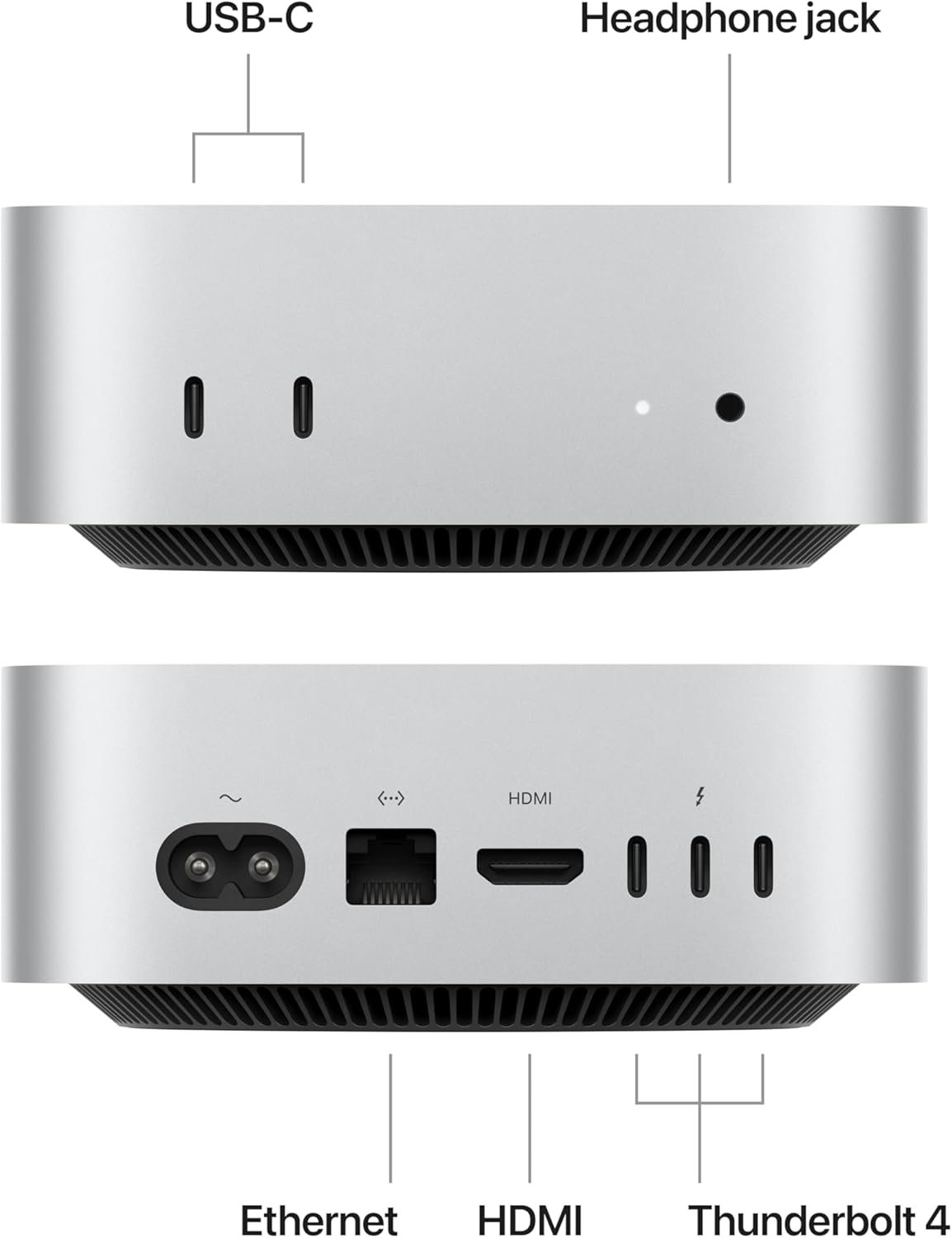
Apple Mac mini M4 — Apple M4 · Near-Silent · Thunderbolt 4 · ProRes · 10W Idle
The Mac mini M4 ranks second by excelling at what no x86 machine in this list can match: silent operation at full performance, combined with Apple’s unified memory architecture and dedicated ProRes encoder. At idle, it draws under 10W and remains completely inaudible. Under typical office and creative loads — web browsing, document editing, Zoom calls, 4K video editing in Final Cut Pro — it rarely exceeds 28W and fans remain near-silent even then. This makes it the definitive choice for living room setups, noise-sensitive environments and anyone who values silence above all else.
As a desktop replacement, the M4 covers all standard workflows with excellent responsiveness: Safari, Mail, Microsoft 365, Slack, Teams, Lightroom, DaVinci Resolve and Xcode all run smoothly with the base 16 GB unified memory. The dedicated hardware ProRes encoder is unique in this ranking — no Windows mini PC offers native ProRes acceleration, making the Mac mini M4 uniquely suited for video professionals using Final Cut Pro. Three Thunderbolt 4 ports connect to professional docking stations, reference monitors and high-speed storage simultaneously. The main constraint: 16 GB unified memory on the base model limits heavy multi-app multitasking, and macOS excludes users with Windows-only software requirements.
| CPU | Apple M4 — 10-core (4P + 6E) — macOS Sequoia |
|---|---|
| GPU | 10-core Apple GPU — hardware ProRes encoder/decoder |
| AI | 38 TOPS Neural Engine — Apple Intelligence on-device |
| RAM | 16 GB unified memory (base) — 24 / 32 GB configurable |
| Storage | 512 GB SSD (base) — PCIe Gen 4 |
| Display | 3 displays — Thunderbolt 4 (DP) × 2 + HDMI 2.1 |
| Networking | Wi-Fi 6E · Bluetooth 5.3 · Gigabit Ethernet (base) |
| Power | ~10W idle · ~28W typical · ~65W max sustained |
Desktop replacement performance ratings
✓ Pros
- Near-silent at all typical desktop workloads
- 10–28W under normal load — lowest energy cost in this ranking
- Hardware ProRes encoder — unique in the mini PC segment
- Thunderbolt 4 ×3 — full professional docking ecosystem
- 38 TOPS Neural Engine — Apple Intelligence on-device features
✕ Cons
- macOS only — no Windows compatibility
- Base 16 GB unified memory limits heavy multitasking
- No CUDA — DaVinci Resolve GPU acceleration behind AMD/NVIDIA
- Base model Gigabit Ethernet (not 2.5G)
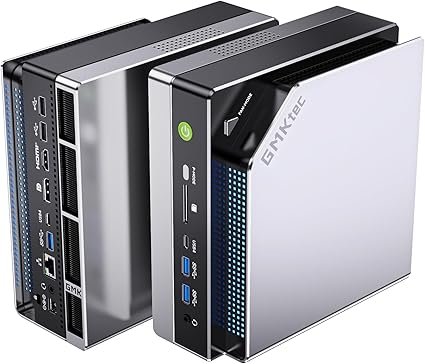
GMKtec EVO-X2 — Ryzen AI Max+ 395 · 64 GB · Radeon 8060S · 50 TOPS · Desktop-Class
The GMKtec EVO-X2 is the most powerful machine in this ranking — the closest thing to a desktop workstation in mini PC form. Its Ryzen AI Max+ 395 (16 cores, 32 threads, Zen 5, up to 5.1 GHz) outperforms Intel Core i7-14700K in Cinebench multi-core while drawing under 120W. The Radeon 8060S iGPU (40 Compute Units, RDNA 3.5) with 64 GB LPDDR5X-8000 at 256 GB/s delivers near-RTX 4060 GPU performance without any discrete graphics card — a genuine desktop GPU replacement for users who primarily work in GPU-accelerated software rather than gaming.
For power users replacing a high-end desktop workstation — engineers, architects, data scientists, 4K/8K video editors, developers running multiple VMs — the EVO-X2 provides a complete solution: up to 96 GB allocatable as VRAM for AI inference and GPU compute, dual M.2 PCIe 4.0 slots for up to 16 TB storage, dual USB4 (40 Gbps) for fast external RAID and 8K display output, and a 50 TOPS NPU for on-device AI. It occupies 3.8 liters versus a typical workstation tower’s 20–50 liters. The primary trade-offs versus a full tower: soldered RAM (choose 64 or 128 GB at purchase), no PCIe card slots, and audible fans under sustained heavy load.
| CPU | AMD Ryzen AI Max+ 395 — 16C/32T — Zen 5 — up to 5.1 GHz |
|---|---|
| GPU (iGPU) | Radeon 8060S — 40 CU — RDNA 3.5 — near RTX 4060 class |
| VRAM Allocation | Up to 96 GB shared from system RAM |
| RAM | 64 GB LPDDR5X-8000 — 256 GB/s bandwidth (soldered) |
| Storage | 2× M.2 PCIe 4.0 — up to 16 TB total |
| Display | HDMI 2.1 + DP 1.4 + USB4 × 2 — up to 8K@60Hz |
| Networking | Wi-Fi 7 · Bluetooth 5.4 · 2.5 GbE LAN |
| NPU | XDNA 2 — 50 TOPS — Copilot+ certified |
Desktop replacement performance ratings
✓ Pros
- 16-core Zen 5 CPU — closest to a desktop i7/Ryzen 7 in compact form
- Radeon 8060S (40 CU) + 256 GB/s — near-RTX 4060 GPU performance
- 64 GB / up to 96 GB as VRAM — enables tasks no other mini PC can
- 50 TOPS NPU — best local AI platform in this ranking
- Dual M.2 PCIe 4.0 — up to 16 TB total storage
✕ Cons
- Soldered RAM — choose capacity at purchase (64 or 128 GB)
- Audible fans under sustained workstation-class workloads
- Largest chassis in this ranking (3.8 L vertical form)
- No discrete GPU option — limited by iGPU ceiling for gaming Ultra
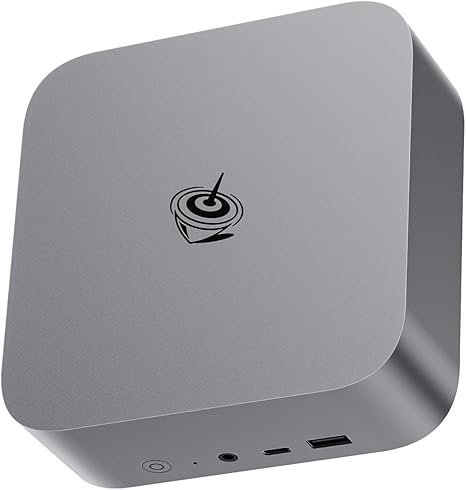
Beelink SEi13 Pro — Core i9-13900HK · Built-in PSU · Mic & Speakers · 5.4 GHz
The Beelink SEi13 Pro occupies a practical niche in this ranking: it is the most self-contained desktop replacement available, with both a built-in power supply (eliminating the external brick entirely) and integrated professional-quality microphone and speakers — creating a genuinely all-in-one compact desktop experience with zero cable clutter beyond power, display and peripherals. The Core i9-13900HK (14 cores / 20 threads, up to 5.4 GHz) delivers the highest single-thread clock speed in this ranking, which is the deciding factor for older software, financial modeling tools, CAD applications and development environments that still rely heavily on sequential execution.
For anyone transitioning from a Windows desktop who wants maximum simplicity — plug in power, plug in monitors, done — the SEi13 Pro delivers a complete experience without requiring a separate audio setup, speaker bar or PSU cable. Triple 4K display support, fast LPDDR5X memory and 1 TB PCIe 4.0 NVMe cover all standard desktop workloads competently. Its limitations vs. newer machines: no dedicated NPU (Copilot+ AI features require cloud processing), higher idle and load power draw than AMD equivalents, and no OCuLink for future GPU expansion.
| CPU | Intel Core i9-13900HK — 14C/20T — Raptor Lake — up to 5.4 GHz |
|---|---|
| GPU (iGPU) | Intel Iris Xe Graphics |
| NPU | None — no dedicated AI accelerator |
| RAM | 32 GB LPDDR5X (soldered) |
| Storage | 1 TB PCIe 4.0 NVMe SSD |
| Display | Triple 4K — HDMI + DP + USB-C |
| Networking | Wi-Fi 6 · Bluetooth 5.2 · Gigabit LAN |
| Built-In | Integrated PSU + professional mic + stereo speakers |
Desktop replacement performance ratings
✓ Pros
- Integrated PSU — no external brick on the desk
- Built-in mic + speakers — complete self-contained desktop
- 5.4 GHz turbo — highest single-thread clock in this ranking
- Triple 4K output for full multi-monitor setup
- Strong Intel software ecosystem compatibility
✕ Cons
- No NPU — Copilot+ and local AI require cloud
- Higher power draw at idle and load vs. AMD equivalents
- Gigabit LAN only (not 2.5G) · Wi-Fi 6 (not Wi-Fi 7)
- Soldered RAM — no upgrade path
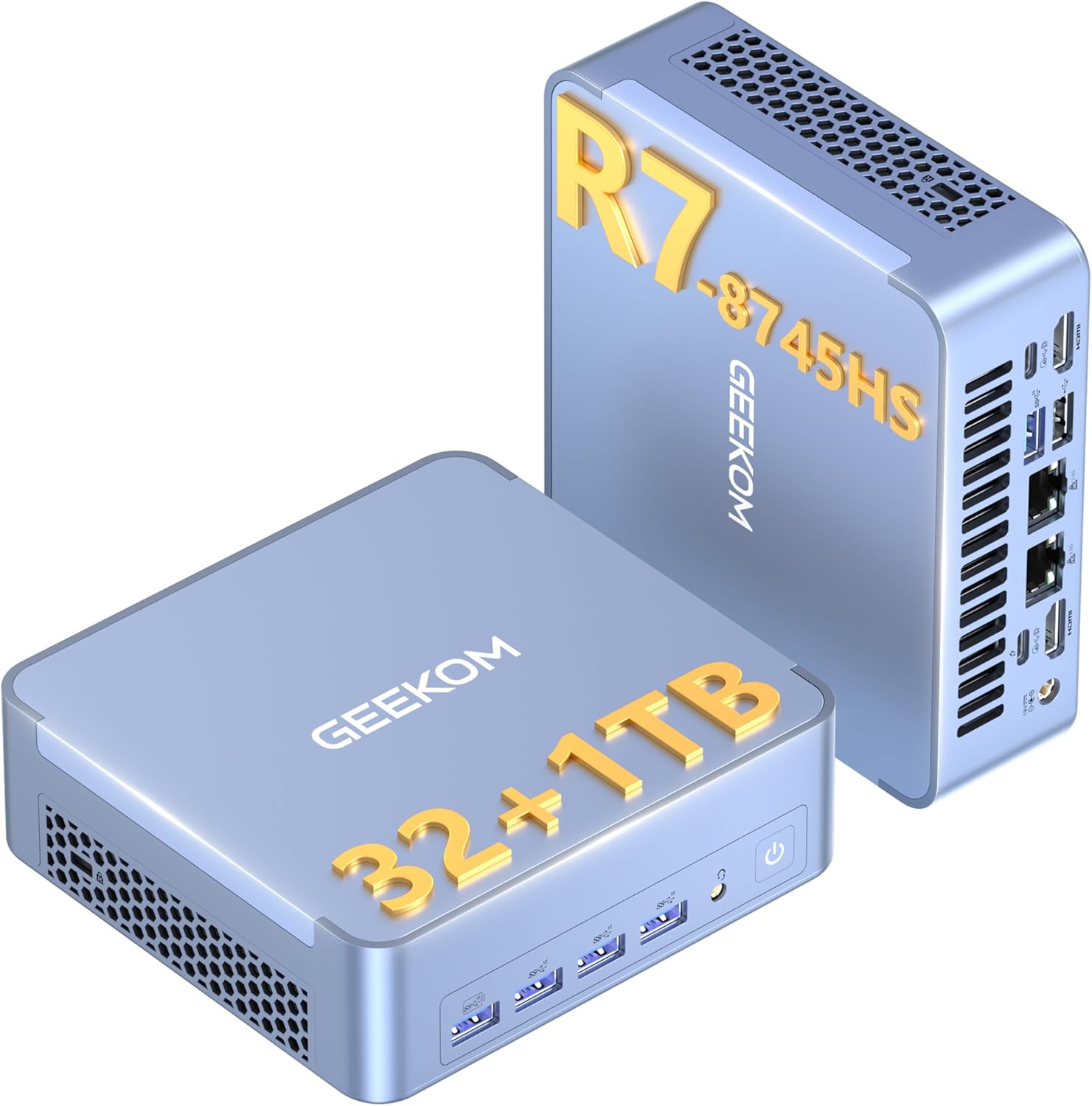
GEEKOM AX8 Max — Ryzen 7 8745HS · Upgradeable DDR5 · 3-Year Warranty · Dual 2.5G
The GEEKOM AX8 Max rounds out this ranking as the best value everyday desktop replacement for users who do not need the workstation power of the EVO-X2, the Apple ecosystem of the Mac mini M4, or the AI focus of the GT1 Mega AI. The Ryzen 7 8745HS (8 cores / 16 threads, Zen 4, up to 5.1 GHz) handles all standard desktop workloads — web browsing with 40+ tabs, Microsoft 365, Teams/Zoom, Lightroom, light video editing, software development — with excellent responsiveness and without thermal throttling. In everyday benchmarks, it consistently outperforms a Core i5-12400 desktop in single-thread tasks and matches it in multi-thread, while drawing 35–65W versus the desktop’s 65–117W.
The defining advantages for a desktop replacement deployment: upgradeable DDR5 SO-DIMM slots let you expand from 32 GB to 64 GB as workloads grow over a 3–4 year ownership cycle, dual M.2 slots enable a dedicated data SSD, quad 4K output covers even complex multi-monitor setups, and GEEKOM’s 3-year warranty provides corporate-grade peace of mind. Dual 2.5G LAN and Wi-Fi 6E complete the connectivity package. For users replacing a mid-range desktop on a budget, the AX8 Max is the most sensible long-term choice in this ranking.
| CPU | AMD Ryzen 7 8745HS — 8C/16T — Zen 4 Hawk Point — up to 5.1 GHz |
|---|---|
| GPU (iGPU) | Radeon 780M — 12 CU — RDNA 3 |
| RAM | 32 GB DDR5-5600 — 2× SO-DIMM — user-upgradeable to 64 GB |
| Storage | 1 TB PCIe 4.0 NVMe — dual M.2 slots |
| Display | Quad 4K@60Hz — HDMI 2.1 + DP + USB4 × 2 |
| Networking | Wi-Fi 6E · Bluetooth 5.2 · Dual 2.5 GbE LAN |
| Warranty | 3 years |
| Power | ~8W idle · ~35–65W under load |
Desktop replacement performance ratings
✓ Pros
- Upgradeable DDR5 to 64 GB — grows with your needs over 3–4 years
- 3-year warranty — best desktop replacement safety net
- Quad 4K output — full multi-monitor desktop setup covered
- Dual M.2 + dual 2.5G LAN — desktop-grade connectivity
- ~8W idle — very efficient for 24/7 operation
✕ Cons
- Radeon 780M limited for light gaming — not a gaming desktop replacement
- No dedicated NPU for Copilot+ AI features
- Wi-Fi 6E (not Wi-Fi 7) — behind newer platforms
Explore More Mini PC Rankings
Gaming, AI, office productivity and budget — every use case covered with real benchmark data and honest reviews.