
Mac mini M4 vs. The Best Windows Mini PCs: The Ultimate Power User Showdown (2025)
Is Apple’s highly-anticipated M4 chip enough to defeat the latest AMD and Intel Mini PCs? We dive deep into performance, features, and true value.
The Mac mini M4 squares off against a high-performance Windows Mini PC competitor.
Table of Contents
- The 2025 Mini PC Landscape: M4 vs. Ryzen 9/Core Ultra 9
- Direct Specification Comparison: M4 vs. Competitors
- Performance Benchmarks: CPU, GPU, and AI (NPU)
- Pricing and True Value: Why Windows Mini PCs Win on Cost
- Top High-End Mini PC Alternatives to the Mac mini M4
- Ecosystem and Upgradability: The Key Difference
- Final Verdict: Who Should Buy Which?
The 2025 Mini PC Landscape: M4 vs. Ryzen 9/Core Ultra 9
For years, the Mac mini has stood as the compact computing benchmark, particularly since the shift to Apple Silicon. The assumed Mac mini M4 (2025 release) with its powerful M4 chip promises a leap in efficiency, especially with the deep integration of Apple Intelligence (AI) features. However, the international market for high-performance Windows Mini PCs is more competitive than ever, offering staggering performance, flexibility, and value.
This comparison isn’t just about raw speed; it’s about ecosystem, upgradability, and price-per-performance in the $1,000 to $1,500 USD segment. We are pitting the Mac mini M4 against the best that manufacturers like Minisforum, Beelink, and GMKtec offer, specifically models featuring the AMD Ryzen 9 8945HS and the Intel Core Ultra 9 185H—the true flagship competitors of 2025.
Why the Mac mini M4 is a Major Player
The M4 chip’s unified memory architecture offers superior memory bandwidth compared to traditional Mini PCs, a crucial advantage for professional tasks like 4K video editing and large software development projects. The integration of its advanced Neural Engine for Apple Intelligence solidifies its position as an AI-ready desktop.
Direct Specification Comparison: M4 vs. Competitors
To ensure a fair comparison, we focus on models configured closely to the user-specified Mac mini M4: 16GB of RAM (or Unified Memory) and a 512GB SSD. Note that prices for Windows Mini PCs are estimated averages based on retail pricing in late 2025, and often include the RAM and SSD in the base price, unlike Apple’s build-to-order model.
| Feature | Apple Mac mini M4 (Hypothetical) | High-End Windows Mini PC (e.g., Minisforum/Beelink) |
|---|---|---|
| Processor | Apple M4 Chip (10-core CPU) | AMD Ryzen 9 8945HS (8-core/16-thread) or Intel Core Ultra 9 185H (16-core/22-thread) |
| Graphics (iGPU) | 10-core GPU | AMD Radeon 880M or Intel Arc Graphics |
| Memory | 16GB Unified Memory (Soldered) | 16GB/32GB DDR5 SO-DIMM (User Upgradable) |
| Storage | 512GB NVMe SSD (Soldered) | 512GB/1TB NVMe SSD (User Upgradable, often multiple slots) |
| AI Engine (NPU) | Dedicated Neural Engine (High TOPS) | AMD Ryzen AI or Intel AI Boost (High TOPS) |
| Starting Price (USD) | ~$1,299 (Configured) | ~$850 – $1,100 (Configured) |
The key hardware distinction lies in the memory. Apple’s Unified Memory offers superior latency and bandwidth but is soldered, meaning no upgrades are possible after purchase. Windows Mini PCs, by contrast, typically use upgradable SO-DIMM DDR5 RAM, providing much greater flexibility and potentially lower initial cost.
Upgrade Your Mini PC Performance Today!
Don’t settle for fixed memory. Explore our selection of high-speed DDR5 SO-DIMM modules that are compatible with the latest AMD and Intel Mini PCs.
Shop High-Performance DDR5 RAM on AmazonPerformance Benchmarks: CPU, GPU, and AI (NPU)
The M4 chip continues Apple’s trend of exceptional efficiency and single-core performance. In raw CPU tasks, the Mac mini M4 is expected to maintain a significant lead in single-threaded performance over its AMD and Intel rivals, often translating to a snappier feel in daily use.
1. CPU Performance: Single-Core vs. Multi-Core
For most users running common office suites, web browsing, and light photo editing, the M4 chip’s superior single-core speed (estimated to be 15-20% faster than the M3) will make macOS feel incredibly fluid. However, the high-core count of the Windows competitors, particularly the 16-core Core Ultra 9 185H, delivers a much stronger punch in sustained, multi-threaded workloads.
- Winner (Single-Core): Mac mini M4. Better latency and raw speed.
- Winner (Multi-Core): Windows Mini PCs (Core Ultra 9 / Ryzen 9). Superior core count for heavy rendering and compilation.
2. Graphics and Gaming (iGPU)
The 10-core GPU in the base Mac mini M4 provides solid graphical performance, especially when utilizing Metal 3. Yet, for pure gaming performance and wider compatibility, the AMD Radeon 880M (in the Ryzen 9) and the Intel Arc Graphics (in the Core Ultra 9) are often superior at the high-end Mini PC level.
The high-end Windows Mini PC segment also offers unique pathways, such as the ability to connect an external GPU (eGPU) via Thunderbolt or OCuLink, a crucial feature Apple’s integrated design often limits or cannot match in terms of standardized plug-and-play support. The GMKtec EVO-X2, for instance, offers features targeting 1440p gaming that the M4 can challenge but not definitively beat in raw FPS for triple-A titles.
Read More: Mini PC vs. PS5/Xbox Series X – Console Killer Benchmarks (2025)3. AI (NPU) Performance
AI processing is the new battlefield. Both platforms are investing heavily:
- Apple M4 (Neural Engine): Built explicitly for “Apple Intelligence,” its NPU is expected to excel at local-only tasks such as advanced photo processing, real-time voice transcription, and complex virtual assistant interactions integrated directly into macOS.
- AMD Ryzen AI / Intel AI Boost: These NPUs are designed to meet the Windows Copilot+ PC standard, delivering high Tera Operations Per Second (TOPS) (often 45 TOPS or higher in 2025 models) for enhanced Windows Studio Effects, Copilot integration, and performance boosts in Adobe and DaVinci Resolve AI features.
The choice here depends on your ecosystem loyalty. For users committed to the Apple software suite (Final Cut Pro, Logic Pro), the M4 is the better integrated AI solution. For professionals using industry-standard Windows tools, the Intel/AMD NPUs offer wider software compatibility outside the Apple walled garden.
Pricing and True Value: Why Windows Mini PCs Win on Cost
Price is where the Mini PC market consistently undercuts Apple. For the user-specified configuration (16GB RAM/512GB SSD), here is a typical cost breakdown:
- Mac mini M4 (10c/10c/16GB/512GB): Estimated $1,299 USD. This price is final; no user upgrades are possible.
- High-End Windows Mini PC (Ryzen 9 8945HS/16GB/512GB): Estimated $950 – $1,050 USD.
The cost difference averages $250 to $350 USD for comparable raw specifications. This saving allows the Windows Mini PC buyer to invest in other areas:
The Windows Mini PC Value Advantage
The money saved can be put towards a high-refresh-rate monitor, a larger capacity SSD upgrade (since Mini PCs usually have two M.2 slots), or doubling the memory to 32GB DDR5 RAM using the upgradable slots for the same total budget as the Mac mini M4.
Top High-End Mini PC Alternatives to the Mac mini M4
While the Mac mini M4 is a strong contender, the Windows market offers numerous high-performance alternatives, often featuring superior port selection and user-upgradable components. These models represent the cutting edge of compact x86 computing in 2025.
| Model Example | Key Feature | Processor | Approx. Price (USD) | Link |
|---|---|---|---|---|
| GMKtec EVO-X2 | Gaming Powerhouse (Strix Halo) | AMD Ryzen AI Max+ 395 (Strix Halo) | $1,499 | Check Price |
| Minisforum UM870 | AMD Multitasking Champion | AMD Ryzen 7 8700G or similar | $899 – $1,150 | Check Price |
| Beelink SEI 14 | Intel Core Ultra AI Focus | Intel Core Ultra 7 or 9 | $800 – $1,000 | Check Price |
| ASUS NUC 14 (Pro/Extreme) | Connectivity & Enterprise | Intel Core Ultra 7/9 | $950+ | Check Price |
Ecosystem and Upgradability: The Key Difference
1. Operating System (OS)
This is the most fundamental choice. macOS is known for its polished user experience, stability, and unparalleled optimization for professional media creation software (Final Cut Pro, Logic Pro). Windows 11 offers maximal hardware and software compatibility, particularly for gaming, engineering applications, and niche industry software.
2. Ports and Connectivity
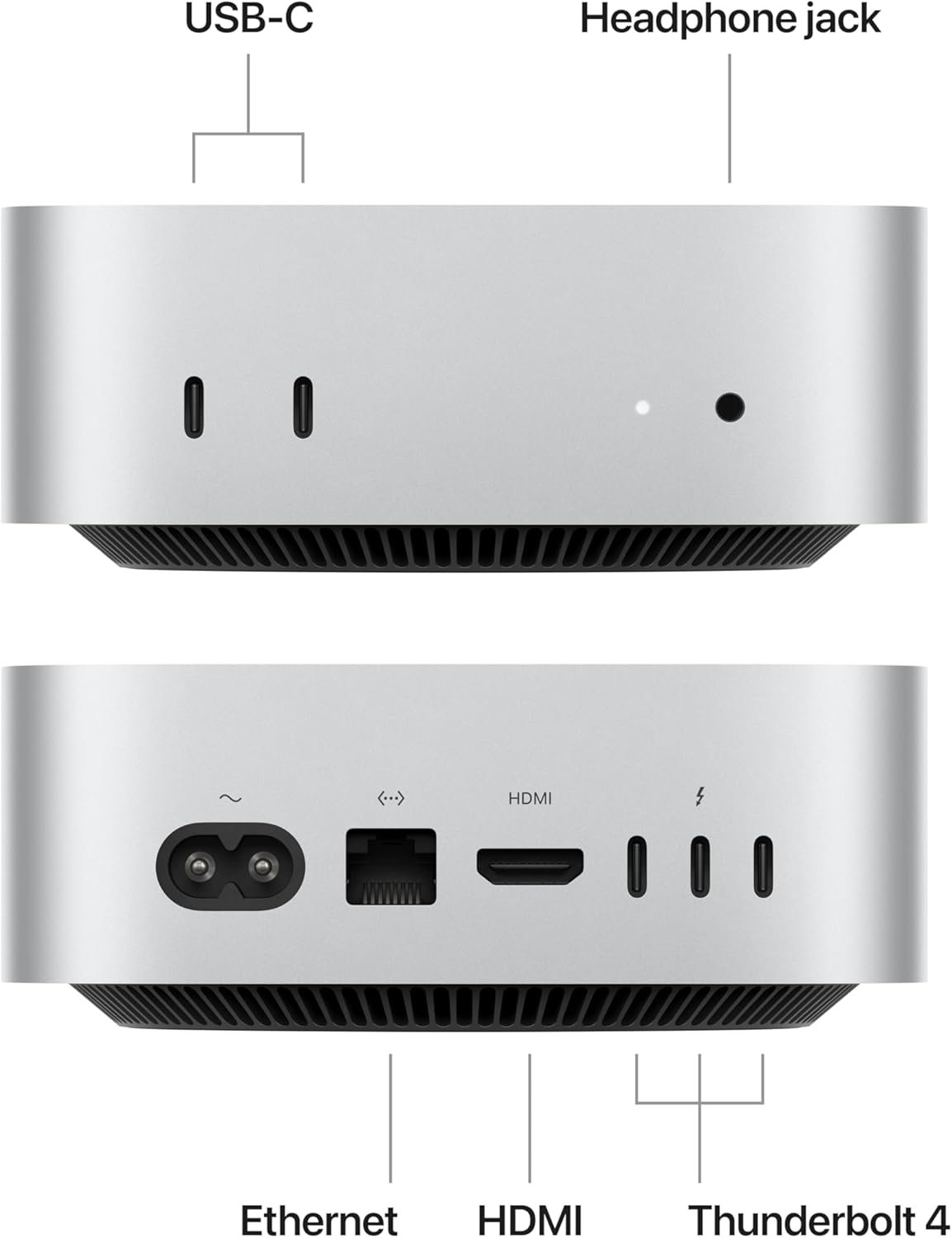
The Mac mini M4 typically offers a combination of Thunderbolt/USB4 ports (often two) and USB-A ports. Windows Mini PCs, especially high-end models, often provide a wider array of connectivity options:
- Multiple USB-A (3.2 Gen 2) ports.
- Dual 2.5 Gigabit Ethernet ports (essential for network professionals).
- Specific Mini PCs offer ports like OCuLink for proprietary, ultra-high-bandwidth eGPU connections, surpassing standard Thunderbolt 4.
3. Upgradability: The Decisive Factor
The Mac mini M4 is a beautiful, sealed unit built for efficiency, but its internal components are soldered (RAM and often the SSD). This means the configuration you buy is the one you keep. If you realize later you need 32GB of RAM or 2TB of storage, you must sell the entire unit and buy a new one.
High-end Windows Mini PCs almost universally allow user upgrades. You can:
- Upgrade or replace the RAM (SO-DIMM).
- Add a second M.2 NVMe SSD or a 2.5-inch SATA drive.
- Replace the Wi-Fi card.
This upgradability provides future-proofing and significantly extends the usable life of the hardware, making it a much better long-term investment for the enthusiast or budget-conscious user.
Final Verdict: Who Should Buy Which?
The “best” compact PC depends entirely on your needs. Both the Mac mini M4 and the high-end Windows Mini PCs offer immense power in a tiny footprint, but their philosophies are vastly different.
Choose the Mac mini M4 if:
- You are fully invested in the Apple ecosystem (iPhone, iPad, AirPods, etc.) and value seamless integration.
- Your primary work relies on optimized macOS applications (Final Cut Pro, Xcode, etc.).
- You prioritize maximum power efficiency and a beautiful, quiet design above all else.
- You are willing to pay a premium for a non-upgradable machine.
Choose a High-End Windows Mini PC (Ryzen 9/Core Ultra 9) if:
- You need the flexibility of a fully upgradable system (RAM, SSD).
- Gaming or using specialized engineering/Windows-only software is a requirement.
- You require extensive port selection (e.g., Dual 2.5G LAN or OCuLink/eGPU support).
- You prioritize price-per-performance and want the most powerful machine for under $1,100 USD.
For the ultimate flexibility and value in the international market, the best Windows Mini PCs from Minisforum, Beelink, and GMKtec remain the dominant choice for tech-savvy power users.