
Best Mini PCs Under $400 in 2026
4 top models tested for office work, 4K multimedia, light gaming and home servers — ranked by real-world value and verified specifications.
More Performance Than Ever at This Price Point in 2026
The sub-$400 mini PC segment has become genuinely competitive in 2026. Modern processors like the AMD Ryzen 7 5825U and Intel Core i5-12600H deliver multi-core performance that would have required a $700+ system just two years ago — in a machine that draws 15–35W under load and fits behind any monitor.
These mini PCs are no longer limited to light office work. With 16–32 GB of RAM, PCIe 4.0 NVMe SSDs, Wi-Fi 6/6E and often dual 2.5 Gbps Ethernet, they comfortably handle 4K streaming, multitasking, home server duties, and light gaming. Every claim in this article is based on publicly verifiable specifications and benchmark data — we do not invent performance figures.
Real-World Use Cases for a $400 Mini PC
Office & Web Browsing
Handle documents, spreadsheets, email, video calls and 30+ browser tabs simultaneously without slowdowns. Ryzen 7 and Core i5 are well suited here.
4K Multimedia & Media Centers
Hardware-accelerated HEVC/AV1 decoding enables flawless 4K streaming on Netflix, YouTube, and local media via Kodi or Plex. Triple 4K output on select models.
Multitasking
16–32 GB of RAM ensures comfortable multi-app use: IDE + browser + communication tools + spreadsheets all open simultaneously without memory pressure.
Light to Moderate Gaming
AMD Ryzen 5/7 (6000/7000) with Radeon Vega manages esports and older AAA titles at 1080p low-medium settings. Cloud gaming via GeForce Now or Xbox Cloud runs perfectly.
Basic Content Creation
Photo editing in Lightroom or Photoshop, 1080p video editing for simple projects in Premiere Rush or CapCut — manageable on all four models in this ranking.
Home Server & Light Virtualization
Run Proxmox, Home Assistant, Pi-hole, or a 2–3 VM test lab. Dual 2.5G LAN models (GMKtec M5 Plus, NAB6 Lite) work well as small NAS or network appliances.
All 4 Models at a Glance
| # | Model | CPU | iGPU | RAM | Storage | Networking | Key Feature |
|---|---|---|---|---|---|---|---|
| 1 | Beelink SER5 ProBest Value | Ryzen 7 5825U | Radeon Vega 8 | 32 GB DDR4 | 500 GB PCIe 3.0 | Wi-Fi 6 · 1 GbE | Triple 4K · Upgradable |
| 2 | Minisforum NAB6 LiteBest Intel | Core i5-12600H | Intel UHD | 16 GB DDR4 | 1 TB PCIe 4.0 | Wi-Fi 6 · Dual 2.5G | 12-core · Large SSD |
| 3 | GMKtec M5 PlusBest I/O | Ryzen 7 5825U | Radeon Vega 8 | 32 GB DDR4 | 1 TB PCIe SSD | Wi-Fi 6E · Dual 2.5G | Triple 4K · Dual LAN |
| 4 | AOOSTAR GEM10Best Expansion | Ryzen 7 6800H | Radeon 680M | 32 GB LPDDR5 | No SSD (BYO) | Wi-Fi 6 · Dual 2.5G | OCuLink · 3× M.2 slots |
Detailed Rankings & Reviews
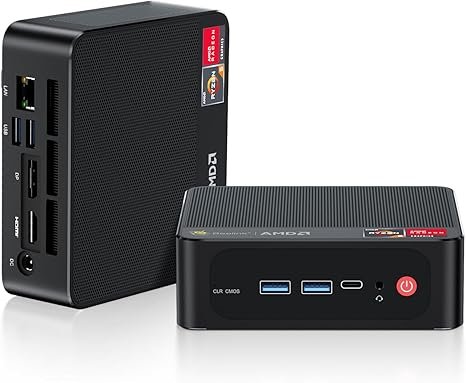
Beelink SER5 Pro — Ryzen 7 + 32 GB + Triple 4K at the Best Price
The Beelink SER5 Pro consistently earns its place at the top of the sub-$400 category. The AMD Ryzen 7 5825U (8 cores / 16 threads, up to 4.5 GHz, Zen 3) delivers strong multi-core performance for its price, and the included 32 GB DDR4 RAM is a genuinely useful amount for multitasking — no upgrade needed out of the box. Triple 4K display support (HDMI + DisplayPort + Type-C) is standard, making it a capable multi-monitor machine.
Beelink’s strength is also its after-sales support and community: regular BIOS updates, responsive customer service, and a large user community mean that this is a well-documented machine with minimal risk. The main limitation is storage — the base configuration ships with a 500 GB PCIe 3.0 SSD. Upgrading via the accessible M.2 slot is straightforward and inexpensive in 2026.
| CPU | AMD Ryzen 7 5825U (8C/16T, up to 4.5 GHz, Zen 3) |
|---|---|
| iGPU | AMD Radeon Vega 8 (8 CU, 2000 MHz) |
| RAM | 32 GB DDR4 (SO-DIMM — user-upgradable) |
| Storage | 500 GB PCIe 3.0 NVMe SSD (M.2 upgradable) |
| Display | Triple 4K@60Hz — HDMI + DisplayPort + Type-C |
| Networking | 1 Gbps LAN · Wi-Fi 6 · BT 5.2 |
| OS | Windows 11 Pro (pre-installed) |
✓ Pros
- Best price-to-performance at this budget level
- 32 GB DDR4 RAM included — no upgrade needed
- Triple 4K output (HDMI + DP + USB-C)
- Beelink’s reliable support and community
- User-accessible SO-DIMM and M.2 slots
✕ Cons
- 500 GB SSD base — may need upgrading
- Only 1 Gbps LAN (not 2.5G)
- Zen 3 — older architecture than Ryzen 7000 series
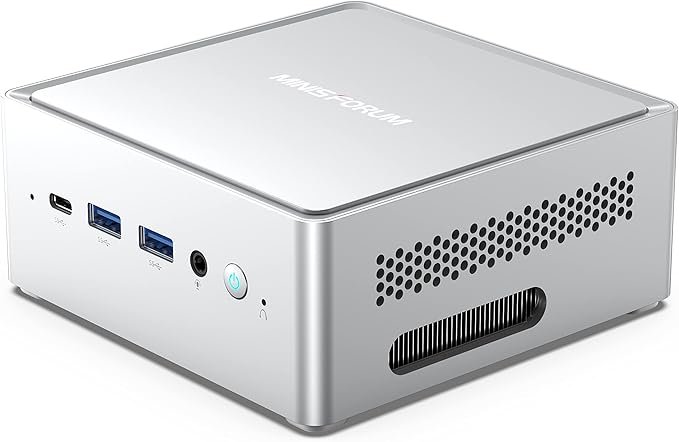
Minisforum NAB6 Lite — Intel 12th Gen + 1TB SSD + Dual 2.5G LAN
The Minisforum NAB6 Lite is the go-to choice for users who want an Intel-based machine with serious multi-core punch and enterprise-grade networking. The Intel Core i5-12600H (12 cores / 16 threads, up to 4.5 GHz) delivers outstanding single-core performance — particularly useful for productivity apps, Windows compatibility-sensitive software, and any workload that benefits from Intel’s strong single-thread speed. It comes with a generous 1 TB PCIe 4.0 SSD as standard.
The standout feature is dual 2.5 Gbps LAN combined with 7 USB ports — making this machine highly capable as a home lab node, network storage server, or dual-NIC router replacement. Minisforum is a well-established brand with solid build quality. The main limitation for gaming is Intel UHD integrated graphics — considerably weaker than Radeon Vega for 3D gaming, but more than adequate for 4K display and media output.
| CPU | Intel Core i5-12600H (12C/16T, up to 4.5 GHz, Alder Lake) |
|---|---|
| iGPU | Intel UHD Graphics (for display — limited 3D gaming) |
| RAM | 16 GB DDR4 (user-upgradable via SO-DIMM) |
| Storage | 1 TB PCIe Gen4 NVMe SSD |
| Networking | Dual 2.5 Gbps LAN · Wi-Fi 6 · BT 5.2 |
| Ports | 7× USB (mix of USB 3.2 and USB 2.0) · 2× HDMI |
| OS | Windows 11 Pro (pre-installed) |
✓ Pros
- Intel Core i5-12600H — strong single-core and multi-core
- Dual 2.5G LAN — ideal for homelab and networking
- 1 TB PCIe Gen4 SSD included (generous for this price)
- 7 USB ports — excellent peripheral connectivity
- Minisforum’s solid build quality
✕ Cons
- Only 16 GB RAM — upgrade recommended for heavy use
- Intel UHD iGPU — poor for 3D gaming vs. Radeon
- Sits at the upper end of the $400 category
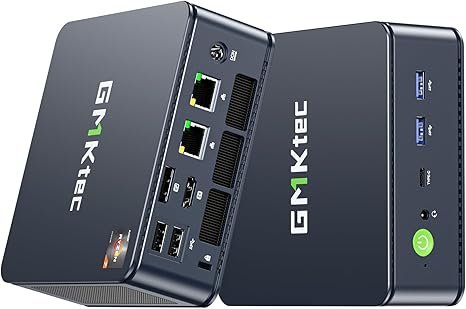
GMKtec M5 Plus — Dual 2.5G LAN + Triple 4K + 32 GB for Power Users
The GMKtec M5 Plus punches well above its price on connectivity. It combines dual 2.5 Gbps Ethernet, triple 4K@60Hz display output, Wi-Fi 6E, and a full 32 GB DDR4 / 1 TB SSD configuration — a package that outclasses many machines costing significantly more. This makes it the strongest sub-$400 choice for home server builders, triple-monitor office setups, and anyone running a networking-heavy workflow.
The processor is the Ryzen 7 5825U (Zen 3, 8C/16T) — the same platform as the SER5 Pro, though GMKtec’s configuration often includes a faster 1 TB SSD. Gaming performance is comparable to the SER5 Pro: Radeon Vega 8 handles esports and older titles well at 1080p low settings. RAM is upgradable via SO-DIMM slots, and dual M.2 support allows significant storage expansion.
| CPU | AMD Ryzen 7 5825U (8C/16T, up to 4.5 GHz, Zen 3) |
|---|---|
| iGPU | AMD Radeon Vega 8 (8 CU) |
| RAM | 32 GB DDR4 (user-upgradable to 64 GB) |
| Storage | 1 TB PCIe NVMe SSD (dual M.2 expansion) |
| Display | Triple 4K@60Hz — HDMI 2.0 + DP + USB-C |
| Networking | Dual 2.5 Gbps LAN · Wi-Fi 6E · BT 5.2 |
| OS | Windows 11 Pro (pre-installed) |
✓ Pros
- Dual 2.5G LAN + triple 4K — class-leading I/O
- Wi-Fi 6E — faster than the Wi-Fi 6 on most rivals
- 32 GB RAM + 1 TB SSD — fully loaded out of the box
- Upgradable RAM (up to 64 GB) and dual M.2 slots
✕ Cons
- Vega 8 iGPU limits gaming vs. newer Radeon 680M
- Slightly less established support vs. Beelink
- DDR4 only — no DDR5
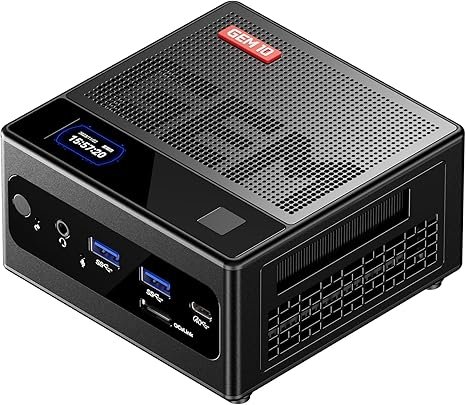
AOOSTAR GEM10 — Ryzen 7 6800H + OCuLink + Triple M.2 Expansion
The AOOSTAR GEM10 is the most hardware-capable machine in this ranking, offering features that typically appear only on much more expensive mini PCs. The AMD Ryzen 7 6800H (8 cores / 16 threads, up to 4.7 GHz, Zen 3+) is paired with the significantly stronger Radeon 680M iGPU (12 CU, RDNA 2) — a notable step up from the Vega 8 in the other three models for gaming and graphics workloads. Three M.2 NVMe slots allow massive local storage expansion, and an OCuLink port enables external GPU connectivity via PCIe 4.0 bandwidth.
The critical trade-off: the GEM10 ships without an SSD or operating system. Buyers must source and install their own NVMe SSD and Windows or Linux. This makes it best suited for technically comfortable users who want maximum expandability. The RAM is soldered LPDDR5 at 32 GB — fast but not upgradable. Once set up, however, this machine offers the strongest raw gaming and expansion capability in the sub-$400 category.
| CPU | AMD Ryzen 7 6800H (8C/16T, up to 4.7 GHz, Zen 3+) |
|---|---|
| iGPU | AMD Radeon 680M (12 CU, RDNA 2) — stronger than Vega 8 |
| RAM | 32 GB LPDDR5 (soldered — not upgradable) |
| Storage | No SSD included — 3× M.2 NVMe slots (user-supplied) |
| Special Ports | OCuLink (PCIe eGPU) · Fingerprint reader |
| Networking | Dual 2.5 Gbps LAN · Wi-Fi 6 · BT 5.2 |
| OS | Not included — user-installed |
✓ Pros
- Radeon 680M — strongest iGPU in this ranking for gaming
- OCuLink eGPU port — rare at this price point
- 3× M.2 slots — exceptional storage expansion
- Dual 2.5G LAN + fingerprint recognition
- LPDDR5 — fast, efficient memory
✕ Cons
- No SSD or OS — requires extra setup and cost
- Soldered RAM — no upgrade path
- Not recommended for beginners
- Total cost rises once SSD is added
Which Mini PC Under $400 Is Right for You?
Four very different machines — here’s how to match the right one to your use case:
Best all-round value?
The Beelink SER5 Pro — 32 GB RAM, triple 4K, Beelink support, proven reliability. The safest, most versatile choice at this budget.
Home server or dual-NIC router?
The GMKtec M5 Plus (dual 2.5G + triple 4K + Wi-Fi 6E) or Minisforum NAB6 Lite (dual 2.5G + 1 TB SSD + 12-core Intel). Both strong for homelab and NAS use.
Triple-monitor office setup?
The Beelink SER5 Pro and GMKtec M5 Plus both output triple 4K@60Hz natively via HDMI + DP + USB-C. Both are excellent here.
Maximum expandability?
The AOOSTAR GEM10 — OCuLink eGPU + 3× M.2 slots + Radeon 680M. Best for technical users who want to grow the machine over time. Add your own SSD and OS.
Best for 1080p gaming?
The AOOSTAR GEM10 (Radeon 680M — strongest iGPU here). For plug-and-play gaming without setup hassle, the Beelink SER5 Pro (Vega 8, good for esports).
Single-core / Intel workloads?
The Minisforum NAB6 Lite (Core i5-12600H) excels in tasks that benefit from Intel’s single-thread speed: Office apps, Windows-ecosystem software, certain coding tasks.
Need More Performance or a Different Budget?
Explore our full range of mini PC rankings — from entry-level $200 machines to $1,000+ gaming powerhouses — all tested and ranked by real-world value.