
KAMRUI H2 vs ACEMAGIC M5: Two Intel HX Mini PCs, Almost the Same Box. Which One to Buy?
The KAMRUI Hyper H2 and the ACEMAGIC M5 are the two best-known ways to get a 14th-gen Intel HX processor, the kind found in gaming laptops, into a 128 mm mini PC. Their spec sheets are so close that the choice comes down to three things: which processor and memory you get for the money, a few small differences in the box, and the price on the day you buy. Here is what the specifications and published tests say.
In short
Same size, same ports, same memory and storage layout, same Intel HX chips. Both are CPU-first machines for coding, virtual machines, heavy office work and three 4K screens, with weak integrated graphics and only Gigabit Ethernet. The KAMRUI H2 with the Core i7-14650HX ships with 32GB of RAM and a 1TB SSD, while ACEMAGIC’s i7 M5 on Amazon comes with 16GB. At a similar price, the 32GB H2 i7 is the better buy; take the M5 if it is clearly cheaper for the configuration you need, or if you want ACEMAGIC’s i9 or Wi-Fi 6E versions.
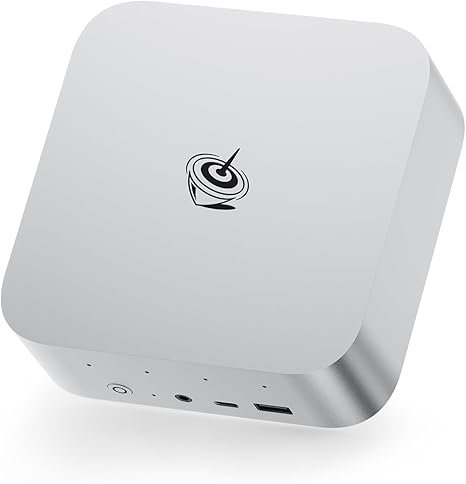
KAMRUI Hyper H2 (Core i7-14650HX, 32GB, 1TB): 16 cores, 24 threads and twice the memory of the i7 M5 sold on Amazon.
ACEMAGIC M5 (Core i5-14500HX): the same platform with 14 cores; also sold with the i7-14650HX and, on ACEMAGIC’s store, the i9-14900HX.
Two mini PCs with nearly identical spec sheets
Both measure about 128 × 128 × 41 mm, have the same port list (USB-C and two 10Gbps USB-A on the front, four USB-A, HDMI 2.0 and DisplayPort 1.4 on the back), two SO-DIMM slots, two M.2 slots and Gigabit Ethernet.
Put the two listings side by side and the differences are hard to find. The real choice is the configuration: KAMRUI sells the H2 with an i5-14450HX, an i5-14500HX or an i7-14650HX, and the i7 model on Amazon comes with 32GB of DDR4 and a 1TB SSD. ACEMAGIC sells the M5 with an i5-14500HX or an i7-14650HX on Amazon, plus 32GB i7 and i9-14900HX versions on its own store. WindowsForum noted listings of the H2 with other chips and conflicting memory claims, so read the processor name and “DDR4” on the listing before you buy.
| Spec | KAMRUI Hyper H2 | ACEMAGIC M5 |
|---|---|---|
| Processors sold | i5-14450HX (10 cores, 16 threads) · i5-14500HX (14 cores, 20 threads) · i7-14650HX (16 cores, 24 threads) | i5-14500HX · i7-14650HX · i9-14900HX (24 cores, ACEMAGIC store only) |
| i7 configuration on Amazon | i7-14650HX, 32GB DDR4, 1TB PCIe 4.0 SSD | i7-14650HX, 16GB DDR4, 1TB SSD (32GB on ACEMAGIC’s store) |
| Graphics | Intel UHD Graphics (16 EU) | Intel UHD Graphics (16 EU) |
| Memory | 2× SO-DIMM DDR4-3200, up to 64GB | 2× SO-DIMM DDR4-3200, up to 64GB; 16GB models may ship with one stick (check) |
| Storage | 2× M.2: PCIe 4.0 x4 NVMe + NVMe/SATA, up to 4TB | 2× M.2 2280: PCIe 4.0 x4 NVMe + PCIe 3.0 x4 NVMe/SATA, up to 4TB |
| Video outputs | HDMI 2.0 · DP 1.4 · USB-C (DP Alt Mode): three 4K60 screens | HDMI 2.0 · DP 1.4b · USB-C (DP Alt Mode): three 4K60 screens |
| USB | Front: USB-C 10Gbps (15W out), 2× USB-A 10Gbps · rear: 4× USB-A 5Gbps | Front: USB-C 10Gbps (15W out), 2× USB-A 10Gbps · rear: 4× USB-A 5Gbps |
| Network | Gigabit Ethernet · Wi-Fi 6 · Bluetooth 5.2 | Gigabit Ethernet · Wi-Fi 6 (Wi-Fi 6E on the 32GB i7 and i9) · Bluetooth 5.2 |
| Cooling | Dual fans, copper heat pipes | “Vapor chamber” design (ACEMAGIC) |
| Size · power | 128 × 128 × 41 mm · 120W adapter (19V, 6.32A) · VESA bracket | 128 × 128 × 41.4 mm · VESA bracket · Kensington slot |
| Software | Windows 11 Pro | Windows 11 Pro |
Sources: KAMRUI and ACEMAGIC Amazon listings; Armchair Arcade and MiniPC-Review (H2); Starry Hope and Retro Handhelds (M5). ACEMAGIC does not publish the M5’s adapter rating.
Processor: the i7-14650HX is the sweet spot
The i7-14650HX has 16 cores (8 performance, 8 efficient) and 24 threads. Notebookcheck’s laptop average is about 20,450 points in Cinebench R23 multi-core, roughly 6 times an Intel N150 and above a Ryzen 9 8945H.
| Processor | Cinebench R23 multi | Cinebench R23 single | Geekbench 6 multi |
|---|---|---|---|
| Core i7-14650HX, laptops (Notebookcheck average) | 20,454 (16,453–24,455) | 1,969 | 14,451 |
| Core i7-14650HX, KAMRUI H2 (MiniPC-Review) | 23,840 | 1,922 | 15,279 |
| Core i5-14500HX, KAMRUI H2 (MiniPC-Review) | 19,608 | 1,880 | 12,542 |
| Core i5-14450HX, KAMRUI H2 (MiniPC-Review · Armchair Arcade) | 16,382 | 1,801 | 11,849 · 10,324 |
| Ryzen 9 8945H, laptops (Notebookcheck average) | 17,604 | 1,813 | 12,650 |
MiniPC-Review does not describe its test setup, so treat its numbers as indicative. Notebookcheck’s i7-14650HX average comes from two laptops, which often run these chips at higher power than a mini PC.
The HX chips are built from desktop silicon and given a bigger power budget than the H and U chips in most mini PCs: Intel rates the i7-14650HX at 55W base power with turbo up to 157W in laptops. In these small boxes, MiniPC-Review saw short bursts of 85 to 95W and about 55W sustained on the H2. That is enough for compiling code, running Docker containers and virtual machines, batch photo exports and CPU video encoding much faster than any N150 or Ryzen U mini PC.
Within the family, the i7-14650HX is the version to aim for: it adds two performance cores and four threads over the i5-14500HX, about 20% more multi-core speed in MiniPC-Review’s figures. The i5-14450HX in the cheapest H2 drops to 10 cores. The i9-14900HX, sold only in the M5 on ACEMAGIC’s store, has 24 cores, but a 55W box cannot let it stretch much further than the i7. Retro Handhelds tested that i9 M5 and found it a small step ahead of an i9-13900HK in Geekbench 6.
Graphics: not gaming PCs, whatever the listing says
Both use the HX chips’ small Intel UHD graphics with 16 execution units. They drive three 4K screens and decode video, but they are far behind a Radeon 780M for games.
Some Amazon titles call these “mini gaming PCs”. Armchair Arcade, which tested the H2 with the i5-14450HX, calls that label misleading: it measured 4,008 points in Geekbench 6 OpenCL and 291 in 3DMark Steel Nomad Light, a test that did not even run properly, and placed Radeon 780M-class graphics at roughly 25,000 to 35,000 OpenCL points. Retro Handhelds reached the same conclusion on the M5: do not buy it to play games. Expect older esports titles, retro emulation and cloud gaming, not modern 3D games. Neither box has USB4 or OCuLink, so you cannot add an external graphics card later. If gaming matters, see our gaming mini PC guide.
Memory and storage: why 32GB matters on these boxes
Both take two DDR4 SO-DIMM sticks (up to 64GB) and two M.2 SSDs (up to 4TB). The 32GB H2 i7 uses two sticks, so it runs in dual channel from day one; check the stick count on any 16GB model.
Memory is the main practical difference between the two i7 models on Amazon. The H2 i7 comes with 32GB, which suits virtual machines, large datasets and many browser tabs alongside an IDE. The M5 i7 sold on Amazon has 16GB, and Starry Hope reports that the 16GB i5 M5 ships with a single stick (earlier listings described two 8GB modules). One stick leaves a slot free but runs the memory in single channel, which lowers bandwidth until you add a second module: open Task Manager › Performance › Memory and look for “Slots used: 2 of 2”. With DDR4 prices still high in 2026 (see our RAM crisis guide), buying the 32GB configuration up front is usually cheaper than upgrading later.
Storage is similar: the first M.2 slot is PCIe 4.0 x4 on both, and the second slot accepts NVMe or SATA drives (PCIe 3.0 x4 on the M5). MiniPC-Review measured about 4,850 MB/s read and 3,900 MB/s write on the H2’s bundled SSD, fast enough that storage never holds these machines back. There is no 2.5-inch drive bay on either. Our RAM and SSD upgrade tutorial walks through adding a stick or a second SSD.
Ports and network: identical, with one weak spot
Seven USB ports, HDMI 2.0, DisplayPort 1.4 and a USB-C port with video: enough for three 4K screens. The weak spot is networking: Gigabit Ethernet only, and modest Wi-Fi speeds in Armchair Arcade’s test.
The front USB-C port carries video (DisplayPort Alt Mode) and up to 15W for accessories, but it cannot power the PC, and Armchair Arcade notes it cannot power a monitor either. Both mini PCs use a barrel-plug adapter. On Wi-Fi 6, Armchair Arcade measured 285 Mbps down and 151 Mbps up on the H2, on a network where a wired desktop reached over 2,200 Mbps: use Ethernet for big downloads or a home server. For a NAS or Proxmox host with fast transfers, the lack of 2.5GbE is a real limit; a USB 2.5GbE adapter on a 10Gbps port is the cheap fix. Retro Handhelds also found the M5’s front USB-A ports tight.
Power, heat and noise
Expect about 11 to 14W at idle and 55W sustained under full load, with an audible fan when you push them. These are not silent PCs.
MiniPC-Review measured the H2 at 11 to 14W idle and 28 to 42W in office work and browsing. During a 15-minute Cinebench run, the processor peaked at 88 to 92°C before settling around 80°C, and the fan reached about 43 dB at 50 cm. Armchair Arcade found the H2 quiet at idle but “noticeably noisy” during long renders; Retro Handhelds said the same of the M5, whose fan kicks into high gear regularly under heavy load. In practice, both are quiet for email, documents and video calls, and loud during compiles and exports. If silence matters more than speed, a fanless mini PC is the better fit.
Which one should you buy?
Compare the exact configurations on the day: with an i7-14650HX, the H2’s 32GB/1TB package wins at a similar price. The M5 makes sense when it is cheaper for the same memory, or if you want the i9 or Wi-Fi 6E versions.
- Buy the KAMRUI H2 i7 (32GB/1TB) for coding, virtual machines, data work, Plex or Proxmox at home, and heavy multitasking on three screens. The 32GB in dual channel means nothing to upgrade.
- Buy the ACEMAGIC M5 if its price is clearly lower for the configuration you need (the i5-14500HX is enough for most office and student work), or if you want ACEMAGIC’s i9-14900HX or Wi-Fi 6E models from its store. Our ACEMAGIC M5 review covers it in detail.
- Buy neither if you want to game, need an NPU for Windows AI features, a silent desk, or 2.5GbE: see the alternatives below.
Both brands run frequent coupons on Amazon, and list prices on these models are often far above what people actually pay. Before you buy, check that a discount is real with our guide to spotting fake deals.
Alternatives
For gaming and an NPU, a Ryzen with Radeon 780M graphics such as the Beelink SER9 is the better all-rounder. For a cheaper office PC that can still play light games, the AMD ACEMAGIC K5 is enough.
| Model | CPU | Graphics | Memory | Storage | Network | Ports / displays | Price |
|---|---|---|---|---|---|---|---|
| KAMRUI Hyper H2 (i7-14650HX, 32GB, 1TB) | Core i7-14650HX · 16 cores / 24 threads | Intel UHD Graphics (16 EU) | 32GB DDR4-3200 · 2× SO-DIMM, up to 64GB | 1TB NVMe PCIe 4.0 + 2nd M.2 (NVMe/SATA), up to 4TB | Gigabit LAN · Wi-Fi 6 | HDMI 2.0 · DP 1.4 · USB-C 10Gbps (DP) · 6× USB-A | Check price |
| ACEMAGIC M5 | — | — | — | — | — | — | Check price |
| Beelink SER9 Pro (Ryzen 7 H 255) | Ryzen 7 H 255 · 8 cores / 16 threads | Radeon 780M | 32GB LPDDR5X-6400 (soldered) | 1TB NVMe + free M.2 slot | — | USB4 · HDMI · DP | Check price |
| ACEMAGIC K5 (Ryzen 5 PRO 7640HS) | Ryzen 5 PRO 7640HS · 6 cores / 12 threads | Radeon 760M (8 CU) | 16GB LPDDR5-5500 (soldered) | 512GB NVMe + free M.2 2280 slot (up to 8TB) | 2.5GbE · Wi-Fi 6 | HDMI 2.0 · DP 1.4 · USB-C 10Gbps (DP) · 6× USB-A | Check price |
Beelink SER9 (Ryzen 7 H 255)
An 8-core Ryzen with Radeon 780M graphics, 32GB of LPDDR5X and USB4: much stronger graphics than any HX mini PC, with less multi-core power.
Check current price on AmazonRead our Beelink SER9 Pro (Ryzen 7 H 255) review
- Radeon 780M (12 CU)
- USB4 for docks and fast storage
- 32GB included
- Memory soldered
- Fewer cores than the i7-14650HX

ACEMAGIC K5 (Ryzen 5 PRO 7640HS)
Six Zen 4 cores with Radeon 760M graphics, 2.5GbE and Wi-Fi 6 in a similar 128 mm box: less CPU power, better graphics and networking.
Check current price on AmazonRead our ACEMAGIC K5 (Ryzen 5 PRO 7640HS) review
- Radeon 760M plays at 1080p low
- 2.5GbE
- Lower price class
- 16GB soldered
- About 60% of the i7-14650HX's multi-core speed
More choices by budget: best mini PCs under $700, under $1,000, and today’s verified mini PC deals.
Complete your setup
Both drive three 4K screens over HDMI, DisplayPort and USB-C, and both have a VESA bracket: a 27-inch monitor with a USB hub and a receiver keyboard make a clean desk.
Our best monitor for a mini PC guide matches screens to these outputs, and the desk setup guide covers the rest.
Amazon Basics 27″ 120Hz: IPS screen with a four-port USB hub for a PC hidden behind it.
Logitech MK470: slim keyboard and mouse on one USB receiver, which also works in the BIOS.
Pros and cons
Both: strong multi-core performance, upgradable memory and storage, three 4K screens. Both: weak graphics, Gigabit Ethernet only, audible under load.
KAMRUI Hyper H2 (i7-14650HX, 32GB, 1TB)
- 16 cores / 24 threads
- 32GB dual-channel DDR4 and 1TB PCIe 4.0 SSD included
- Two SO-DIMM and two M.2 slots
- Three 4K60 outputs, Windows 11 Pro
- Intel UHD graphics, not for games
- Gigabit Ethernet, modest Wi-Fi throughput
- Loud during long renders
- Confusing range of listings and chips
ACEMAGIC M5
- i5, i7 and i9 versions
- Wi-Fi 6E on the 32GB i7 and i9
- Two SO-DIMM and two M.2 slots, Kensington slot
- Three 4K60 outputs, Windows 11 Pro
- 16GB on the i7 sold on Amazon; 16GB models may use a single stick
- Intel UHD graphics, not for games
- Gigabit Ethernet only
- Audible fan under heavy load; tight front USB ports
Verdict
These are two versions of the same idea. Pick on configuration and price: the 32GB KAMRUI H2 i7 is the better package today, and the ACEMAGIC M5 wins whenever it costs less for the same chip and memory.
Neither brand gives you a reason to pay much more for its logo: the boxes, ports and upgrade options match almost line for line, and published tests show the same strengths (many cores, fast storage) and the same weaknesses (graphics, Gigabit Ethernet, fan noise under load). Read the processor, the memory size and the number of sticks on the listing, compare both on the same day, and buy the cheaper one for the configuration you need.
FAQ
Is the KAMRUI H2 the same as the ACEMAGIC M5?
They are sold by different brands, but their published specifications are almost identical: a 128 mm square case about 41 mm tall, the same port layout, two DDR4 SO-DIMM slots, two M.2 slots, Gigabit Ethernet, Wi-Fi 6 and Intel 14th-gen HX processors. The differences are the configurations each brand sells, the cooling design and small details such as Wi-Fi 6E on some M5 models.
Which is faster, the KAMRUI H2 or the ACEMAGIC M5?
With the same processor, performance should be very close, since both run the HX chips at about 55W sustained. The difference comes from the configuration: an i7-14650HX is about 20% faster in multi-core work than an i5-14500HX, and a model with two memory sticks (dual channel) is faster than one with a single stick.
Can the KAMRUI H2 or ACEMAGIC M5 play games?
Only light ones. Both use Intel UHD graphics with 16 execution units, which handle video and three 4K desktops but are far behind AMD’s Radeon 780M in games. Expect older esports titles, retro emulation and cloud gaming. There is no USB4 or OCuLink port for an external graphics card.
Can you upgrade the RAM and SSD?
Yes. Both have two DDR4 SO-DIMM slots that accept up to 64GB, and two M.2 slots for up to 4TB of storage in total. The first M.2 slot is PCIe 4.0 x4; the second accepts NVMe or SATA drives.
Are the KAMRUI H2 and ACEMAGIC M5 loud?
They are quiet at idle and in office work, but audible under sustained load: MiniPC-Review measured about 43 dB at 50 cm on the H2 during a 15-minute Cinebench run, and Armchair Arcade and Retro Handhelds both describe the fans as noisy during long renders.
Related
- ACEMAGIC M5 review
- KAMRUI Pinova P2 review
- ACEMAGIC K5 review
- Best mini PC for coding
- Black Friday mini PC deals
Sources
- Armchair Arcade, KAMRUI Hyper H2 review (Mar 23, 2026, i5-14450HX): PCMark 10, Geekbench 6, 3DMark, Wi-Fi speed, ports, noise
- MiniPC-Review, KAMRUI Hyper H2 review (Oct 13, 2026): versions, Cinebench R23, Geekbench 6, power draw, temperatures, noise, SSD speed, adapter
- WindowsForum, KAMRUI Hyper H2: SKU confusion (Mar 2, 2026): processor and memory variations between listings, memory layout
- Starry Hope, ACEMAGIC M5 model page: configurations, memory, M.2 slots, ports, Wi-Fi 6E trims, size
- Retro Handhelds, ACEMAGIC M5 review (Mar 18, 2026, i9-14900HX): performance, graphics, noise, front ports
- Notebookcheck, Intel Core i7-14650HX specifications and benchmarks (cores, power, Cinebench averages)
- Notebookcheck, i7-14650HX vs Ryzen 9 8945H (Cinebench and Geekbench 6 averages)
- KAMRUI Hyper H2 (B0GGNRJQX3) and ACEMAGIC M5 Amazon listings; checked October 2026