
Beelink EX Mate Pro Review: The $199 Dock That Replaces 5 Desk Accessories
The Beelink EX Mate Pro combines a USB4 v2 hub, a 96W laptop charger, a 4-bay M.2 enclosure for up to 32TB, a Bluetooth speaker and a quad-microphone array in a 1-liter cube, all connected to your computer through one cable. Here is what it does well, where it falls short, and who should buy it.
$199 at Beelink’s store (list $239), checked Oct 7, 2026. Prices change often.
In short
The Beelink EX Mate Pro is the most feature-dense dock under $200 in 2026. It replaces a USB hub, a laptop charger, an external SSD enclosure, a speaker and a conference microphone with one 99 × 99 × 98.3 mm cube. Its main trade-off is speed: the four M.2 slots run at PCIe 4.0 x1, about 1.6 GB/s per drive, versus roughly 6 GB/s for the single PCIe x4 slot of the $399.99 Satechi Thunderbolt 5 CubeDock. Buy it for capacity and a one-cable desk; skip it if you need maximum SSD speed or an SD card reader.
Our rating
- Features9.5
- Value for money9.0
- Design & portability8.5
- Storage speed7.5
- Port selection7.5
What we like
- Four M.2 slots for up to 32TB of NVMe storage
- Built-in 140W power supply, 96W laptop charging, no brick
- Speaker and quad-mic array with a physical mute button
- 2.5GbE Ethernet and two USB4 v2 80 Gbps ports
- Half the price of the Satechi CubeDock, 3-year warranty
What we don’t
- PCIe 4.0 x1 slots: about 1.6 GB/s per drive
- No SD card reader, one HDMI, only two USB-A ports
- Speaker fine for calls, modest for music
- SSD installation uses small, fiddly screws
Key facts
- Price: $199 (list $239) at Beelink’s store, Oct 7, 2026
- Host connection: USB4 Version 2.0, 80 Gbps; compatible with USB4 40 Gbps and Thunderbolt 3/4/5
- Storage: 4× M.2 2230/2242/2280, PCIe 4.0 x1, up to 8TB each (32TB total)
- Claimed SSD speed: up to 1,655 MB/s read, 1,586 MB/s write (Beelink)
- Charging: 96W USB-PD to the host from an internal 140W supply
- Ports: 2× USB4 v2, 1× HDMI 2.0 (4K60), 1× 2.5GbE, 1× USB-A 3.0, 1× USB-A 2.0
- Audio: speaker, 4-mic array (5 m pickup, AI noise reduction), Bluetooth 6.0
- Size: 99 × 99 × 98.3 mm (about 1 liter); warranty 3 years
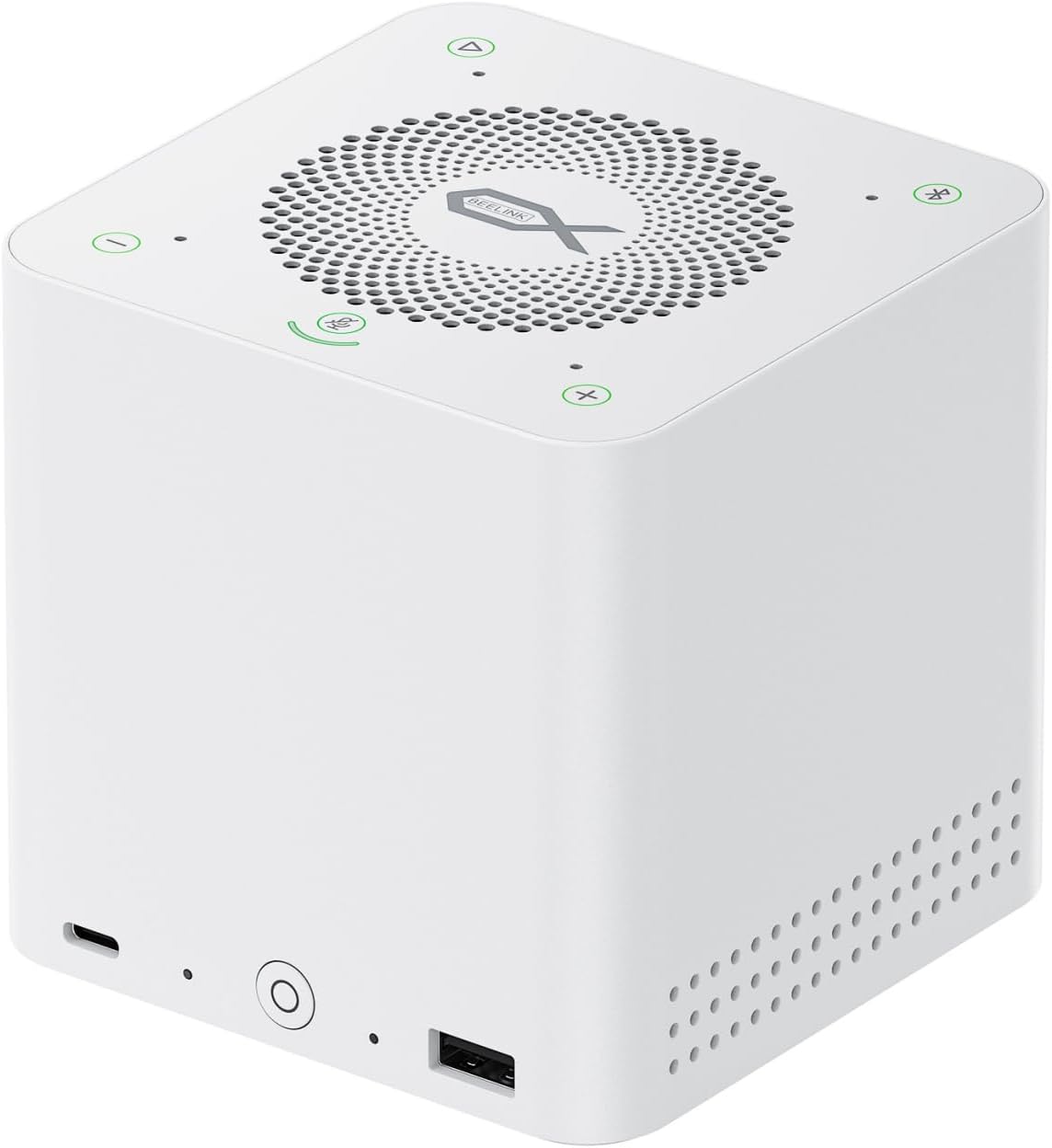
What is the Beelink EX Mate Pro?
The Beelink EX Mate Pro is an all-in-one USB4 v2 docking station that combines a hub, a 96W laptop charger, a 4-bay M.2 NVMe enclosure, a Bluetooth 6.0 speaker and a quad-microphone array in a single 99 × 99 × 98.3 mm chassis.
Most docks compete on port count. Beelink took a different route: it asked how many separate devices a typical desk needs, and how to merge them. The usual answer is five — a USB hub, a laptop charger, an external SSD enclosure, a speaker and a microphone. The EX Mate Pro replaces all five and connects to your laptop or mini PC through one USB4 v2 cable that also carries 96W of charging power.
The chassis is about the size of a Beelink mini PC: roughly 10 cm per side, white plastic, a power button on the front, a small fan and a speaker grille on top. The box includes a soft carrying pouch and braided cables (USB-C to USB-C 80 Gbps, HDMI and power), so taking it between home and office is realistic.
Who is it for?
Two groups get the most from it: laptop owners who want a single-cable desk setup with large extra storage, and mini PC owners who need more storage and a usable conference microphone without a stack of boxes. If you already own a Thunderbolt 5 dock with a PCIe x4 SSD slot and don’t need 32TB, the case is weaker. Pairing ideas: our BOSGAME M5 review covers a 128GB Strix Halo mini PC that works well with it.
The 5 accessories it replaces
The EX Mate Pro replaces a USB hub, a laptop charger, an external SSD enclosure, a Bluetooth speaker and a conference microphone. Each works on its own; the value comes from needing one power cable and one data cable for all five.
1. USB4 v2 hub
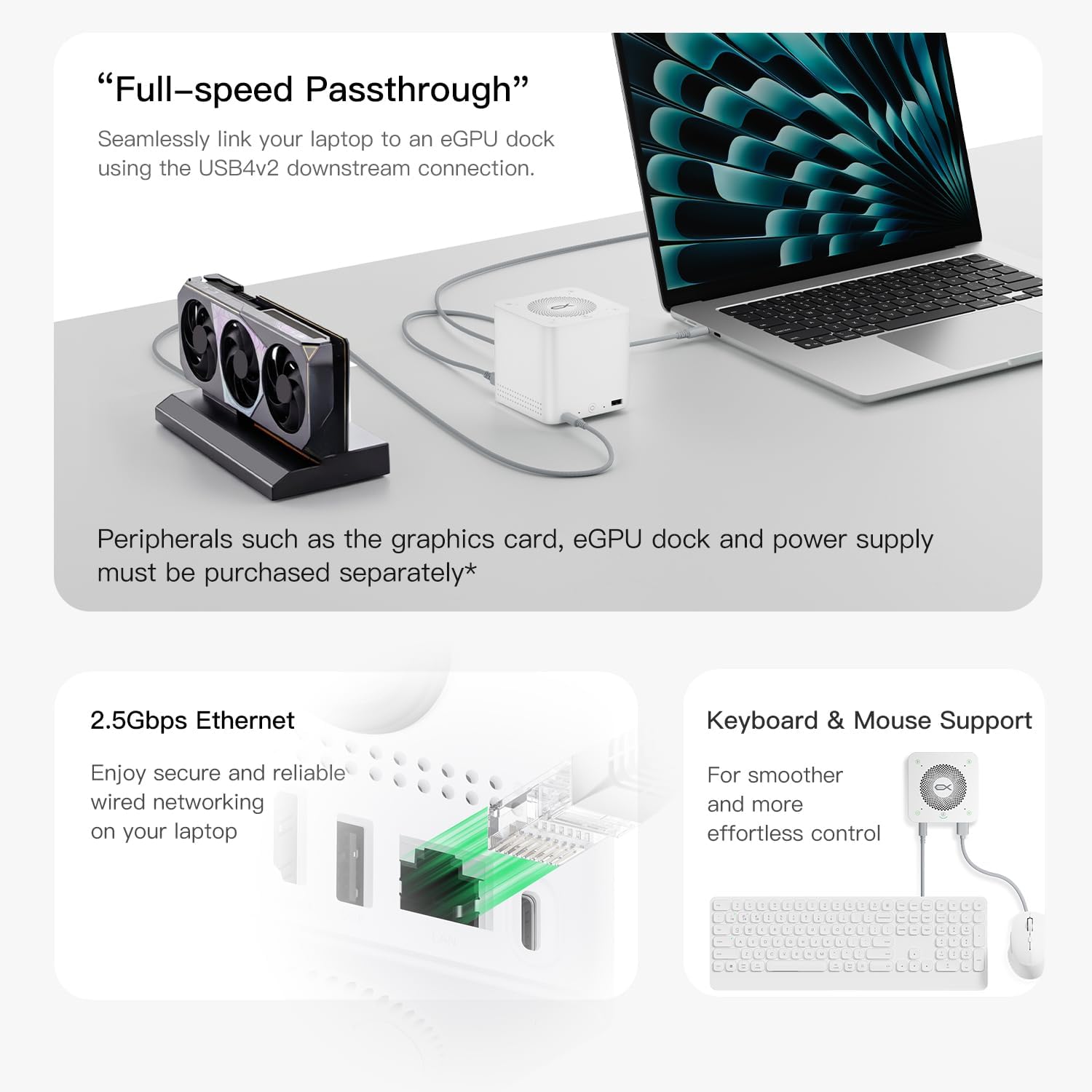
Two USB4 v2 ports run at up to 80 Gbps: one uplink to your computer and one downlink for a fast peripheral such as a portable SSD or an eGPU enclosure. Around them sit an HDMI 2.0 port (4K at 60 Hz), a 2.5GbE Ethernet port, one USB-A 3.0 port and one USB-A 2.0 port. HDMI plus the USB4 downlink allows two external displays, depending on the host. The 2.5GbE port is a real upgrade over the gigabit Ethernet found on most consumer docks if you use a NAS or move large files over the network.
2. 96W laptop charger
Most charging docks rely on an external brick. The EX Mate Pro has its 140W power supply inside the chassis, so one AC cable powers the dock and the dock sends up to 96W of USB Power Delivery to your laptop through the uplink. Beelink claims a full charge of a 70Wh MacBook Pro 14 in about 90 minutes. The USB4 downlink and the USB-A 3.0 port each supply 15W.
3. 4-bay M.2 NVMe enclosure (up to 32TB)
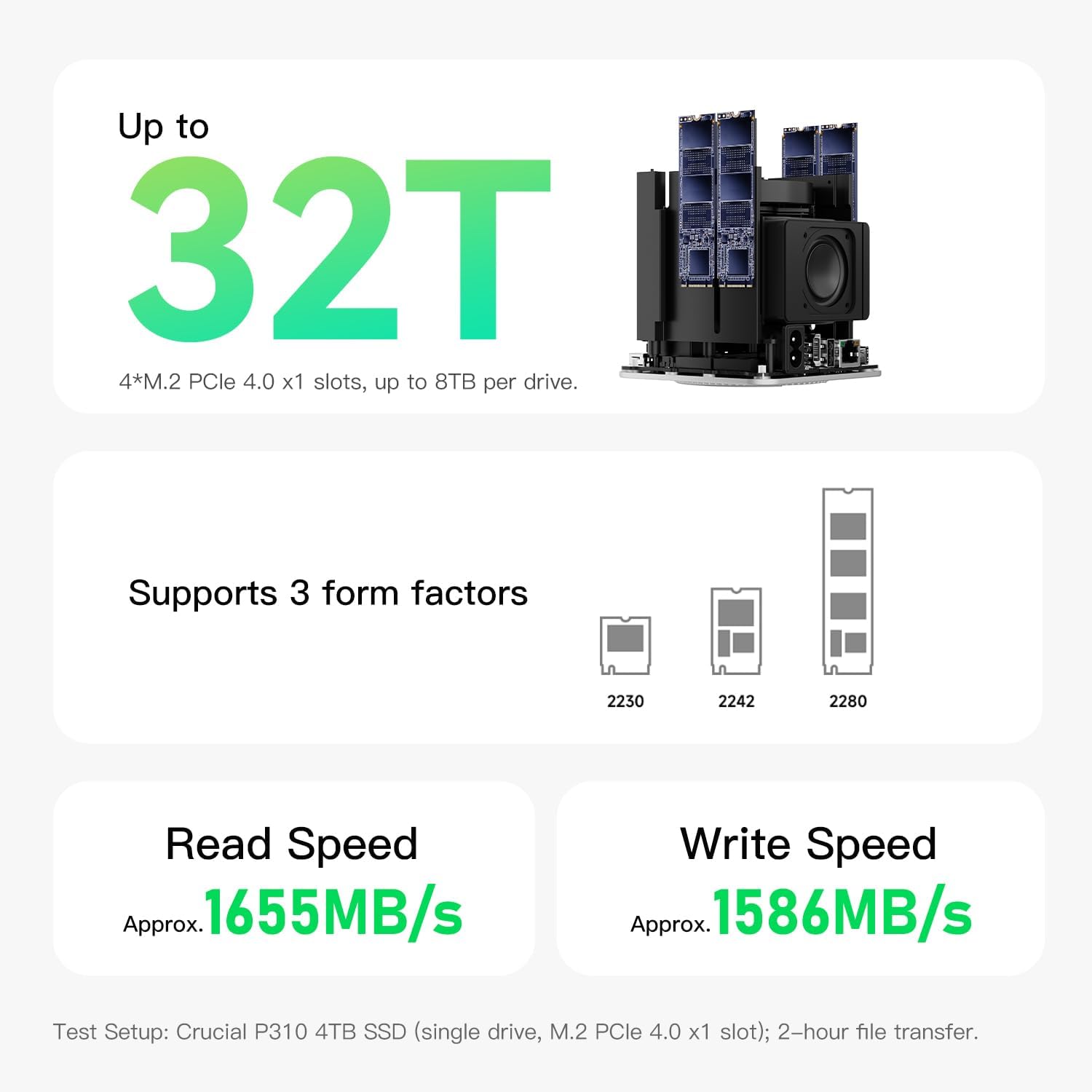
Four M.2 slots take 2230, 2242 and 2280 drives up to 8TB each, so a spare 2230 drive from a Steam Deck fits as well as a standard 2280 SSD. The slots are PCIe 4.0 x1 — the single most important detail before buying, covered in the storage section. Installing drives requires removing the bottom panel; Beelink includes the screws.
4. Bluetooth 6.0 speaker
The top panel has a small speaker and touch controls: volume, play/pause, microphone mute and a switch between PC mode and Bluetooth mode. In Bluetooth mode it works as a standalone speaker for a phone or tablet. Sound is clear for calls and podcasts and adequate for background music, but it does not replace a dedicated speaker.
5. Quad-microphone conference system
A four-microphone array with AI noise reduction picks up voices up to about 5 m away. A light shows when the microphones are live, and the physical mute button cuts them in one touch. With the speaker, this lets you take video calls without a headset — the use case Beelink designed the product around.
Beelink EX Mate Pro full specifications
| Type | USB4 v2 dock + 4-bay M.2 enclosure + speaker + conference mic |
|---|---|
| Dimensions | 99 × 99 × 98.3 mm (about 1 liter) |
| Uplink | 1× USB4 v2 Type-C, 80 Gbps, 96W PD out |
| Downlink | 1× USB4 v2 Type-C, 80 Gbps, 15W out |
| Video output | 1× HDMI 2.0 (4K@60Hz) + DisplayPort Alt Mode over USB4 |
| Networking | 2.5GbE RJ45 |
| USB-A | 1× USB-A 3.0 (15W) · 1× USB-A 2.0 (480 Mbps) |
| M.2 slots | 4× M.2 PCIe 4.0 x1 (2230/2242/2280), up to 8TB each |
| Max storage | 32TB |
| Claimed SSD speed | Up to 1,655 MB/s read · 1,586 MB/s write |
| Power supply | Internal 140W (no external brick) |
| Audio | Speaker + 4-mic array (5 m range, AI noise reduction) |
| Wireless | Bluetooth 6.0 (speaker mode) |
| Cooling | Active, small fan |
| In the box | Pouch · USB-C 80 Gbps cable · HDMI cable · power cable · M.2 screws |
| OS support | Windows · macOS · Linux |
| Warranty | 3 years |
How fast is the EX Mate Pro’s SSD storage?
Each M.2 slot is wired as PCIe 4.0 x1, so one drive reaches about 1.6 GB/s (Beelink claims 1,655 MB/s read, 1,586 MB/s write), versus 6 GB/s or more on a PCIe 4.0 x4 link. That is plenty for media libraries, game storage and backups, but not for heavy multi-stream video editing.
PCIe 4.0 x1 has a theoretical ceiling of about 2 GB/s, and real drives land around 1.6 GB/s after overhead. What that means in practice:
- 1.6 GB/s per drive is about 3× a SATA SSD (550 MB/s) and faster than any 10 Gbps USB enclosure (about 1 GB/s in practice); it is close to a 20 Gbps USB enclosure.
- Several drives at once do not add up to 4×. All four slots share the dock’s internal PCIe switch and the USB4 link to your computer, so total throughput is capped well below 6.4 GB/s, and lower still on a 40 Gbps USB4 host.
- 4K video editing: fine for single-stream compressed footage; borderline for multi-stream or RAW work.
- Media library, games, backups: more than enough, and 32TB of capacity is the headline feature.
Installation is not tool-free. The bottom panel is screwed on and reviewers describe the M.2 screws as small and fiddly, so plan a few minutes and good light. Drives then appear as normal local disks. For redundancy or a single large volume, use software RAID from the operating system: Storage Spaces on Windows, Disk Utility on macOS, or mdadm/ZFS on Linux. The dock has no hardware RAID controller of its own (our reading of Beelink’s materials; verify before relying on it).
SSD compatibility
Some owners report problems with certain SanDisk and WD drives (notably a SanDisk SSDH3N 1TB and several WD SN-series models). Check Beelink’s compatibility notes or community threads before buying drives. Mainstream drives from Samsung, Crucial, Kingston and Lexar are widely reported to work.
Beelink EX Mate Pro vs Satechi CubeDock vs ORICO
The Beelink EX Mate Pro wins on capacity, features and price; the Satechi Thunderbolt 5 CubeDock wins on single-drive speed and ports; the ORICO 4-bay enclosure is the cheapest way to add storage only.
| Spec | Beelink EX Mate Pro | Satechi CubeDock | ORICO IT48N-C |
|---|---|---|---|
| Price | $199 | $399.99 | ~$120–130 |
| Interface | USB4 v2, 80 Gbps | Thunderbolt 5 | USB4, 40 Gbps |
| M.2 slots | 4 | 1 | 4 |
| Slot link | PCIe 4.0 x1 | PCIe 4.0 x4 | PCIe 4.0 x1 |
| Max capacity | 32TB | 8TB | 32TB |
| Laptop charging | 96W (internal PSU) | 140W | None |
| Speaker + mics | Yes | No | No |
| Ethernet | 2.5GbE | 2.5GbE | None |
| SD reader | No | SD + microSD | No |
| Best for | Desk consolidation + capacity | Max SSD speed + ports | Storage only |
The Satechi CubeDock is faster per drive (about 6 GB/s on PCIe x4 versus 1.6 GB/s) and adds an SD card reader, but it costs twice as much and holds one SSD, capping storage at 8TB versus 32TB. The ORICO matches the Beelink’s capacity for less money, with no charging, audio or Ethernet. The EX Mate Pro is therefore the pick for consolidation and capacity; the Satechi is the pick for raw SSD speed.
Do you need a USB4 v2 computer?
No. Few laptops and mini PCs support 80 Gbps USB4 v2 yet; most run USB4 at 40 Gbps. The dock is backward-compatible and works fine at 40 Gbps. You lose some headroom when several drives are busy at once, but HDMI, 2.5GbE, USB-A and a single SSD never come close to saturating a 40 Gbps link.
One device, five functions, one cable
Beelink EX Mate Pro — USB4 v2 · 4× M.2 · 96W PD · speaker + mics
$199 at Beelink’s store on Oct 7, 2026 (list $239).
Verdict: should you buy the Beelink EX Mate Pro?
Buy the Beelink EX Mate Pro if you want one cable for charging, storage up to 32TB, networking and conference audio. Skip it if you need the fastest external SSD, an SD card reader, or already own a Thunderbolt dock that covers your needs.
Buy the Beelink EX Mate Pro ($199) if you…
- Want a single-cable desk: data, display, charging and audio over one cable
- Need lots of local storage: four M.2 slots, up to 32TB, expandable one drive at a time
- Take video calls daily and want a speaker and noise-cancelling mics without a headset
- Prefer an internal power supply with no brick on the floor
- Own a mini PC and want storage, 2.5GbE and a microphone in one box
Choose the Satechi Thunderbolt 5 CubeDock ($399.99) if you…
- Need maximum SSD speed: about 6 GB/s on PCIe x4 versus 1.6 GB/s
- Need an SD card reader for camera work
- Want more ports and a design that matches Apple hardware
Choose the ORICO IT48N-C (~$120) if you…
- Only need storage expansion, without charging, audio or Ethernet
- Have a budget under $150
Bottom line
The EX Mate Pro is neither the fastest dock nor the one with the most ports. It is the most complete dock at $199: hub, 96W charger, 32TB-capable NVMe enclosure, speaker and conference mic in one cube. If that matches how you work, nothing else at this price comes close. Looking for a machine to pair it with? See our best mini PCs for local AI in 2026, or our GMKtec EVO-X3 review for a Strix Halo mini PC with OCuLink.
Beelink EX Mate Pro FAQ
What is the Beelink EX Mate Pro?
The Beelink EX Mate Pro is an all-in-one USB4 v2 docking station that combines five functions in a 99 × 99 × 98.3 mm chassis: a hub with two 80 Gbps USB4 v2 ports, a 96W laptop charger powered by an internal 140W supply, a 4-bay M.2 NVMe enclosure for up to 32TB, a Bluetooth 6.0 speaker, and a quad-microphone array with AI noise reduction.
How much does the Beelink EX Mate Pro cost?
As of October 7, 2026, the Beelink EX Mate Pro sells for $199 on Beelink’s official store, down from a $239 list price. The Satechi Thunderbolt 5 CubeDock costs $399.99, and a 4-bay M.2 enclosure without charging or audio typically costs $100 to $130.
How many M.2 SSDs can the Beelink EX Mate Pro hold?
The Beelink EX Mate Pro holds four M.2 NVMe SSDs in 2230, 2242 or 2280 sizes. Each slot supports up to 8TB, for 32TB in total. The slots run at PCIe 4.0 x1, and Beelink claims up to 1,655 MB/s read and 1,586 MB/s write.
Does the Beelink EX Mate Pro charge a laptop?
Yes. The Beelink EX Mate Pro delivers up to 96W of USB Power Delivery through its USB4 v2 uplink, powered by a built-in 140W supply, so no external brick is needed. Beelink claims a full charge of a 70Wh MacBook Pro 14 in about 90 minutes.
Does the Beelink EX Mate Pro work with mini PCs and Macs?
Yes. It works with any computer that has a USB4 or Thunderbolt 3, 4 or 5 port, including Windows mini PCs, Mac mini and MacBook, under Windows, macOS and Linux. Hosts limited to 40 Gbps USB4 work but do not reach the dock’s full 80 Gbps.
Is the Beelink EX Mate Pro fast enough for video editing?
For single-stream editing of compressed 4K footage, yes: each PCIe 4.0 x1 slot reaches about 1.6 GB/s. For multi-stream 4K, 8K or RAW workflows, a single-drive PCIe x4 enclosure such as the Satechi CubeDock (around 6 GB/s) is the better choice.
What are the Beelink EX Mate Pro’s main weaknesses?
The main weaknesses are PCIe 4.0 x1 M.2 slots that cap each SSD at about 1.6 GB/s, limited ports (no SD card reader, one HDMI, two USB-A), a speaker that is fine for calls but modest for music, and fiddly screws when installing SSDs.
Beelink EX Mate Pro vs Satechi CubeDock: which is better?
The Beelink EX Mate Pro ($199) is better for storage capacity and desk consolidation: four M.2 slots, 96W charging, speaker and microphones. The Satechi Thunderbolt 5 CubeDock ($399.99) is better for raw SSD speed and ports: one PCIe x4 slot at about 6 GB/s, 140W charging and an SD card reader.
How we reviewed the Beelink EX Mate Pro
This review combines Beelink’s official specifications with the hands-on results published by independent outlets listed below, cross-checked against each other. Where a figure comes from Beelink, we say so. Our score weighs features, value, design, storage speed and ports against the other USB4 storage docks we track. Read our full review methodology.
Sources
- Beelink, EX Mate Pro official product page and Amazon listing (specifications, pricing checked Oct 7, 2026)
- TechRadar, review by Mark Pickavance (April 2026)
- NAS Compares (May 2026)
- Notebookcheck (April 2026)
- CNX Software (April 2026)
- Minimachines (April 2026)
- Smartzone, Androidphoria (May 2026)
- Cowcotland (July 2026)
- Root-Nation (August 2026), including SSD compatibility notes
- AllThingsGeek (2026)