
ACEMAGIC K1 Review: Ryzen 4300U Triple 4K Mini PC for $310 — Worth It?
A full-powered 28W Ryzen 4300U, triple 4K displays, 16GB DDR4 and 512GB SSD for $310. ACEMAGIC positions the K1 as a genuine step up from N150/N97 budget mini PCs — and the specs back that up. Here’s our honest verdict.
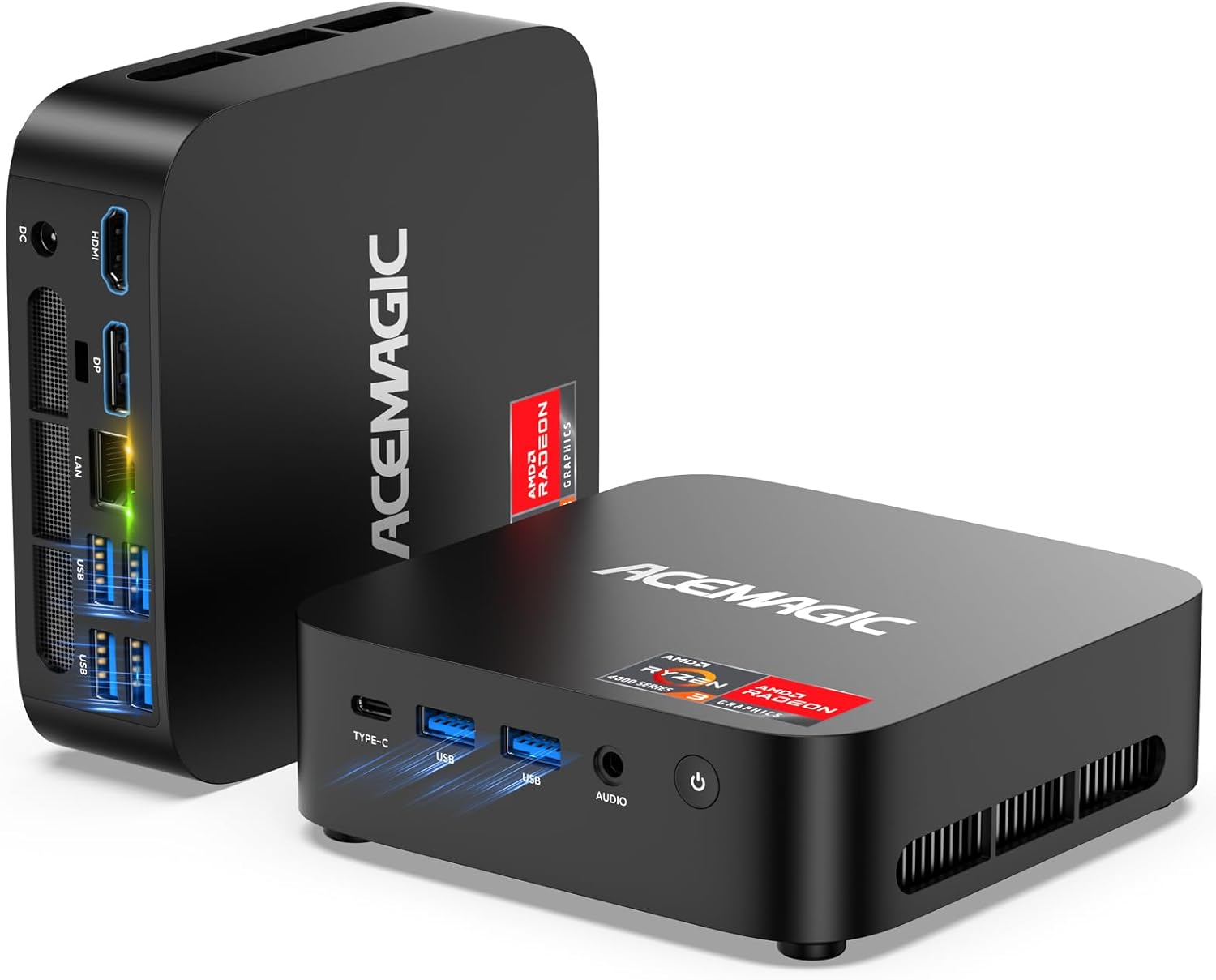
The ACEMAGIC K1 is one of the best-value Ryzen 4300U mini PCs available at $310. Its 28W full-TDP chip outperforms N150/N97 chips in CPU-intensive tasks, triple 4K output covers most home office scenarios, and Windows 11 Pro is included. The Ryzen 4300U is a 2020 Zen 2 chip — not the newest architecture — but at this price, the performance-per-dollar ratio is genuinely strong. Amazon customer reviews are overwhelmingly positive. Recommended for home office users, multi-monitor productivity setups, and light developers who want real CPU power without spending $700+.
The Ryzen 4300U — What “28W Full TDP” Actually Means
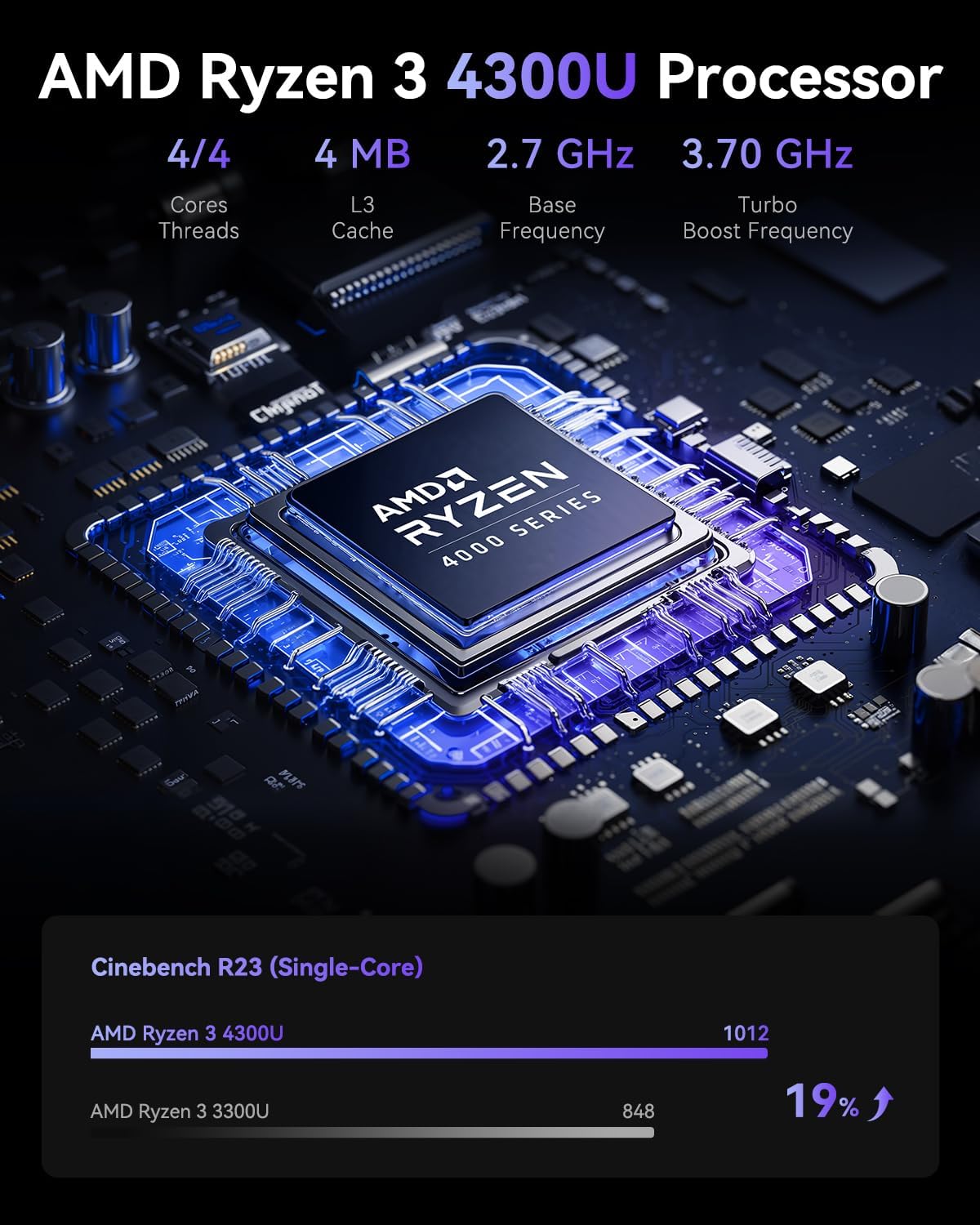
The Ryzen 3 4300U in the ACEMAGIC K1 is configured at its full 28W TDP — the maximum for this processor. Most budget mini PCs artificially restrict their CPUs to 15W or less to reduce heat. Running at 28W means the K1 extracts the full performance the chip is capable of.
The AMD Ryzen 3 4300U is a 4-core, 4-thread processor built on AMD’s 7nm Zen 2 architecture, with a 2.7GHz base and 3.7GHz boost clock. It’s a 2020-generation chip — which means it predates more recent architectures like Intel’s Alder Lake-N (N100/N150) and AMD’s Zen 4/Zen 5. That context matters: in raw IPC and efficiency, the N150 is a newer design.
However, the Ryzen 4300U running at 28W has a clear advantage in sustained multi-threaded workloads. Published Cinebench R23 community data puts the Ryzen 4300U at approximately 4,800–5,400 points multi-core when running at full TDP — considerably higher than the N150’s ~2,800 points. For tasks that use multiple cores simultaneously — compiling code, exporting documents, video calls with background processing, running multiple applications — this gap is real and noticeable.
ACEMAGIC’s claim that it “outperforms N150/N97 chips” is accurate for multi-threaded CPU performance. The N150 has the edge in per-core efficiency and power consumption at idle, but the Ryzen 4300U at 28W is the stronger processor for active computing workloads.
Triple 4K Display — How It Works on the K1
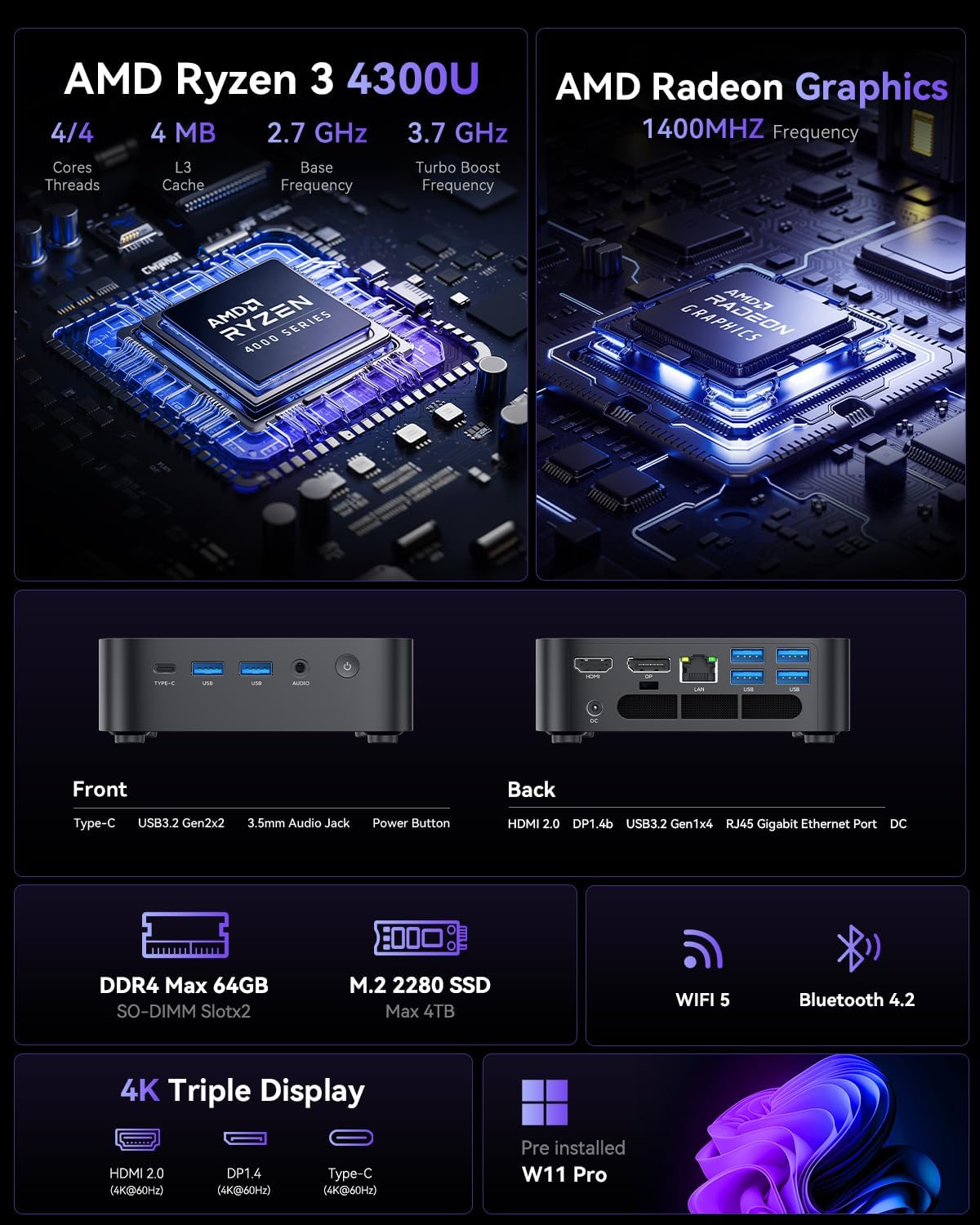
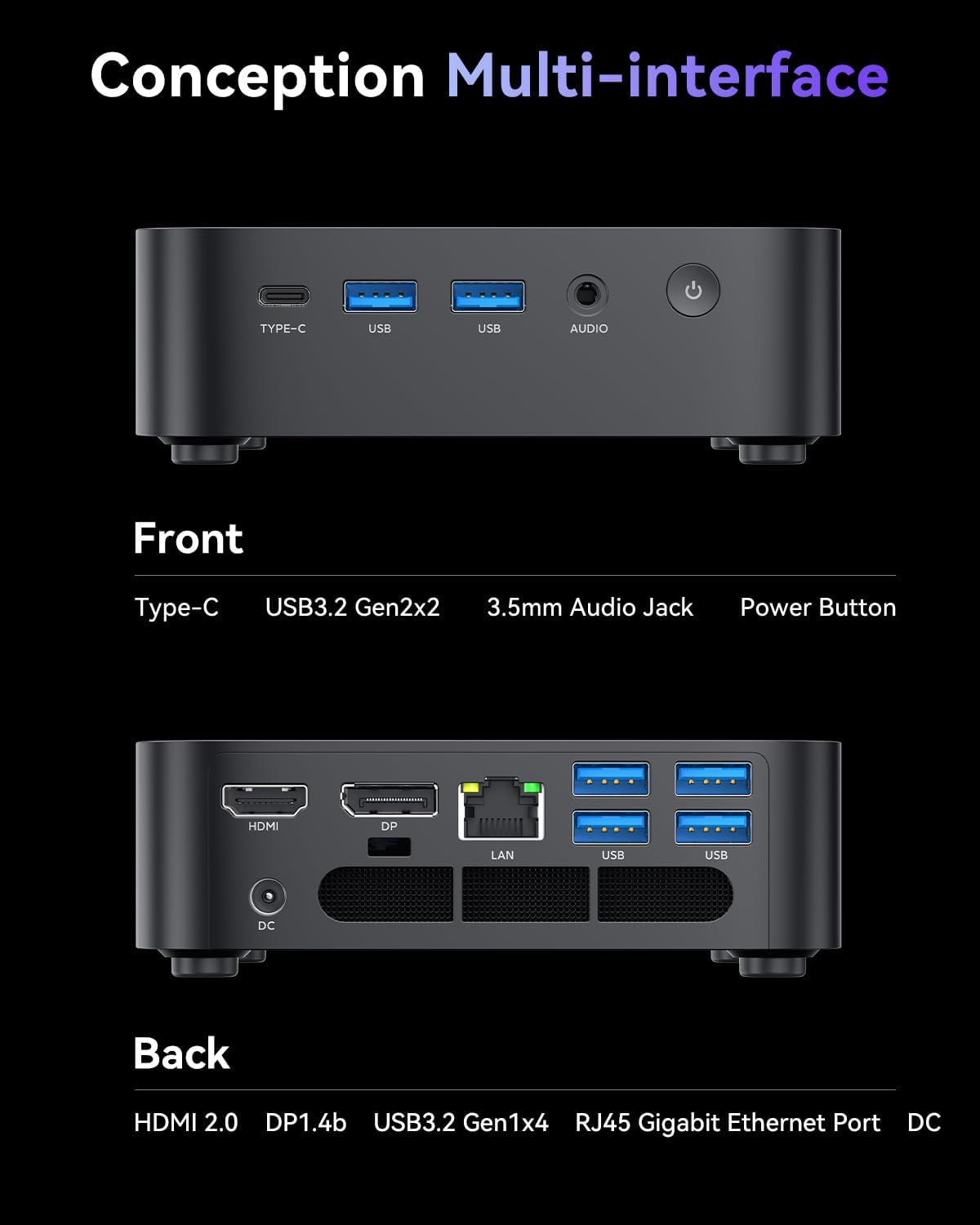
The ACEMAGIC K1 supports three simultaneous 4K@60Hz displays via HDMI 2.0 + DisplayPort 1.4 + USB-C (DisplayPort Alt Mode). At $310, this is the standout feature — most budget mini PCs at this price only support two displays.
The Ryzen 4300U’s integrated Radeon graphics natively support multiple display outputs. ACEMAGIC routes them across three separate physical ports. All three can drive 4K@60Hz independently and simultaneously — genuinely useful for productivity setups, stock trading dashboards, coding with multiple windows, or multi-monitor home office work.
All 3 outputs support simultaneous 4K@60Hz operation
Full Specifications
The K1 ships with Windows 11 Pro pre-installed, 16GB DDR4 RAM, 512GB NVMe SSD, and supports up to 4TB total storage — with a compact 5.05×5.05×1.61 inch chassis and 80mm cooling fan for 24/7 silent operation.
| CPU | AMD Ryzen 3 4300U — 4C/4T — Zen 2 — 7nm — 2.7GHz base / 3.7GHz boost — 28W full TDP |
|---|---|
| GPU (integrated) | AMD Radeon Graphics — 6 CUs — up to 1,500 MHz |
| RAM | 16GB DDR4 — dual-channel |
| Storage | 512GB NVMe SSD — expandable up to 4TB total |
| Display outputs | HDMI 2.0 + DisplayPort 1.4 + USB-C (DP Alt Mode) — up to 3× 4K@60Hz simultaneous |
| Networking | Gigabit Ethernet — Wi-Fi (dual-band) — Bluetooth |
| USB ports | USB 3.2 Gen 2 Type-A × multiple — USB-C (data + display) |
| Cooling | High-conductivity aluminium heatsink + 80mm silent fan + dual air outlets |
| Operating system | Windows 11 Pro — genuine, pre-installed |
| Dimensions | 5.05 × 5.05 × 1.61 inches — weight: 1.1 lbs (0.5 kg) |
| Wall mount | VESA mount support included |
| Price | $310 on Amazon |
Performance & Use Cases
The Ryzen 4300U at 28W handles the following tasks without issues — this is where the chip earns its keep over N150/N97 budget alternatives:
Performance Ratings for Everyday Tasks
Where it performs particularly well: sustained multi-tab browsing, Office 365 with multiple documents open simultaneously, Zoom and Teams with background effects enabled, and light coding tasks in VS Code. Amazon reviewers consistently highlight smooth multitasking and quiet operation under everyday workloads.
Where it shows its limits: demanding gaming (the 6-CU Radeon iGPU is dated), video editing beyond basic cuts, and any workflow that benefits from modern AI acceleration. The Ryzen 4300U predates AMD’s XDNA NPU architecture — there is no hardware AI accelerator in this chip, meaning Windows Copilot+ features run on the CPU rather than a dedicated neural engine.
Design, Size & Build Quality
The ACEMAGIC K1 measures 5.05 × 5.05 × 1.61 inches — fractionally more compact than competitors using the same Ryzen 4300U platform. At 1.1 lbs, it fits in a jacket pocket and vanishes behind a monitor on its VESA mount.
The matte black aluminum and plastic chassis is clean and professional — a neutral aesthetic that suits corporate desk setups and home offices equally. The 80mm fan with dual air outlets is ACEMAGIC’s key cooling claim: the wider fan and improved airflow path are designed to maintain 28W operation quietly over extended use. Based on Amazon user reports, fan noise during everyday tasks is minimal and non-disruptive.
Port layout is practical: display outputs are grouped at the rear, USB ports accessible on the front and rear, and the Ethernet jack is easy to reach. The power button is tactile and responsive. VESA mount hardware is included — attach the K1 to the back of any VESA-compatible monitor and your desk is completely clear.
Who Is the ACEMAGIC K1 For?
Pros & Cons
✓ What We Like
- 28W full TDP — full Ryzen 4300U performance, not throttled
- Triple 4K@60Hz — rare at this price point
- Outperforms N150/N97 in multi-threaded workloads
- Windows 11 Pro included — genuine license
- Compact 5.05×5.05×1.61″ — VESA mountable
- Quiet 80mm fan — minimal noise in normal use
- Expandable up to 4TB storage
- Strong Amazon customer ratings
- ACEMAGIC professional after-sales support
✕ Watch Out For
- Ryzen 4300U is 2020 Zen 2 — not latest generation
- No hardware NPU — no Windows Copilot+ AI acceleration
- Gigabit Ethernet only — no 2.5GbE
- Higher idle power than N150 mini PCs (~15–20W vs ~10W)
- Integrated GPU limited for gaming
- Wi-Fi standard not confirmed (likely Wi-Fi 5)
Final Verdict
The ACEMAGIC K1 occupies a specific and well-defined niche: it’s the best-value option for users who need real multi-core CPU performance and triple 4K display support under $350. The Ryzen 4300U at full 28W TDP delivers noticeably more horsepower than the N150/N97 chips found in most budget mini PCs — the multi-core performance gap is real, and it shows in sustained multitasking.
The honest caveats: this is 2020 hardware, power efficiency at idle lags behind newer chips, and there’s no NPU. If your priorities are always-on server efficiency or the latest AI features, other mini PCs serve you better. But for a compact, quiet home office machine that handles a triple-monitor desk setup, runs Office and video calls smoothly, boots fast, and includes Windows 11 Pro — all at $310 — the ACEMAGIC K1 is a strong, honest value proposition.
Amazon buyers agree: the reviews are consistently positive around build quality, triple display detection, and quiet operation. That real-world validation aligns with what the specifications predict.
Frequently Asked Questions
CPU performance data referenced in this review is sourced from published Cinebench R23 community benchmarks for the AMD Ryzen 3 4300U. No sample unit was provided — this review is based on ACEMAGIC’s official product specifications, Amazon listing data, and customer review analysis. Performance ratings reflect our editorial assessment of expected real-world performance relative to this price tier. This article contains affiliate links — we earn a commission on qualifying purchases at no extra cost to you.