
GMKtec NEO-X1 Pro Review: Ryzen 9 9955HX3D and a Desktop RTX 5070 in 14.6 Liters
The NEO-X1 Pro is GMKtec’s most powerful compact PC: AMD’s 16-core Ryzen 9 9955HX3D with 3D V-Cache, a desktop GeForce RTX 5070, liquid cooling and a built-in 850W power supply. It is not a palm-sized mini PC — at 14.6 liters it is a small desktop — but it brings real 1440p gaming and workstation power to a case far smaller than a tower.
In short
7.5 / 10
The NEO-X1 Pro is the most capable compact PC we cover: a 16-core Zen 5 processor with 128MB of L3 cache, a desktop RTX 5070 for high-refresh 1440p gaming, upgradeable memory up to 96GB and two PCIe 5.0 SSD slots, all cooled by an AIO and powered by an internal supply. Buy it if you want desktop gaming and creative performance in a small, tidy box; skip it if you need a truly small mini PC, 16GB of video memory for 4K, or the lowest price for this performance.
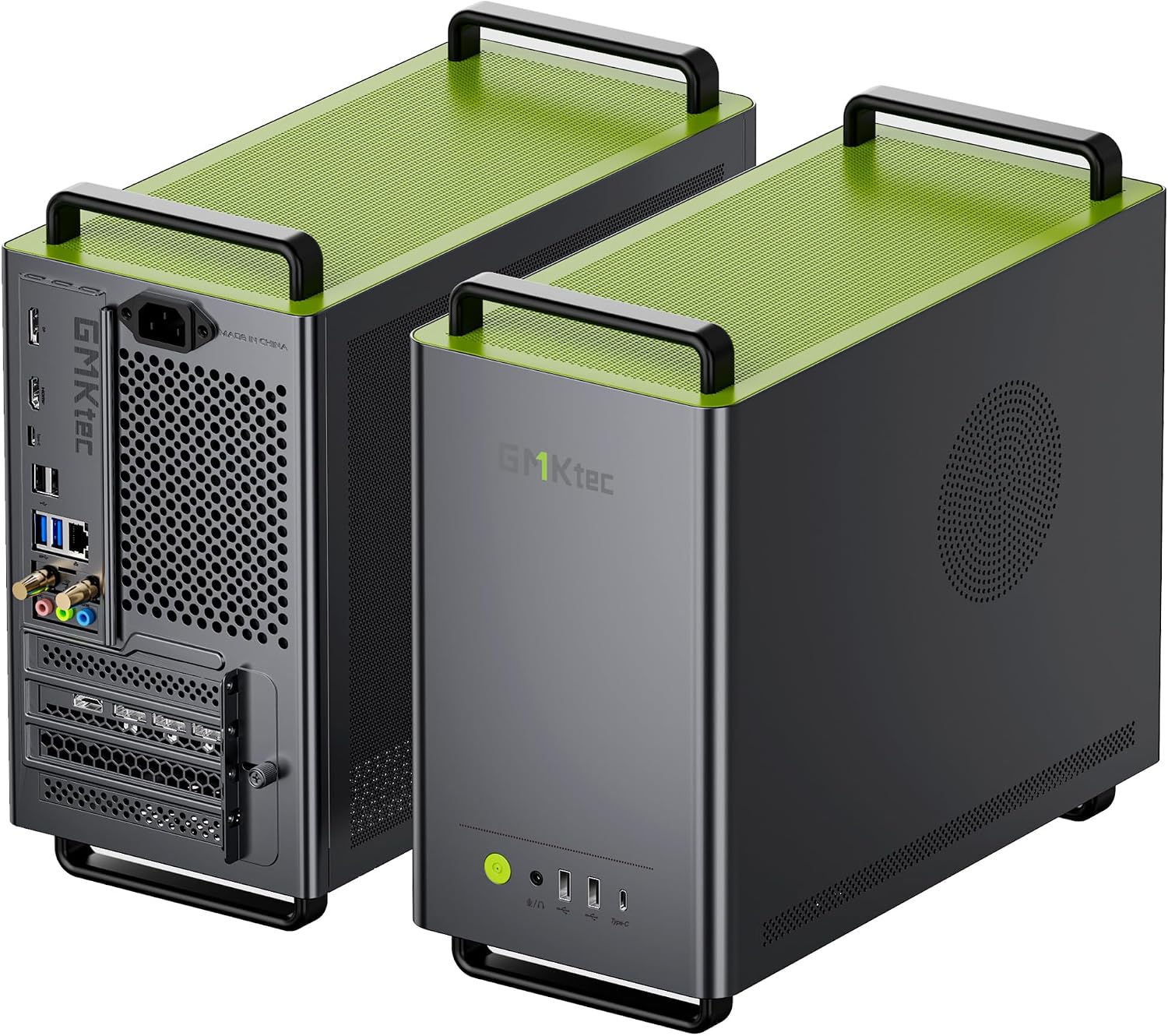
Specifications
A Ryzen 9 9955HX3D running at up to 160W, a desktop RTX 5070 12GB, two DDR5 SO-DIMM slots, two PCIe 5.0 M.2 slots and an internal 850W SFX power supply in a 14.6-liter case.
| Component | Specification |
|---|---|
| Processor | AMD Ryzen 9 9955HX3D (Zen 5) · 16 cores / 32 threads · up to 5.4GHz · 128MB L3 cache with 3D V-Cache |
| CPU power modes | Performance 160W (170W briefly) · Balanced 85W · Silent 54W |
| Graphics | NVIDIA GeForce RTX 5070 desktop GPU · 6,144 CUDA cores · 12GB GDDR7, 192-bit |
| Memory | DDR5-5600 · 2× SO-DIMM · 32GB or 64GB depending on configuration · up to 96GB |
| Storage | 1TB or 2TB PCIe 4.0 SSD · 2× M.2 PCIe 5.0 x4 slots · up to 8TB per slot |
| Display outputs | 3× DisplayPort 2.1b + 1× HDMI 2.1b on the graphics card · four displays |
| USB | Front: 2× USB-A 2.0, 1× USB-C 10Gbps · Rear: 2× USB-A 3.2 Gen 2, 2× USB-A 2.0, 1× USB-C 10Gbps · no USB4 |
| Network | 2.5GbE · Wi-Fi 7 · Bluetooth 5.4 |
| Cooling | AIO liquid cooler for the CPU · three case fans |
| Power supply | Internal 850W SFX, 80 PLUS Gold, fully modular |
| Size / weight | 14.6 liters · 350 × 165 × 265 mm without handle · about 7 kg · metal chassis |
Check the configuration on the listing
The NEO-X1 Pro is sold with 32GB or 64GB of memory and different SSD sizes, and the cheaper NEO-X1 (non-Pro) uses a Ryzen 9 9955HX without 3D V-Cache and an RTX 5060 Ti 8GB. Check the processor, graphics card and memory lines before you buy. Igor’s Lab also noted that one section of GMKtec’s site mentions a 500W supply while the specification table lists 850W; independent coverage confirms 850W.
Design: a small desktop, not a mini PC
At 14.6 liters and about 7 kg it is roughly four times the volume of a compact gaming box like the Minisforum G1 Pro — the price of fitting a full desktop graphics card.
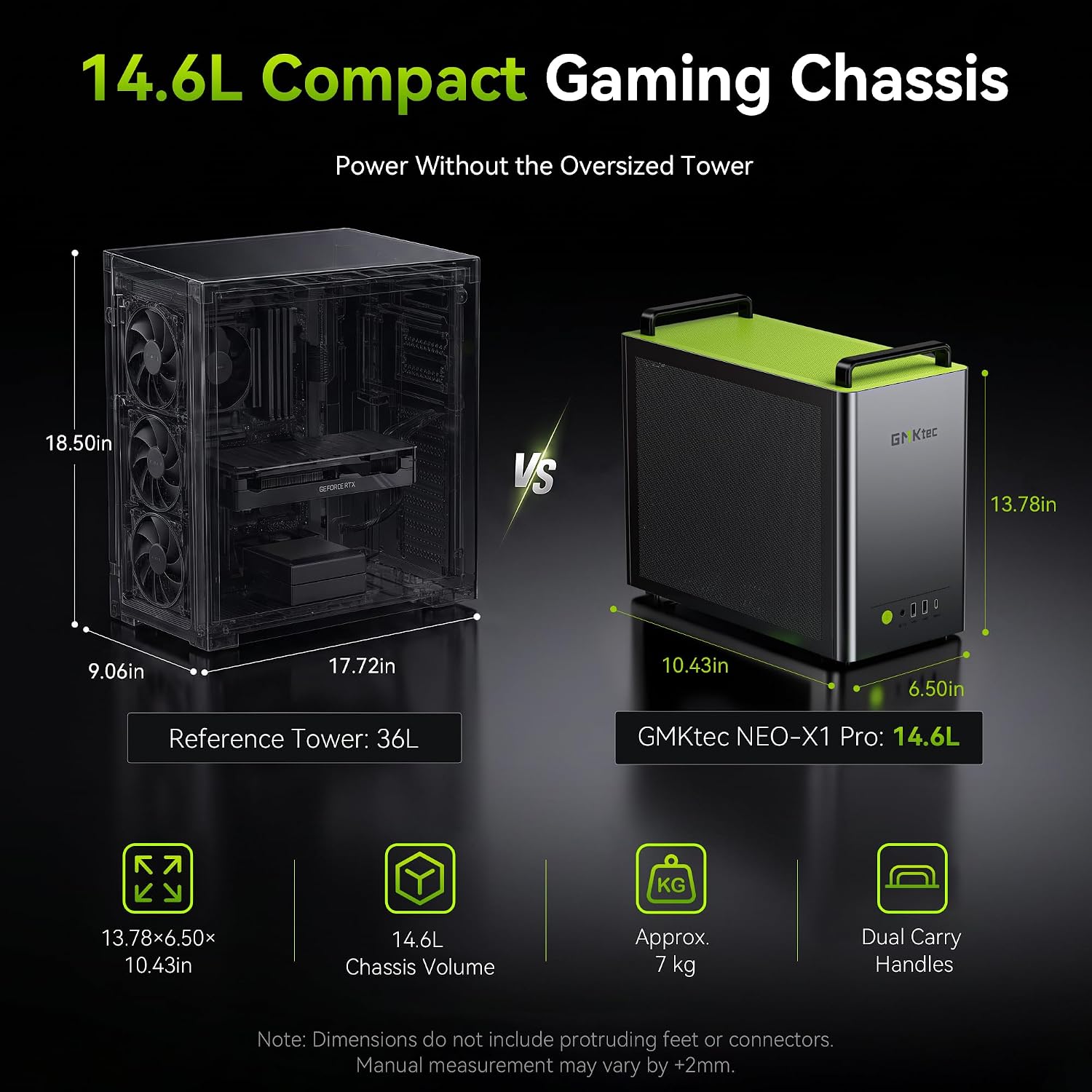
The metal case has a carry handle, a footprint of 350 × 165 mm and stands 265 mm tall without the handle. That is small for a desktop with a 160W processor and a desktop graphics card, and the internal power supply means a single power cord. It will not hide behind a monitor, though: plan desk space as you would for a small tower.
The port selection is the weak spot. Four of the eight USB ports are USB 2.0, the two USB-C ports run at 10Gbps, and there is no USB4 or Thunderbolt for fast external storage. Networking stops at 2.5GbE, where some competitors now offer 5GbE or 10GbE. The four display outputs sit on the graphics card itself.
Processor: 16 cores with 3D V-Cache
The 9955HX3D is AMD’s top laptop-class chip; here it runs at up to 160W with liquid cooling, stayed at 67°C in Deskmodder’s test and handles heavy creative work with ease.
The Ryzen 9 9955HX3D combines 16 Zen 5 cores with 128MB of L3 cache thanks to AMD’s 3D V-Cache. GMKtec lets it draw up to 160W in Performance mode, far above the 55W–75W typical of laptops, and offers 85W Balanced and 54W Silent modes. Deskmodder measured 5,863 points multi-core and 441 points single-core in Cinebench 2026, with a maximum CPU temperature of 67°C.
The extra cache matters most in games limited by the processor and at high refresh rates. At 1440p and 4K the RTX 5070 is usually the limit, so the 3D V-Cache adds less there. For video encoding, 3D rendering, compiling code or running several virtual machines, the 16 cores and up to 96GB of memory put the NEO-X1 Pro in workstation territory.
Gaming: what the RTX 5070 can do
A desktop RTX 5070 performs about like an RTX 4070 Super: often above 100 fps at 1440p with maximum settings, and playable 4K with DLSS — with 12GB of video memory as the long-term limit.
| Resolution | What to expect |
|---|---|
| 1080p | High-refresh gaming in almost every title; esports far above 144 fps |
| 1440p | Often above 100 fps at maximum settings; around 60 fps in the heaviest path-traced games such as Cyberpunk 2077 RT Overdrive and Black Myth: Wukong |
| 4K | Playable in many games with DLSS; Deskmodder found S.T.A.L.K.E.R. 2 and Gray Zone Warfare stable at high details, while Microsoft Flight Simulator 2024 dropped frames at large airports |
DLSS 4 Multi Frame Generation can multiply the frame rate in supported games, but it works best from a base of around 60 fps and adds latency. PCWorld’s main reservation about the RTX 5070 is its 12GB of memory on a 192-bit bus, which may hold back future games at 4K; AMD’s Radeon RX 9070 offers 16GB at a similar level. GMKtec has not documented which replacement graphics cards fit the case, so don’t count on swapping the GPU later.
Noise, heat and power
No independent noise measurement yet: Deskmodder found it clearly audible under heavy load, and the three power modes let you trade speed for silence.
A 160W processor and a desktop RTX 5070 together dissipate several hundred watts in games, which three fans and an AIO must move out of a small case. Expect a quiet machine on the desktop and an audible one in long gaming or rendering sessions; the Balanced 85W mode is the sensible daily setting if noise matters. Power consumption has not been published.
Upgrades and what’s in the box
Memory and storage are easy to upgrade: two SO-DIMM slots (96GB worked in Deskmodder’s test) and two PCIe 5.0 M.2 slots.

Deskmodder replaced the 64GB kit with 2×48GB DDR5-5600 and added a second 2TB SSD without issues. Note that the PCIe 5.0 slots ship with a PCIe 4.0 drive (about 4,100 MB/s sequential read in Deskmodder’s test), so a faster SSD is an easy later upgrade. With memory prices high in 2026 (see our RAM crisis guide), the 64GB configuration is the better long-term buy if you edit video or run virtual machines.
Alternatives
| Model | CPU / GPU | Choose it if… |
|---|---|---|
| Minisforum G1 Pro | Ryzen 9 8945HX · RTX 5060 8GB | You want a much smaller (about 3.8 L) box for 1080p and 1440p with DLSS. Review |
| ASUS ROG NUC (2025) | Core Ultra 7 HX · RTX 5060 Laptop GPU | You want a compact RTX box from a major brand |
| GMKtec EVO-X2 | Ryzen AI Max+ 395 · Radeon 8060S | You want large local AI models in a quiet mini PC more than top gaming speed. Review |
| GMKtec NEO-X1 (non-Pro) | Ryzen 9 9955HX · RTX 5060 Ti 8GB | You want the same case for less, with a slower GPU and no 3D V-Cache |
| Mini PC + OCuLink eGPU | Ryzen mini PC + desktop graphics card | You prefer to choose and upgrade the GPU yourself. OCuLink guide |
Who should buy it
- want high-refresh 1440p gaming in a small, tidy case
- edit video, render 3D or compile code and need 16 cores
- want memory and storage you can upgrade (96GB, two PCIe 5.0 slots)
- value an internal power supply and a single cable
- want a palm-sized mini PC behind a monitor
- plan to game at 4K for years (12GB of video memory)
- need USB4, Thunderbolt or 10GbE
- want a near-silent machine under load
Pros and cons
- Desktop RTX 5070 with DLSS 4
- 16-core Ryzen 9 with 128MB L3 cache, up to 160W
- AIO cooling, low CPU temperatures in testing
- Upgradeable DDR5 (96GB) and two PCIe 5.0 slots
- Internal 850W SFX power supply
- Four display outputs, Wi-Fi 7
- 14.6 liters: a small desktop, not a mini PC
- 12GB of video memory
- Four USB 2.0 ports, no USB4, 2.5GbE only
- Audible under heavy load
- GPU upgrade path not documented
- Expensive
| Category | Score |
|---|---|
| Gaming performance (1440p) | 9.0 |
| CPU and creative work | 9.0 |
| Upgradeability | 8.0 |
| Connectivity | 6.0 |
| Size and noise | 5.5 |
| Value | 6.5 |
Verdict
7.5/10 — desktop-class gaming and workstation power in a compact case, held back by its size for a “mini” PC, dated USB ports and a 12GB GPU.
The NEO-X1 Pro delivers what its spec sheet promises: a 16-core processor that stays cool under liquid cooling, a desktop RTX 5070 that handles 1440p at high settings, and real upgrade room for memory and storage. It is the strongest compact PC we have covered. It is also big for the category, louder than integrated-graphics mini PCs under load, and short on fast USB ports. If you want a small desktop for gaming and creative work and the price fits your budget, it is a strong choice; if you want something truly small, the Minisforum G1 Pro and our best gaming mini PC guide cover smaller options.
FAQ
Is the GMKtec NEO-X1 Pro a mini PC?
Not in the usual sense. At 14.6 liters and about 7 kg it is a small form factor desktop: much smaller than a tower, but about four times the volume of a compact gaming box like the Minisforum G1 Pro. The extra space holds a desktop RTX 5070, an AIO cooler and an 850W power supply.
Does the NEO-X1 Pro use a laptop or desktop RTX 5070?
A desktop GeForce RTX 5070 with 12GB of GDDR7 on a 192-bit bus, according to GMKtec and independent coverage. It performs about like an RTX 4070 Super, well above the laptop RTX 5060 found in smaller gaming mini PCs.
Can it play games at 4K?
Many games are playable at 4K with DLSS: Deskmodder found S.T.A.L.K.E.R. 2 and Gray Zone Warfare stable at high details. The RTX 5070 is happiest at 1440p, and its 12GB of video memory may limit future games at 4K.
Can I upgrade the RAM, SSD and graphics card?
Memory and storage, yes: two DDR5 SO-DIMM slots up to 96GB and two PCIe 5.0 M.2 slots up to 8TB each. GMKtec has not documented which replacement graphics cards fit, so treat the GPU as fixed.
Is it loud?
No noise measurements have been published yet. Deskmodder reported it is clearly audible under heavy load; the Balanced (85W) and Silent (54W) CPU modes reduce noise at the cost of some processor performance.
What is the difference between the NEO-X1 and the NEO-X1 Pro?
The Pro uses the Ryzen 9 9955HX3D with 3D V-Cache (128MB L3) and an RTX 5070 12GB; the NEO-X1 uses the Ryzen 9 9955HX (64MB L3) and an RTX 5060 Ti 8GB. Both use the same series design with liquid cooling and Wi-Fi 7.
Related
- Best gaming mini PC (2026)
- Minisforum G1 Pro review
- GMKtec EVO-X2 review
- What is OCuLink? eGPU guide
- Best mini PCs over $1,000