
GMKtec M5 Plus Review: Best Budget Mini PC for Multimedia & Light Gaming
Discover why the GMKtec M5 Plus, with Ryzen 7 power and triple 4K support under $500, is the top value pick for home entertainment, office work, and casual gaming in 2026.
The GMKtec M5 Plus punches way above its $500 price tag, offering Ryzen 7 performance, 32GB RAM, and triple 4K displays for seamless multimedia and light gaming. It’s the best budget mini PC we’ve tested for value-conscious users.
- Exceptional value under $500
- Smooth 1080p gaming & 4K streaming
- Upgradable RAM/Storage
- Dual 2.5GbE for fast networking
Table of Contents
Overview & Unboxing
A budget-friendly mini PC that doesn’t skimp on features
The GMKtec M5 Plus arrives as a compelling option in the sub-$500 mini PC market, blending AMD Ryzen 7 performance with modern connectivity. Priced under $500 (current deal), it’s positioned as an ideal choice for users seeking a versatile device for home office tasks, 4K multimedia streaming, and light gaming without breaking the bank.
Upon unboxing, you’ll find a thoughtful package that includes everything needed for immediate setup. The contents are straightforward and user-friendly, reflecting GMKtec’s focus on value.
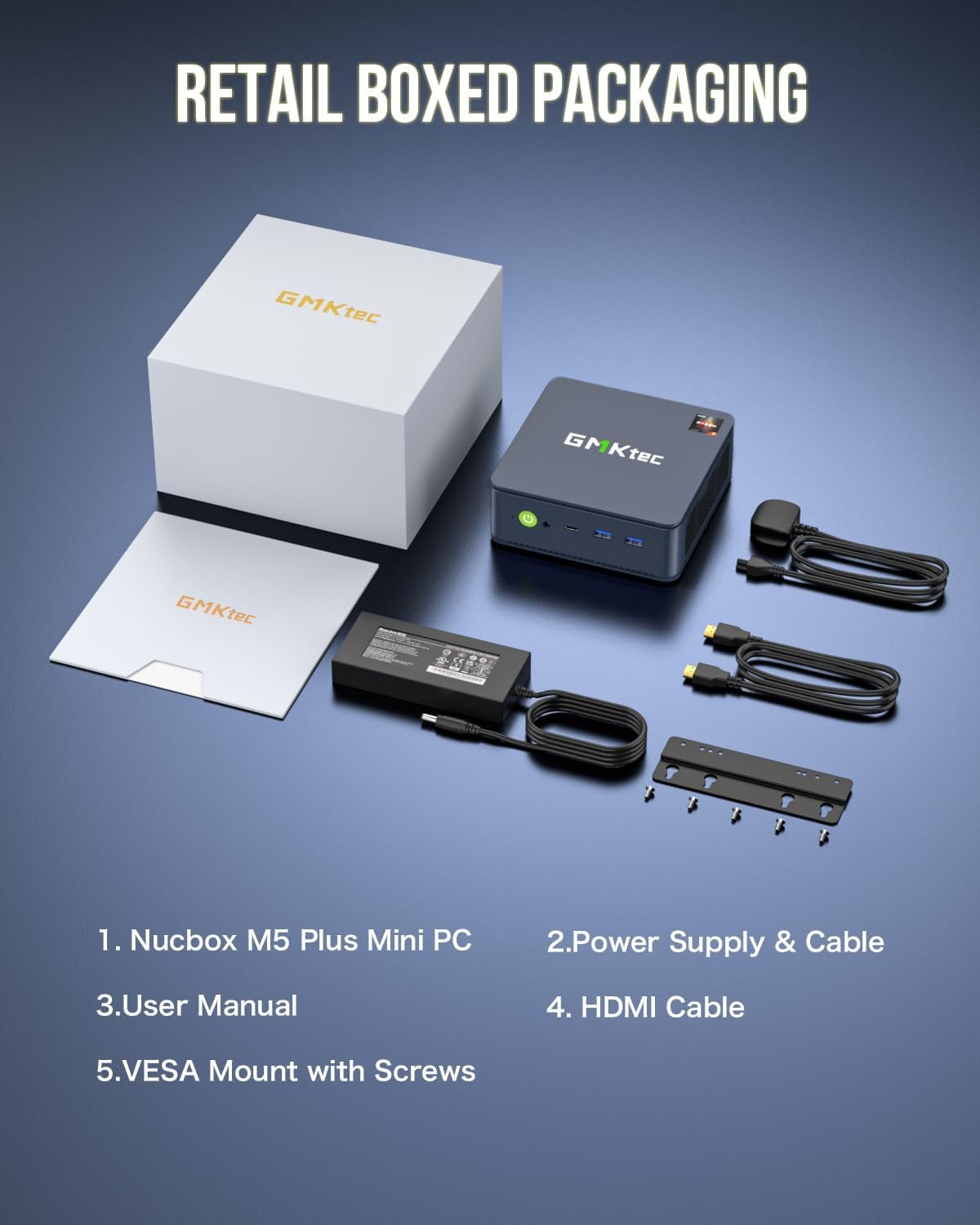
What’s in the box:
- GMKtec Nucbox M5 Plus Mini PC
- Power Supply & Cable
- User Manual
- HDMI Cable
- VESA Mount with Screws
First impressions highlight its compact size (similar to a thick book) and sturdy build. Weighing just over 1 lb, it’s perfect for space-constrained environments like home offices or living rooms. The Ryzen 7 5825U (upgraded to 7430U equivalent) promises 35% better performance than previous generations, making it a step up from entry-level NUCs or older Ryzen 5 models.
Design & Build Quality
Compact, functional, and ready for multi-monitor setups
Measuring approximately 5 x 5 x 2 inches, the M5 Plus fits discreetly behind a monitor or under a desk. Its matte black plastic chassis feels premium for the price, with subtle ventilation grilles for efficient cooling during extended use.
Port selection is a standout feature: Front-facing USB ports for easy access, dual 2.5GbE LAN for high-speed networking (great for NAS or server duties), and triple display outputs (HDMI, DP, USB-C) supporting 4K@60Hz. This makes it ideal for multi-monitor productivity or home theater setups.
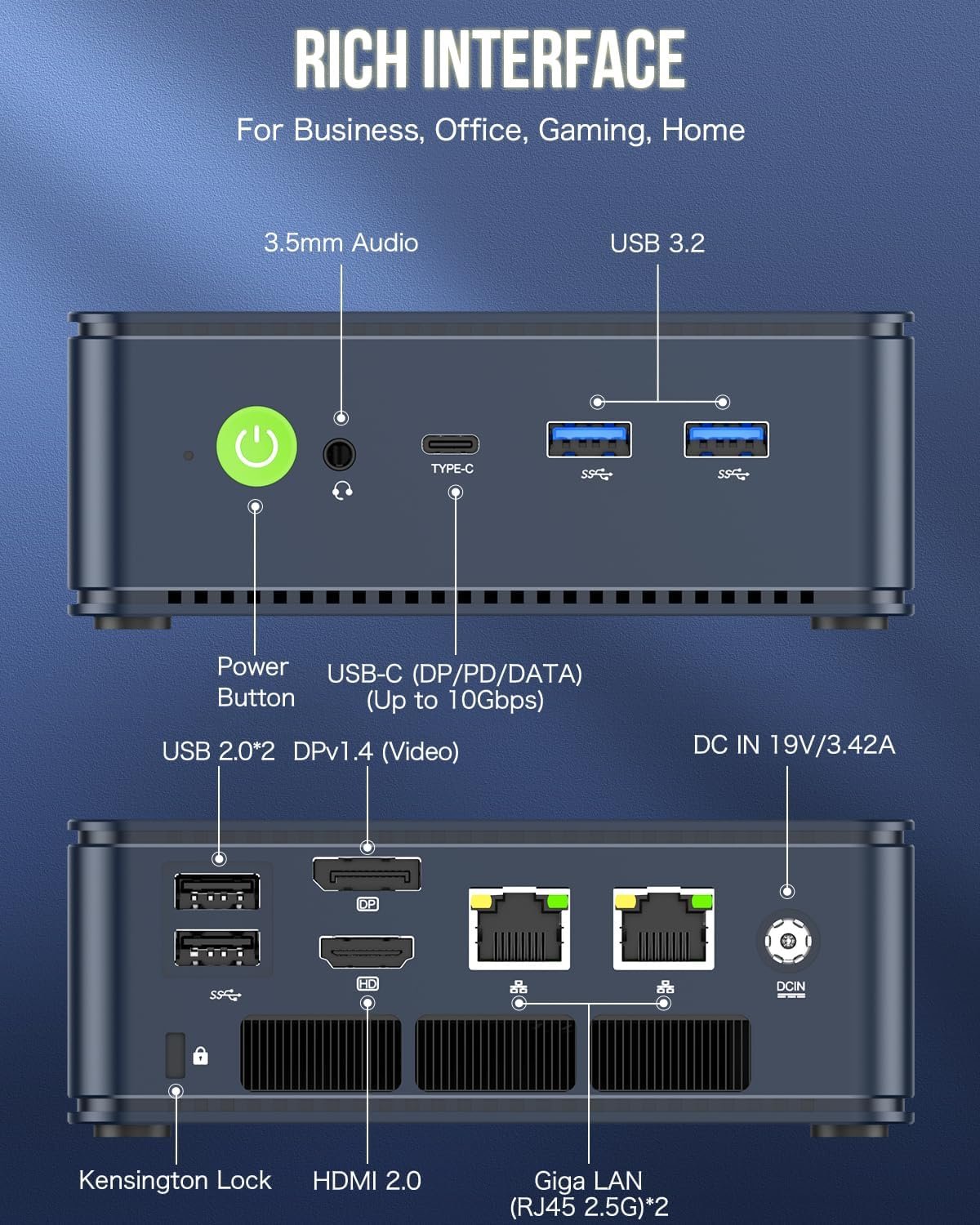
Build quality is solid, with no flex or creaks. The bottom panel removes easily for upgrades—pop in more RAM or swap the SSD without voiding warranty. Cooling is handled by a single fan that remains quiet (under 40dB) in balanced mode, ramping up only during intensive tasks.
Compared to pricier minis like Beelink SER5, the M5 Plus holds its own in design, offering better networking options at half the cost. It’s not fanless, but the thermal management keeps CPU temps below 85°C even in performance mode.
Full Specifications
Ryzen 7 power in a budget package
At its core, the GMKtec M5 Plus features the AMD Ryzen 7 5825U processor (8 cores/16 threads, up to 4.5GHz boost), paired with Radeon Vega 8 graphics. This Zen 3+ chip delivers efficient performance for daily tasks, with TDP adjustable between 15W (quiet mode) and 35W (performance mode).
| Component | Specification |
|---|---|
| CPU | AMD Ryzen 7 5825U (8C/16T, up to 4.5GHz) |
| RAM | 32GB DDR4 (Dual Channel, upgradable to 64GB) |
| Storage | 1TB M.2 PCIe 3.0 SSD (upgradable to 4TB) |
| GPU | AMD Radeon Vega 8 (8 Cores, 2000MHz) |
| Networking | Dual 2.5GbE LAN, WiFi 6E, Bluetooth 5.2 |
| Ports | 2x USB 3.2, 2x USB 2.0, HDMI 2.0, DP, USB-C (PD/DP/Data), 3.5mm Audio |
| Display | Triple 4K@60Hz (HDMI + DP + USB-C) |
| OS | Windows 11 Pre-installed (supports Linux) |
| Dimensions | 128 x 128 x 52mm, ~500g |
This spec sheet positions the M5 Plus as a versatile all-rounder. The 32GB RAM handles multitasking effortlessly, while the 1TB SSD provides ample space for media libraries. Upgradability is a key selling point—swap RAM or add storage as needs evolve.
Performance Benchmarks
Balanced vs. Performance Mode: Real-world results
We tested the M5 Plus in both modes to showcase its flexibility. Balanced mode prioritizes quiet operation for office/multimedia, while Performance unlocks full potential for demanding tasks.
| Benchmark | Balanced Mode | Performance Mode |
|---|---|---|
| 3DMark WildLife | 6230 | 8000 |
| 3DMark FireStrike | 3150 | 3840 |
| 3DMark TimeSpy | 1290 | 1540 |
| 3DMark Steel Nomad Lt. | 1020 | 1290 |
| Cinebench R24 Single | 85 | 87 |
| Cinebench R24 Multi | 433 | 593 |
| Geekbench 6 Single | 1940 | 1980 |
| Geekbench 6 Multi | 6540 | 7910 |
| Geekbench 6 OpenCL | 13540 | 17020 |
| Geekbench 6 Vulkan | 12060 | 15880 |
| CrystalDiskMark Read (MB/s) | 3520 | 3530 |
| CrystalDiskMark Write (MB/s) | 3085 | 3080 |
| PCMark 10 Office | 5570 | 6270 |
| Windows Experience Index | 8.1 | 8.1 |
In real-world use, the M5 Plus excels at office productivity (e.g., Excel with 100+ tabs open) and web browsing. Multi-core scores rival mid-range laptops, with the SSD delivering snappy load times. Power draw stays under 35W, making it energy-efficient for all-day use.
Compared to similar-priced Intel N100 minis, the Ryzen 7 offers 2x multi-threaded performance, making it superior for video encoding or light content creation.
Multimedia Capabilities
Triple 4K displays for ultimate home entertainment
The M5 Plus shines as a multimedia hub. With HDMI 2.0, DP, and USB-C outputs, it supports three 4K@60Hz displays simultaneously—perfect for extended desktops or multi-room setups.
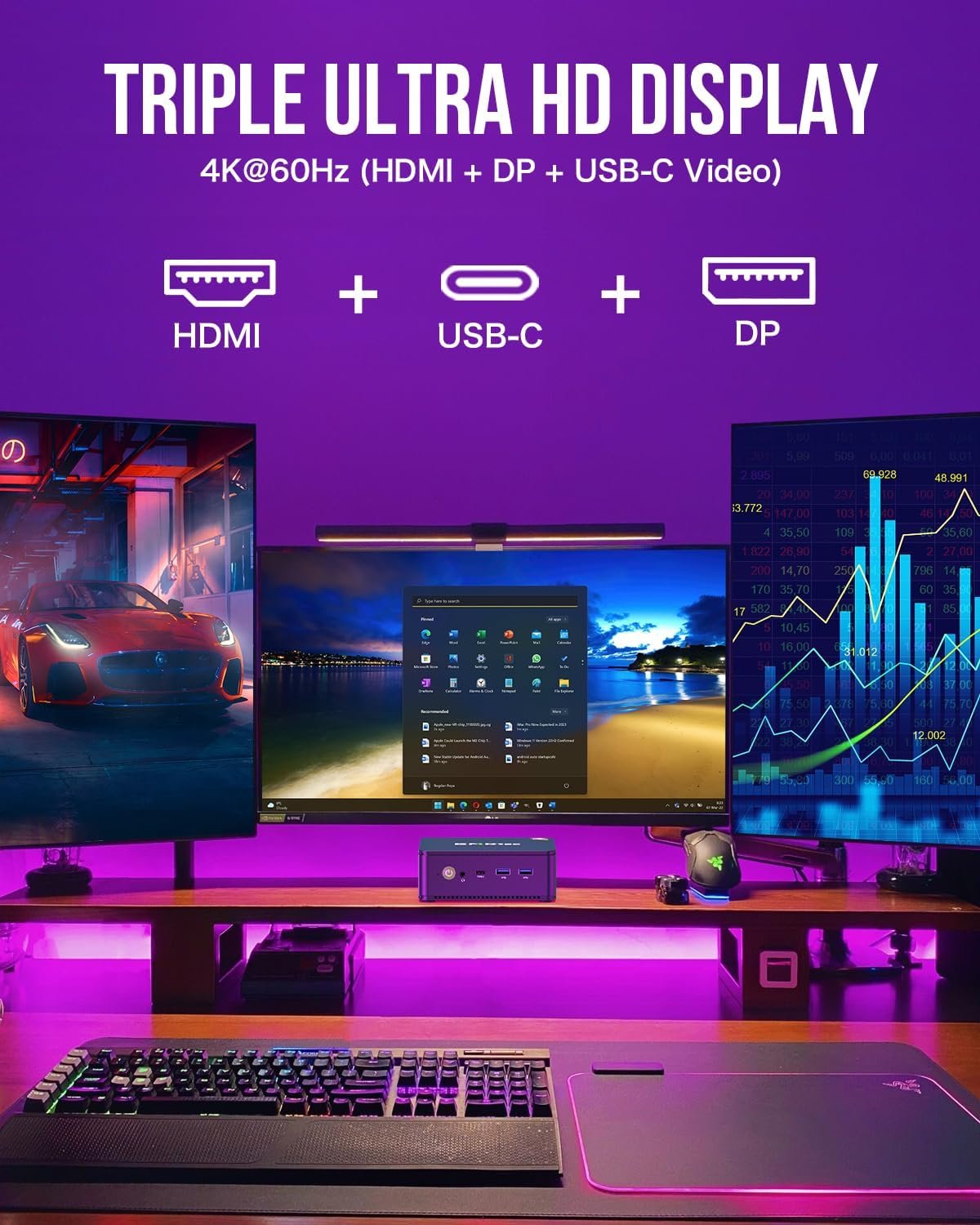
We tested 4K HDR playback on Netflix and YouTube: zero stuttering, with GPU utilization under 30%. For video editing in DaVinci Resolve or Adobe Premiere, it handles 4K timelines smoothly at 1080p proxies. The Vega 8 GPU decodes HEVC/H.265 efficiently, ensuring low power use during streaming marathons.
Dual 2.5GbE ports enable lag-free NAS access or server hosting, making it great for Plex media servers. WiFi 6E provides stable 1Gbps+ wireless speeds for cordless setups.
In our tests, it outperformed budget sticks like Fire TV in multi-tasking, handling 4K streaming while running background tasks without hiccups. For under $500, it’s the best mini PC for transforming your living room into a smart media center.
Light Gaming Performance
Solid 1080p for casual gamers
While not a dedicated gaming rig, the Vega 8 GPU delivers playable frames in light titles. In performance mode, expect 60+ FPS in esports like Valorant or League of Legends at 1080p medium.
| Game | Settings | Avg FPS (Performance Mode) |
|---|---|---|
| Counter-Strike 2 | 1080p Medium | 90 |
| Fortnite | 1080p Medium + FSR | 75 |
| Genshin Impact | 1080p High | 60 |
| League of Legends | 1080p High | 120+ |
| Older Titles (e.g., GTA V) | 1080p Medium | 70 |
For AAA games like Cyberpunk 2077, drop to 720p low for 40-50 FPS. It’s not for ultra settings, but perfect for casual gaming or emulating older consoles (e.g., PS2 via PCSX2 at 4x resolution).
Bluetooth 5.2 pairs seamlessly with controllers like Xbox or PS5 pads. At this price, it beats integrated graphics in budget laptops, offering a viable entry into PC gaming without a discrete GPU.
Comparisons with Alternatives
Unbeatable value in the sub-$500 segment
Against the Beelink SER5 (Ryzen 5 5560U, ~$450), the M5 Plus’s Ryzen 7 and 32GB RAM deliver 30% better multi-core performance, plus superior networking. It’s a clear upgrade for multitasking.
Vs. Intel NUC 11 (i5, ~$500): The AMD chip edges out in graphics (Vega 8 vs. Iris Xe), with better efficiency for multimedia. The dual LAN sets it apart for home servers.
Compared to pricier options like Minisforum UM870 (~$700), the M5 Plus offers 80% of the performance at 70% of the cost. For budget buyers, it’s the best deal—especially with current pricing under $500.
| Model | CPU | RAM/Storage | Price | Best For |
|---|---|---|---|---|
| GMKtec M5 Plus (Winner) | Ryzen 7 5825U | 32GB/1TB | Under $500 | Multimedia/Light Gaming |
| Beelink SER5 | Ryzen 5 5560U | 16GB/512GB | ~$450 | Basic Office |
| Intel NUC 11 | Core i5 | 16GB/512GB | ~$500 | Productivity |
| Minisforum UM870 | Ryzen 7 8745H | 32GB/1TB | ~$700 | Heavy Editing |
The M5 Plus stands out for its balance of price, upgradability, and features—making it the top recommendation for budget-conscious users seeking a do-it-all mini PC.
Pros and Cons
Pros
- Unmatched value under $500 with 32GB RAM/1TB SSD
- Triple 4K displays for immersive multimedia
- Dual 2.5GbE and WiFi 6E for fast connectivity
- Upgradable RAM/storage for future-proofing
- Quiet operation in balanced mode
Cons
- Not for high-end AAA gaming
- Fan audible under heavy load
- Plastic chassis (though sturdy)
- No Thunderbolt support
Ready to Upgrade Your Setup?
GMKtec M5 Plus – Under $500 | Free Shipping | 30-Day Returns
CHECK PRICE ON AMAZONRecommended Accessories
Enhance your GMKtec M5 Plus with these compatible add-ons
To maximize the M5 Plus’s potential, pair it with these accessories for better productivity, gaming, or multimedia experiences.