
SIKAI CASE Foldable Bluetooth Keyboard Review: Specs, Pros and Cons (2026)
A keyboard that folds to the size of a phone, with an aluminum body and a stand that holds your phone or tablet: the SIKAI CASE is built for typing on the go. Here is what it does well, where its compact layout falls short, who should buy it, and which alternatives suit other uses better.
In short
7.5 / 10
A well-built pocket keyboard for phones and small tablets: aluminum body, a magnetic stand for devices up to 11 inches, three-device switching and a long claimed battery life, in a folded size you can slip into a jacket. The compact layout has no number row and takes some getting used to. Buy it for travel, school and tablet notes; choose a full-size keyboard for long typing sessions.
What changed in this update (Oct 12, 2026)
We rewrote this page as a specifications and analysis review: the previous version gave six separate category scores and an 8.4 rating that no hands-on test supported. It now has a single score, clearer limits (Bluetooth-only, no number row, stand size), a section on using the keyboard with a laptop or mini PC, and cheaper or more comfortable alternatives.
Specifications
A compact Bluetooth keyboard with an aluminum alloy body, scissor-switch keys, a hidden magnetic stand, three-device pairing and a rechargeable battery, weighing about 250 g.
| Item | Specification |
|---|---|
| Layout | Compact, no dedicated number row (numbers on the Fn layer) |
| Keys | Low-profile scissor switches |
| Connection | Bluetooth, up to 3 paired devices (Fn + 1 / 2 / 3) |
| Compatibility | iOS, iPadOS, Android, Windows, macOS |
| Body | Aluminum alloy, folds in half, magnet keeps it closed |
| Stand | Hidden magnetic stand for phones and tablets up to 11 inches |
| Battery | Rechargeable, about 2 hours to charge; up to 45 h of typing and 90 days standby (claimed) |
| Power saving | Sleeps after 10 minutes without use |
| Size and weight | About 202 × 46 mm folded, 202 × 89 mm open; about 250 g |
| In the box | Keyboard, charging cable, storage bag |
Who is it for?
People who type on a phone or a small tablet away from a desk: students taking notes, travelers answering email, and anyone who wants a real keyboard in a bag without carrying a laptop.
The SIKAI CASE solves one problem well: turning a phone or an 11-inch tablet into a small writing station anywhere. The stand removes the need for a separate holder, and the three-device memory lets you move from phone to tablet to laptop with a key combination. It is less suited to long writing sessions, spreadsheets with many numbers, or typing in the dark, since there is no backlight.
Design and typing
The aluminum body is the main quality argument at this size; the compact layout is the main compromise, with small keys and numbers moved to a secondary layer.
Most cheap folding keyboards are plastic and flex in the middle; an aluminum body is stiffer and protects the keys when folded. Unfolded, the keyboard is about half the width of a standard keyboard, so touch typists need an adjustment period and some keys share functions through the Fn key. Scissor switches keep the keys quiet, which matters in a classroom or on a train. The magnetic stand works best with a phone or a light tablet without a thick case.
Battery and connectivity
SIKAI CASE claims up to 45 hours of typing and 90 days on standby from a charge of about two hours, with automatic sleep after 10 minutes; three devices are remembered and switched with Fn + 1, 2 or 3.
Even at half the claimed figure, a charge covers several days of travel typing. Pairing follows the usual Bluetooth steps: hold the Fn and channel keys until the light blinks, then select the keyboard in your device’s Bluetooth settings. On some Android phones the keyboard may appear in the list under a code rather than a name; pairing with that entry works normally.
Can you use it with a laptop or a mini PC?
Yes, as soon as the operating system has started. Like every Bluetooth-only keyboard, it does not work in the BIOS or during a Windows installation, so it is a travel or second keyboard rather than the main keyboard of a mini PC.
Paired with a laptop or a mini PC, the SIKAI CASE is handy for a living-room setup or a compact travel kit with a portable monitor. For a desk, a keyboard and mouse on a 2.4GHz USB receiver is more practical: it works from the moment the computer starts. Our mini PC desk setup guide explains why, and the keyboards and mice page lists receiver models.
Alternatives
Choose the ProtoArc XK01 for a full-size folding layout with a number pad, the Logitech K400 Plus for typing and pointing from a sofa, and the Logitech MK470 for a quiet desk set that works in the BIOS.
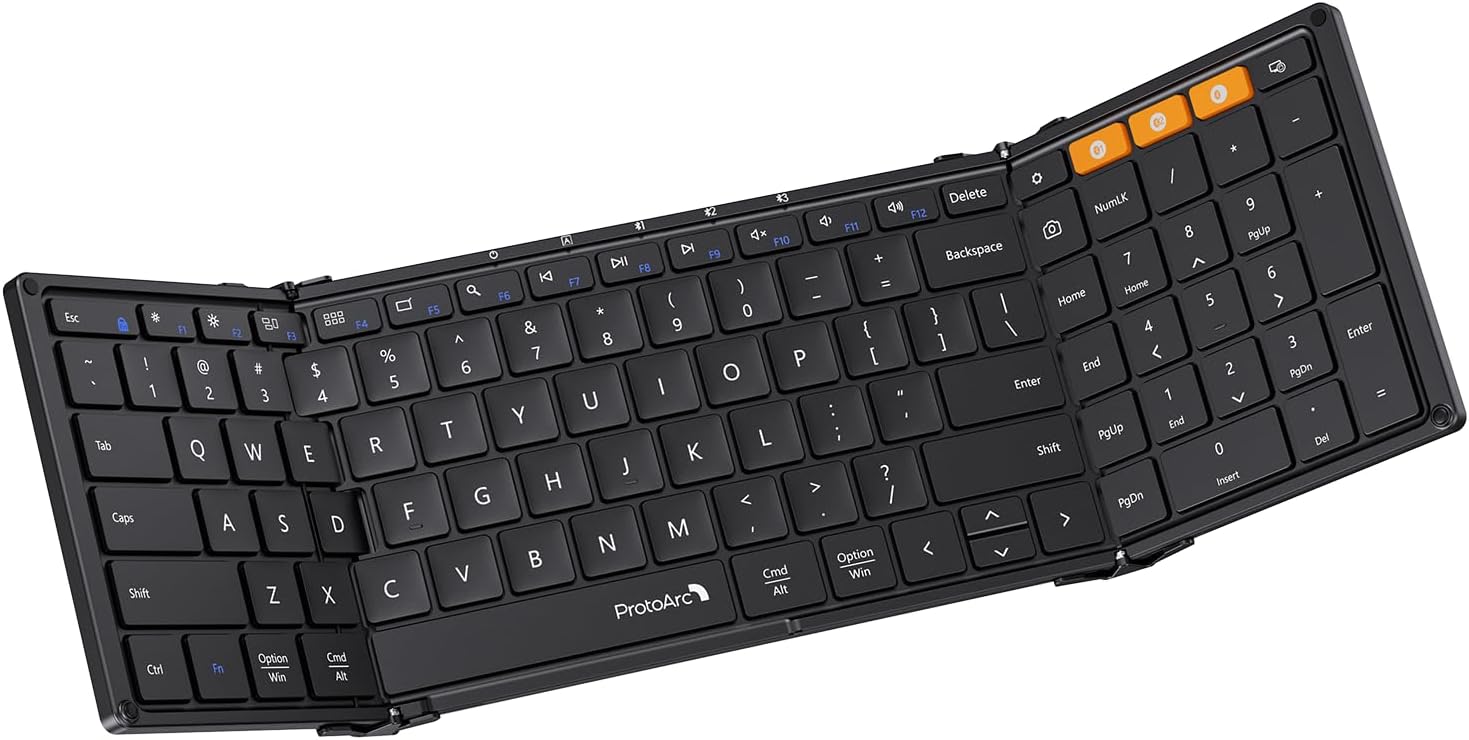
ProtoArc XK01 Foldable Keyboard
A folding Bluetooth keyboard with a full-size layout and a number pad, for people who type longer texts or numbers on a tablet, phone or laptop.
Check current price on Amazon- Number pad and fuller layout
- Folds for travel
- Larger and heavier than the SIKAI
- No built-in stand

Logitech K400 Plus Wireless Touch Keyboard
A full keyboard with a built-in touchpad on a 2.4GHz USB receiver: type and point from the sofa, and it works in the BIOS.
Check current price on Amazon- Keyboard and touchpad in one
- USB receiver: works before Windows loads
- Not foldable
- No backlight
For a desk, the Logitech MK470 Slim Combo (keyboard and mouse on one receiver) is quiet and compact. All three appear, with other ideas, in our mini PC gift guide.
Pros and cons
Strong build and portability for the price; the trade-offs are the compact layout, the stand size limit and Bluetooth-only use.
- Aluminum body, about 250 g
- Folds to phone size
- Magnetic stand for phones and 11-inch tablets
- Three devices, quick switching
- Long claimed battery life
- Quiet scissor keys
- No number row; small keys
- Stand limited to 11-inch devices
- No backlight
- Bluetooth only: no BIOS use
- Thick cases weaken the stand’s grip
Verdict
A good buy if you want a real keyboard that fits in a pocket for your phone or tablet; look at the ProtoArc XK01 for longer typing and at a receiver keyboard for a desk.
The SIKAI CASE does what a pocket keyboard should: it is solid, light, holds your device and lasts for days between charges. Its limits are those of the format. If you understand them before buying, it is an easy, useful accessory and a good small gift.
FAQ
Does the SIKAI CASE foldable keyboard work with an iPad?
Yes, over Bluetooth with any iPad. The magnetic stand holds phones and tablets up to 11 inches, such as an iPad Air or iPad mini; a larger iPad still pairs but the stand will not hold it securely.
How long does the battery last?
SIKAI CASE claims up to 45 hours of typing and up to 90 days on standby from a charge of about two hours. The keyboard sleeps after 10 minutes without use. These are manufacturer figures.
Can it connect to several devices?
It remembers three devices and switches between them with a key combination (Fn + 1, 2 or 3). Only one device receives typing at a time.
Does it have a number row?
No. Numbers are typed through the Fn layer of the compact layout. If you type many numbers, a full-size folding keyboard with a number pad, such as the ProtoArc XK01, is a better fit.
Can I use it with a mini PC or a laptop?
Yes, once Windows, macOS or Linux has started. Like every Bluetooth-only keyboard it does not work in the BIOS or during a Windows installation, so keep a keyboard with a USB receiver or cable as the main keyboard of a mini PC.
Sources
- SIKAI CASE Foldable Bluetooth Keyboard with Magnetic Stand, product listing (Walmart Marketplace)
- SIKAI CASE product documentation and Amazon listing (battery, size and weight figures; checked March and October 2026)
- MiniPCDeals, Mini PC desk setup: why receiver keyboards work in the BIOS