
BOSGAME M4 Plus Review: Ryzen 9 7940HS with OCuLink and Dual 2.5GbE
The M4 Plus combines AMD’s Ryzen 9 7940HS with an OCuLink port for an external graphics card, a USB4 port and two 2.5GbE ports, in a light plastic case. Independent Linux benchmarks show strong processor performance for its class and very low idle power; the trade-offs are a 2023 chip, Wi-Fi 6 and a fan you can hear in a quiet room.
In short
7.5 / 10
The M4 Plus is a strong-value Ryzen 9 mini PC for people who may add a graphics card later: OCuLink, USB4, dual 2.5GbE and upgradeable DDR5 around a Ryzen 9 7940HS that LinuxLinks found close to an Intel Core Ultra 7 255H in multi-core work. The Radeon 780M is fine for 1080p esports. Look elsewhere if you want Wi-Fi 6E or 7, a metal case or a silent machine.
What changed in this update (Oct 11, 2026)
The previous version of this page reviewed a different model, the BOSGAME M4 with a Ryzen 7 8745HS, while our link leads to the M4 Plus with a Ryzen 9 7940HS. We rewrote the review for the M4 Plus, removed game frame rates and benchmark scores we could not trace to a source, removed printed prices, and corrected the comparison table (the Reatan X7 uses a Ryzen 7 H 255, not an 8745HS).
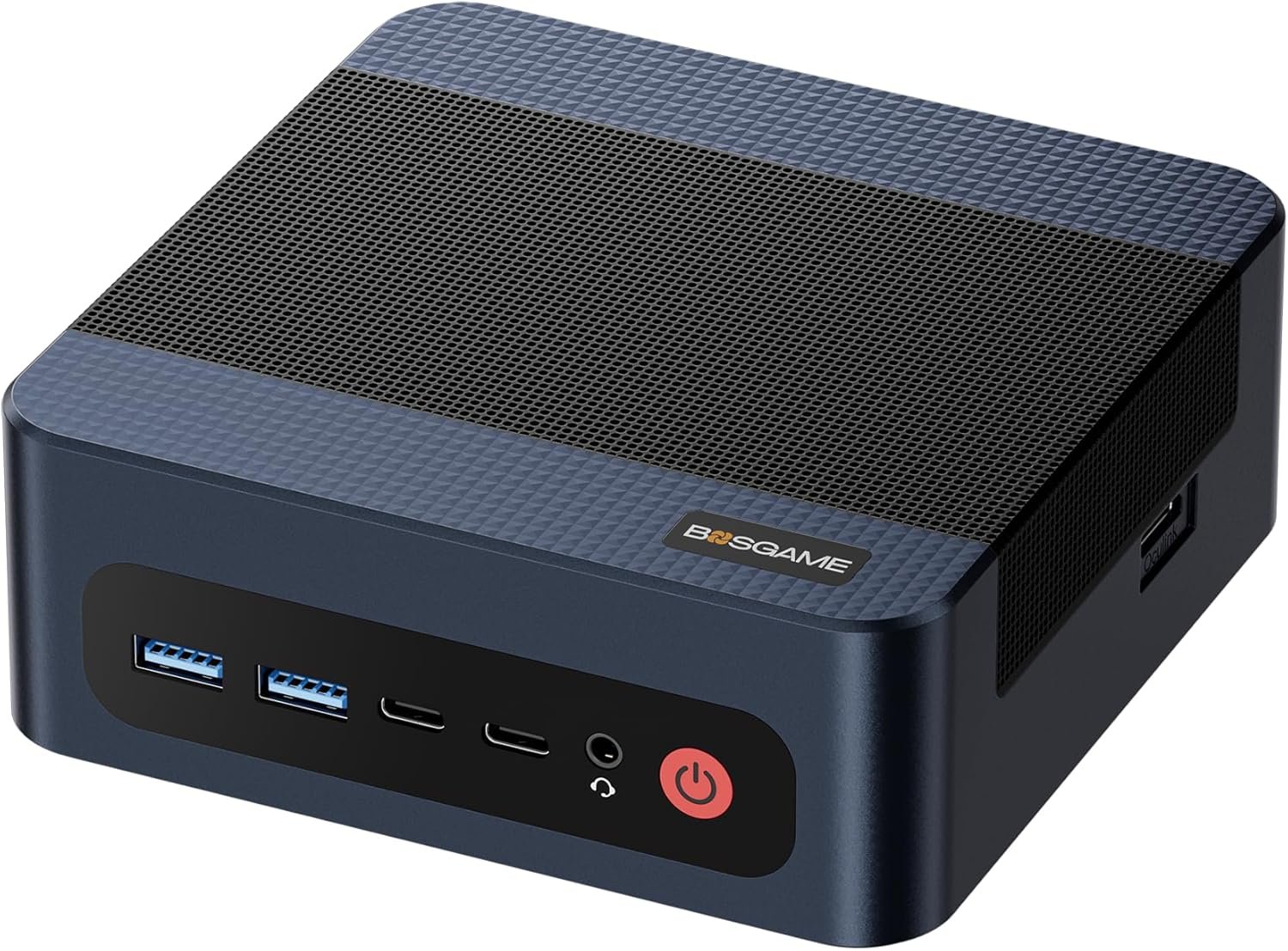
Specifications
Ryzen 9 7940HS with Radeon 780M, 32GB of upgradeable DDR5, a 1TB NVMe SSD, OCuLink, USB4, HDMI 2.0, DisplayPort 1.4, dual 2.5GbE and Wi-Fi 6.
| Component | Specification |
|---|---|
| Processor | AMD Ryzen 9 7940HS (Zen 4, 2023) · 8 cores / 16 threads · up to 5.2 GHz · 16MB L3 |
| Graphics | Radeon 780M · 12 RDNA 3 compute units · 6GB reserved by default, up to 16GB in the BIOS |
| Memory | 32GB DDR5 · upgradeable (system reports a 64GB maximum) |
| Storage | 1TB NVMe SSD (PCIe 4.0) |
| Expansion | OCuLink port on the side for an external graphics card |
| Front ports | USB4 (8K60 video) · 2× USB 3.2 10Gbps · USB-C with 4K60 video · audio jack |
| Rear ports | HDMI 2.0 · DisplayPort 1.4 · 2× 2.5GbE · 2× USB 2.0 |
| Wireless | Wi-Fi 6 · Bluetooth 5.2 |
| Case | Plastic |
M4 Plus, M4 or M4 Neo?
BOSGAME sells several OCuLink models with similar names: the M4 Plus (Ryzen 9 7940HS, reviewed here), the M4 (Ryzen 7 8745HS) and the M4 Neo (Ryzen 7 7840HS). All three use Radeon 780M graphics and perform similarly; check the processor in the listing title and pick the cheapest configuration that has the memory and storage you need.
Performance
In LinuxLinks’ tests the Ryzen 9 7940HS came within 10% of an Intel Core Ultra 7 255H in multi-core compression, beat it by nearly 20% in Coremark and matched it in single-core chess, while costing much less; Ryzen AI 9 HX 370 machines are faster in rendering.
The 7940HS is a 2023 chip, but its eight Zen 4 cores remain competitive with 2025 Intel H-series processors in everyday and multi-threaded work. LinuxLinks compared it with a Minisforum AI X1 Pro (Ryzen AI 9 HX 370), an ASRock NUC Box with Core Ultra 7 255H, an Intel NUC 13 Pro and two desktops: it lost to the HX 370 and 255H in the smallpt renderer but came out ahead on performance per price, and called its OpenSSL result remarkable for the money.
The Radeon 780M handles esports and older games at 1080p and recent games at low settings with upscaling. That is where OCuLink matters: plugged into an OCuLink dock with a desktop graphics card, the M4 Plus can run demanding games at 1440p, because OCuLink gives the card a direct PCIe 4.0 x4 link instead of going through USB4. Our OCuLink guide explains what to buy.
Power, noise and build
LinuxLinks measured the lowest idle power of all the machines it tested, but found the fan audible from one meter in a very quiet room, even in the BIOS quiet setting; the plastic case is light and sufficient.
Low idle consumption makes the M4 Plus a reasonable always-on home server, helped by its two 2.5GbE ports. The fan will not bother you in a normal office, but it is not a silent PC. The plastic case feels less premium than the aluminum GEEKOM machines, which LinuxLinks considered more than sufficient for most uses. Memory and storage are easy to upgrade.
Alternatives
Choose the M4 Plus for OCuLink plus dual 2.5GbE at a modest price; a GMKtec K8 Plus for the same combination with a newer Ryzen 7 8845HS; a GEEKOM AX8 Max for a metal case and four displays without OCuLink; a Peladn HO5 for much stronger integrated graphics.
| Model | Processor | Key difference |
|---|---|---|
| GMKtec K8 Plus | Ryzen 7 8845HS | Also OCuLink and dual 2.5GbE, Wi-Fi 6E |
| GEEKOM AX8 Max | Ryzen 7 8745HS | Aluminum case, 2× USB4, no OCuLink. Review |
| Reatan X7 | Ryzen 7 H 255 | OCuLink, 2× USB4, Wi-Fi 7, 64GB. Review |
| Peladn HO5 | Ryzen AI 9 HX 370 | Radeon 890M, OCuLink, USB4, Wi-Fi 7. Review |
Pros and cons
- OCuLink for an external graphics card
- Dual 2.5GbE and USB4
- Strong multi-core performance for the price
- Very low idle power
- Upgradeable memory and storage
- 2023 processor, no Copilot+ NPU
- Wi-Fi 6 only
- Fan audible in a quiet room
- Plastic case
- Confusing M4 / M4 Plus / M4 Neo naming
| Category | Score |
|---|---|
| Processor performance | 8.0 |
| Connectivity and expansion | 8.5 |
| Integrated graphics | 6.5 |
| Noise and build | 6.0 |
| Value | 8.0 |
Verdict
A capable, well-connected Ryzen 9 mini PC and a sensible base for an OCuLink graphics card setup; not the choice for silence, Wi-Fi 7 or premium build.
Buy the M4 Plus if you want strong processor performance, two networks and the option to add a desktop graphics card later, at a lower price than newer Ryzen AI machines. Compare it with the M4 and M4 Neo listings on the day you buy: performance is close, so the best deal of the three is usually the right one.
FAQ
Which processor does the BOSGAME M4 Plus use?
The AMD Ryzen 9 7940HS, an 8-core, 16-thread Zen 4 processor from 2023 with Radeon 780M graphics. The BOSGAME M4 uses a Ryzen 7 8745HS and the M4 Neo a Ryzen 7 7840HS.
Does the M4 Plus have OCuLink?
Yes, on the side of the case. OCuLink connects an external graphics card dock over a direct PCIe 4.0 x4 link, which loses less performance than USB4.
Can I upgrade the RAM?
Yes. It ships with 32GB of DDR5, and LinuxLinks found the system reports a 64GB maximum. Storage is also easy to upgrade.
Is it good for gaming?
On its own, for esports and older games at 1080p. With an OCuLink graphics card dock, it can run demanding games at 1440p.
Is the BOSGAME M4 Plus quiet?
Not completely. LinuxLinks heard the fan from one meter in a very quiet room, even with the BIOS quiet setting. It also measured very low idle power, which suits always-on use.