
Best USB Hubs for Mini PCs 2026: Expand Your Connectivity
Mini PCs deliver powerful performance in tiny packages, but their limited ports can quickly become a bottleneck. A quality USB hub or docking station turns your compact machine into a versatile workstation supporting multiple displays, fast data transfers, charging, and more peripherals. In 2026, options range from simple 4-port USB 3.0 hubs under $15 to full-featured 12-in-1 USB-C docks with 4K HDMI and 100W power delivery.
For most mini PC users, the Anker USB C Hub 4 Ports offers excellent value with 5Gbps data transfer and a long 2ft cable. Need video output and charging? Choose a UGREEN USB-C multiport hub with HDMI 4K and 100W PD. For full workstation setups, go with a 9-in-1 or 12-in-1 docking station supporting multiple displays and Ethernet.
Why USB Hubs Matter for Mini PCs
Mini PCs pack impressive specs into small chassis, but most offer only 2–6 USB ports. A good hub expands connectivity without sacrificing the compact footprint that makes mini PCs appealing for home offices, HTPCs, or portable setups.
Common use cases include connecting multiple external drives, keyboards, mice, printers, webcams, and external displays while charging the mini PC simultaneously. USB hubs also enable stable wired Ethernet and card readers for photographers or videographers.
Types of USB Hubs & Docking Stations
Basic USB 3.0 Type-A Hubs
Simple port multipliers using traditional rectangular USB-A connectors. Ideal for adding more data ports to older mini PCs or for users who only need extra USB slots for peripherals.
USB-C Multiport Hubs
Modern hubs that connect via USB-C and often include video output (HDMI/DisplayPort), power delivery (PD), card readers, and Ethernet. Best match for 2024–2026 mini PCs with USB4 or Thunderbolt support.
Full Docking Stations
Premium solutions with multiple video outputs, higher power delivery (up to 100W+), and more ports. Perfect for permanent desk setups where the mini PC acts as a desktop replacement.
Key Features to Consider in 2026
- Data Speed: 5Gbps (USB 3.0/3.1 Gen1) for everyday use; 10Gbps (USB 3.2 Gen2) for large file transfers.
- Video Output: HDMI 4K@60Hz or better. Some support dual displays.
- Power Delivery (PD): 60W–100W to charge the mini PC while using other ports.
- Ethernet: Gigabit or 2.5Gbps for stable wired networking.
- Card Readers: SD/TF slots useful for media workflows.
- Cable Length & Build: Longer cables (2ft+) improve desk flexibility; aluminum builds offer better durability and heat dissipation.
Top USB Hubs for Mini PCs 2026
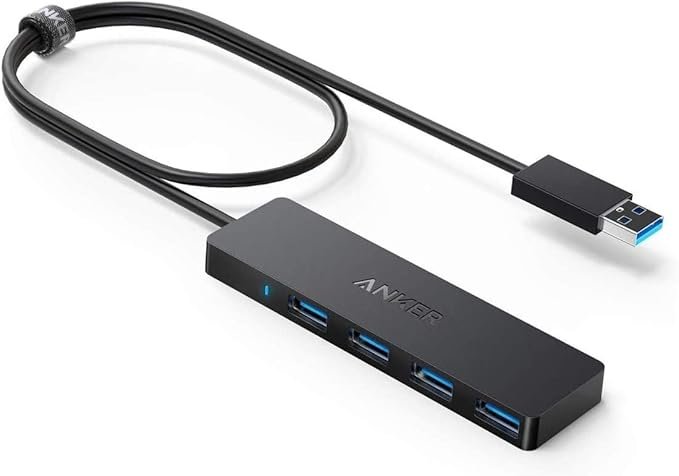
Anker USB C Hub 4 Ports — 5Gbps Data Transfer
Simple, reliable 4-port USB 3.0 hub with extended 2ft cable. Perfect for adding extra peripherals to any mini PC without video needs.
✓ Pros
- Affordable and reliable brand
- Long cable for flexible placement
- Fast enough for most peripherals
- Plug-and-play with all mini PCs
✕ Cons
- No video output or PD charging
- Limited to data only
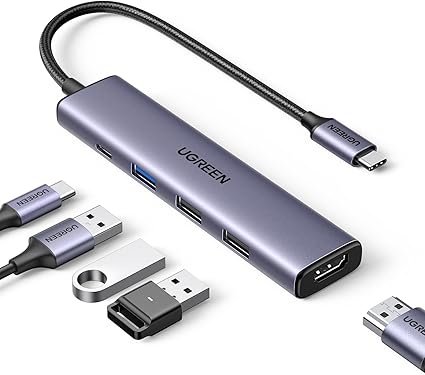
UGREEN USB C Hub 5 in 1 — HDMI 4K + 100W PD
Compact multiport adapter with 4K HDMI, power delivery, and multiple USB ports. Excellent for mini PCs needing display output and charging in one device.
✓ Pros
- 4K HDMI support
- 100W Power Delivery
- Compact and portable
- Reliable UGREEN build quality
✕ Cons
- Data speed limited to 5Gbps on some ports
- No Ethernet in base model
Comparison Table: Best USB Hubs for Mini PCs 2026
| Model | Ports | Video | Data Speed | PD | Price Range | Best For |
|---|---|---|---|---|---|---|
| Anker USB C Hub 4 Ports | 4× USB 3.0 | None | 5Gbps | No | $12–18 | Basic expansion |
| UGREEN Revodok 105 | 5-in-1 | HDMI 4K | 5Gbps | 100W | $25–35 | Everyday + display |
| UGREEN 12-in-1 (premium) | 12 ports | Dual HDMI + DP | 10Gbps | 100W | $80–120 | Full workstation |
| Newmight 10-in-1 Dock | 10 ports | 4K + VGA | 5Gbps | 100W | $40–60 | Legacy displays |
Buying Guide for USB Hubs with Mini PCs
Match the hub to your mini PC’s ports (USB-A vs USB-C) and your workflow. Check power requirements — high-TDP gaming mini PCs may need stronger PD. Read recent reviews for driver compatibility, especially with Windows 11 mini PCs.
Prioritize reputable brands like Anker and UGREEN for better build quality and warranty support. Avoid ultra-cheap no-name hubs that can cause data corruption or overheating.